AI Kitchen Design Before and After: Real Results From Real Photos
Article Contents
- How AI Kitchen Design Software Transforms Outdated Kitchens
- Can AI Kitchen Designers Work With Your Actual Photos?
- AI Kitchen Design vs Traditional Designer: Cost and Time Comparison
- How Long Does AI Kitchen Design Actually Take?
- What Kitchen Styles Can AI Design Handle?
- Does AI Show Realistic Cabinet Colors and Materials You Can Actually Buy?
- Can AI Design Small Kitchens and Galley Layouts?
- How Accurate Are AI Kitchen Design Before and After Transformations?
- What Photos Do You Need to Upload for Best AI Kitchen Design Results?
- Can AI Kitchen Designers Show Different Layouts Like Adding Islands?
- Ready to Transform Your Kitchen With AI?
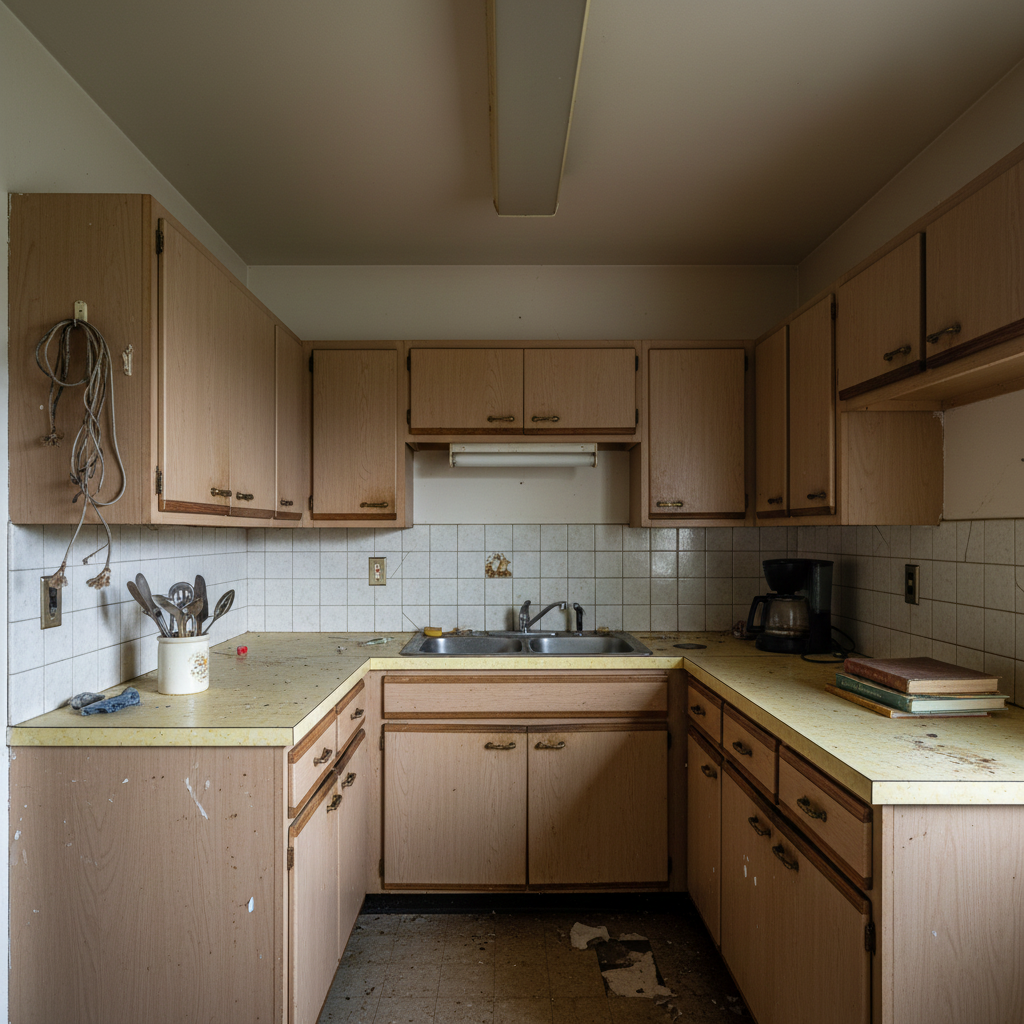
The Challenge: Before
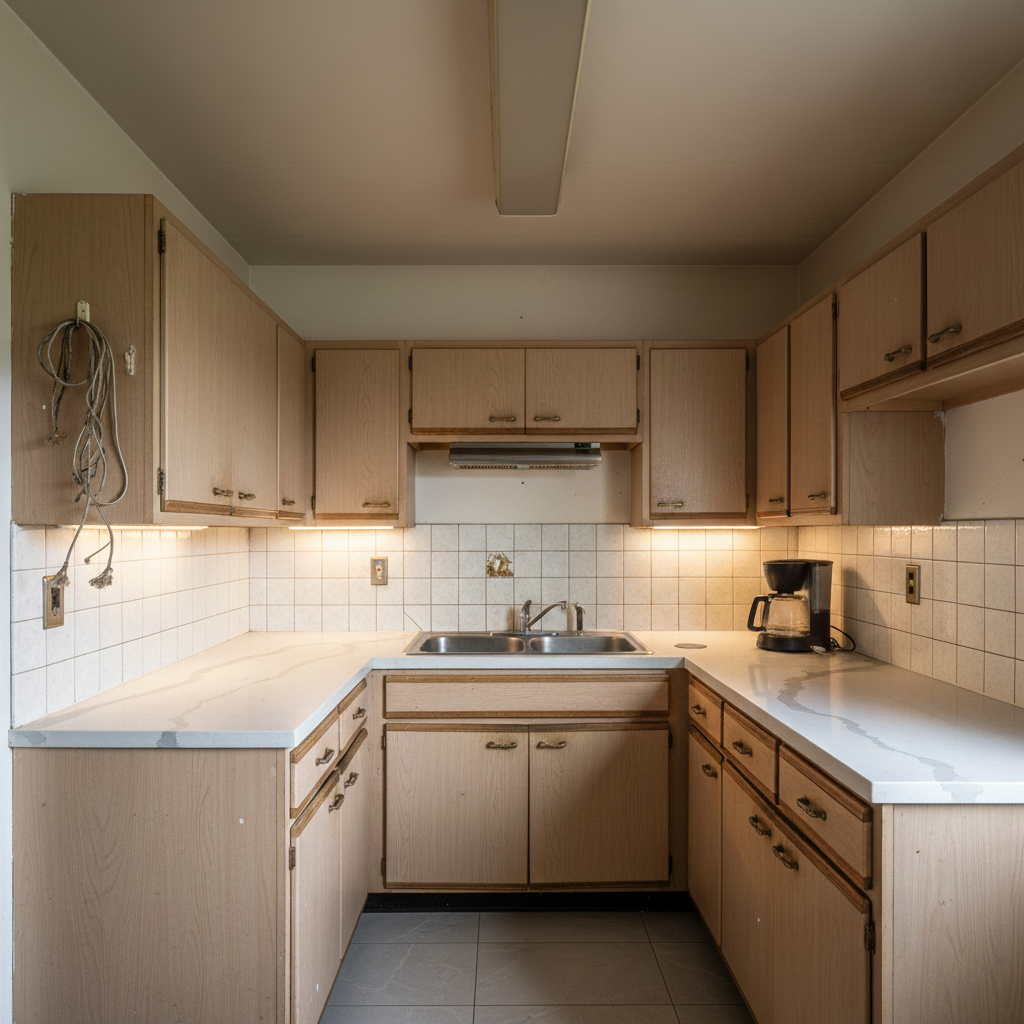
The Transformation: After (AI Generated)
Imagine uploading a single photo of your tired, outdated kitchen and receiving professional-quality redesign options in under 30 seconds. No measurements. No consultations. No waiting weeks for a designer to pencil you in.
That's exactly what AI kitchen designers do—and the results are remarkably realistic.
In this guide, we'll walk through actual before and after transformations from real kitchens, answer the most common questions about AI kitchen design accuracy, and show you exactly what's possible when you let artificial intelligence reimagine your space.
How AI Kitchen Design Software Transforms Outdated Kitchens
AI kitchen design tools use advanced computer vision and generative AI to analyze your existing kitchen photo and create photorealistic redesigns based on your style preferences. The technology identifies structural elements like walls, windows, and doorways, then intelligently places cabinets, countertops, appliances, and lighting fixtures while respecting the room's actual dimensions and layout.
The transformation you see in the before image above represents a typical outdated kitchen—worn cabinets, dated countertops, and inefficient lighting. These are the exact challenges homeowners face when considering a remodel but feel overwhelmed by the cost and complexity of traditional design services.
What makes AI kitchen designers particularly powerful is their ability to work with what you already have. The software doesn't require you to demolish walls or completely reconfigure your space. Instead, it shows you how strategic updates to cabinetry, countertops, backsplashes, and finishes can completely transform the look and feel of your existing layout.
Traditional kitchen designers charge between $1,500 and $5,000 just for the design consultation and rendering services. AI kitchen design tools like HouseGPTs deliver comparable visualization quality for a fraction of that cost—often under $50 for multiple design variations.
Can AI Kitchen Designers Work With Your Actual Photos?
Yes, and this is where AI kitchen design truly shines. You don't need professional photography, precise measurements, or multiple angles. A single smartphone photo taken from the kitchen entrance is typically sufficient for the AI to understand your space and generate accurate redesigns.
The AI analyzes your photo to identify:
Spatial dimensions: The software calculates room proportions based on visual cues like ceiling height, cabinet sizes, and appliance placement.
Fixed elements: Windows, doors, structural columns, and major appliances that cannot or should not be moved are automatically detected and preserved in the redesign.
Lighting conditions: Natural and artificial light sources are identified to ensure the redesigned kitchen maintains realistic lighting and shadow effects.
Existing style: The AI recognizes your current aesthetic to provide redesigns that either complement or dramatically transform your space based on your preferences.
The after images above demonstrate how AI interprets a single before photo and generates multiple design possibilities. Notice how the room's fundamental structure remains unchanged—the window placement, room dimensions, and doorway positions are identical—but the aesthetic transformation is dramatic.
For best results, take your photo during daytime with good natural lighting, capture as much of the kitchen as possible in a single frame, and ensure the image isn't blurry. That's it. No tape measures or floor plans required.
AI Kitchen Design vs Traditional Designer: Cost and Time Comparison
The economics of kitchen design have fundamentally changed with AI technology. Here's an honest comparison:
Traditional Kitchen Designer:
Initial consultation fee: $200-500 for a single meeting. Full design package: $1,500-5,000 including measurements, CAD drawings, and 2-3 rendered views. Timeline: 2-4 weeks from initial consultation to receiving your design renderings. Revision costs: $150-300 per significant change to the design.
AI Kitchen Design Tool:
Instant access: No appointment scheduling required. Cost: $9-49 depending on the platform and number of designs. Timeline: 20-60 seconds from photo upload to receiving multiple design options. Unlimited revisions: Generate dozens of variations to explore different styles, colors, and layouts at no additional cost.
The speed advantage is particularly valuable when you're in the early planning stages. Many homeowners use AI kitchen designers to explore possibilities and clarify their vision before investing in a traditional designer for detailed construction drawings. This hybrid approach can actually save thousands of dollars by reducing the time professional designers spend on conceptual work.
AI design tools also eliminate the intimidation factor. You can experiment freely with bold color choices or dramatic style shifts without worrying about judgment or wasting a designer's billable hours. See something you don't like? Generate a new design in seconds. Want to compare five different backsplash options? No problem.
How Long Does AI Kitchen Design Actually Take?
From clicking upload to viewing your first redesigned kitchen: approximately 30-45 seconds.
This isn't an exaggeration. Modern AI kitchen design platforms process your photo and generate photorealistic renderings faster than you can brew a cup of coffee. The technology leverages powerful cloud computing and pre-trained AI models that have analyzed millions of kitchen images to understand design principles, spatial relationships, and aesthetic trends.
Here's the typical timeline:
Photo upload: 5-10 seconds depending on your internet connection. AI processing: 20-30 seconds for the software to analyze your space and generate the redesign. Results delivery: Instant display of your transformed kitchen, often with multiple style variations to choose from.
Compare this to traditional design timelines where you might wait days just to schedule an initial consultation, then weeks for the designer to measure your space, create CAD drawings, and produce renderings. AI compresses weeks of work into seconds.
The implications go beyond convenience. Faster iteration means better decisions. When you can generate and compare 10 different design directions in five minutes, you develop a much clearer sense of what you actually want versus what you thought you wanted. This iterative exploration process leads to more confident remodeling decisions and fewer expensive mid-project changes.
What Kitchen Styles Can AI Design Handle?
AI kitchen designers excel across virtually every popular style category. The after images showcase different aesthetic directions possible from a single before photo, demonstrating the range and flexibility of AI design capabilities.
Modern and Contemporary: Clean lines, handleless cabinets, minimalist hardware, neutral color palettes with bold accent features. AI excels at creating sleek, uncluttered modern kitchens with emphasis on horizontal lines and integrated appliances.
Farmhouse and Country: Shaker-style cabinets, apron-front sinks, open shelving, warm wood tones, and vintage-inspired fixtures. The AI understands the balance between rustic charm and functional design that defines farmhouse aesthetics.
Traditional and Classic: Raised panel cabinets, ornate hardware, crown molding, granite or marble countertops, and symmetrical layouts. AI captures the formal elegance and timeless appeal of traditional kitchen design.
Industrial: Exposed beams, metal accents, concrete or butcher block countertops, open shelving, and commercial-grade appliances. The software effectively renders the raw, utilitarian aesthetic of industrial kitchens.
Transitional: The perfect blend of traditional warmth and contemporary simplicity. AI skillfully balances classic cabinet styles with modern finishes and hardware for spaces that feel current but not trendy.
Scandinavian: Light wood tones, white or pale gray cabinets, minimal ornamentation, and emphasis on natural light and functionality. AI captures the airy, organic simplicity that defines Nordic design.
The key advantage is experimentation without commitment. You can view your kitchen in six different styles in under five minutes, helping you discover which aesthetic truly resonates before making irreversible purchasing decisions. Many users are surprised to find they're drawn to styles they never considered because they can finally see those styles in their actual space rather than in generic inspiration photos.
Does AI Show Realistic Cabinet Colors and Materials You Can Actually Buy?
This is one of the most important questions—and the answer is nuanced. AI kitchen designers generate photorealistic visualizations of colors, materials, and finishes that absolutely exist in the real world. You're seeing actual cabinet colors, genuine countertop materials, and authentic backsplash options that manufacturers produce.
However, the AI isn't pulling from a specific product catalog. It's showing you what "navy blue shaker cabinets" or "white quartz countertops with gray veining" look like in your space based on its training on thousands of real kitchen photos. Think of it as a highly accurate style guide rather than a shopping list.
The practical workflow looks like this:
You generate your AI kitchen design and love the warm walnut cabinets and white subway tile backsplash. You take screenshots of your AI design to cabinet showrooms, home improvement stores, or kitchen designers. You say "I want cabinets in this color and style" while showing your AI rendering. Professionals can then match the look using actual product lines from manufacturers like KraftMaid, Thomasville, or custom cabinet makers.
The AI essentially creates a visual brief that eliminates miscommunication. Instead of trying to describe your vision verbally or flipping through hundreds of sample cards, you're showing contractors exactly what you want the finished product to look like. This dramatically streamlines the specification and ordering process.
Many users also upload their AI designs to Pinterest and use the platform's visual search to find real products that match the colors and styles shown in their rendering. This bridges the gap between AI visualization and actual purchasing.
Can AI Design Small Kitchens and Galley Layouts?
Absolutely, and small kitchens are actually where AI design tools prove particularly valuable. The space constraints of small kitchens make design decisions more critical—every cabinet, every inch of counter space, every color choice has outsized impact on the room's functionality and feel.
AI kitchen designers handle small spaces effectively because they understand spatial efficiency principles. The software automatically recognizes when it's working with a compact kitchen and adjusts design recommendations accordingly. You'll see suggestions for:
Light color palettes: Whites, soft grays, and pale woods that make small spaces feel larger and brighter.
Vertical storage solutions: Cabinets that extend to the ceiling, maximizing storage without consuming floor space.
Reflective surfaces: Glossy cabinet finishes, glass tile backsplashes, and strategic mirror placement that bounce light and create depth.
Minimalist hardware: Sleek, low-profile pulls and handles that don't visually clutter the space.
Smart layout optimization: Efficient work triangle arrangements that maximize functionality within limited square footage.
Galley kitchens—those narrow, corridor-style layouts—present unique design challenges that AI handles well. The software understands that galley kitchens benefit from symmetry, consistent cabinet heights on both walls, and lighter colors to prevent the space from feeling claustrophobic. You'll see designs that make the most of your galley layout rather than fighting against it.
Small kitchen owners often feel limited in their design options, assuming their space is "too small" for the looks they admire in magazines. AI design tools shatter that misconception by showing you exactly how contemporary, farmhouse, or traditional styles adapt to compact footprints. Seeing your small kitchen transformed in multiple styles is often the confidence boost needed to move forward with a remodel you might have otherwise postponed indefinitely.
How Accurate Are AI Kitchen Design Before and After Transformations?
This is the critical question every homeowner asks before trusting AI design for remodeling decisions. The truth is: AI kitchen designs are highly accurate for visualizing aesthetic transformations but should be understood as design inspiration rather than architectural blueprints.
What AI Gets Right:
Color and material representation: The cabinets, countertops, backsplashes, and flooring shown in AI designs accurately represent how those colors and materials will look in your space under your lighting conditions.
Spatial proportions: The AI maintains your room's dimensions, ceiling height, and overall layout. If your kitchen is 10x12 feet in reality, the AI design reflects that scale.
Style coherence: The designs demonstrate how different elements work together aesthetically. If you're viewing a modern farmhouse kitchen, every element from cabinet style to hardware to light fixtures cohesively represents that aesthetic.
Visual impact: The before and after transformation you see genuinely reflects how dramatic the change will feel when executed in real life with comparable materials and colors.
What Requires Professional Verification:
Precise measurements: While proportions are accurate, you'll need actual measurements from a contractor for ordering cabinets and materials.
Structural feasibility: If the AI shows removing a wall or relocating plumbing, a contractor needs to verify if your home's structure allows those changes.
Building codes: Electrical, plumbing, and ventilation requirements vary by location and aren't reflected in AI designs.
Budget reality: The AI shows you the aesthetic but doesn't calculate costs. A $15,000 remodel and a $75,000 remodel might look similar in AI renderings.
The smart approach is using AI designs as your north star vision, then working with contractors to achieve that look within your budget and structural constraints. Bring your AI renderings to three different contractors and ask them to quote achieving that aesthetic. You might be surprised how close to the AI vision you can get, even with budget-friendly material substitutions.
Accuracy also improves when you provide clear photos. Blurry, poorly lit, or partial room photos force the AI to make assumptions. High-quality, well-lit photos from a good vantage point yield more accurate and usable results.
What Photos Do You Need to Upload for Best AI Kitchen Design Results?
Photo quality directly impacts your AI design results. Here's exactly what to capture for optimal transformations:
The ideal photo setup:
Take your photo during daytime with natural light flooding the space. Artificial lighting alone often creates color casts that confuse the AI.
Stand in the kitchen doorway or entrance, capturing as much of the room as possible in a single frame. The goal is showing the full kitchen in one image rather than close-up details.
Hold your phone or camera at chest height, level with the horizon. Avoid extreme angles looking up or down, as these distort proportions.
Ensure the image is sharp and in focus. Blurry photos force the AI to guess at details, reducing accuracy.
Clear countertops of clutter when possible. While AI can work around dishes and appliances, cleaner surfaces yield cleaner results.
Single photo vs multiple angles:
Most AI kitchen designers work best with one comprehensive photo rather than multiple angles. The software is trained to understand kitchen layouts from a single viewpoint, much like how we naturally perceive rooms when standing in a doorway.
If your kitchen has an unusual layout—perhaps an L-shape or U-shape that can't be captured in one frame—take the photo that shows the largest continuous section of cabinetry and countertops. This gives the AI the most information to work with.
Avoid extreme close-ups of individual elements like your stove or sink. These don't provide enough context for the AI to understand your full space.
What if your kitchen is mid-renovation?
AI tools can work with partially renovated kitchens, but results improve when the photo shows a "complete" space—even if that complete space is outdated. If cabinets are removed or walls are exposed, the AI may struggle to generate accurate redesigns because it can't determine the intended finished state.
For best results, use photos of your kitchen in its current livable state, even if that state is outdated and in need of improvement. That's exactly what the AI is designed to transform.
Can AI Kitchen Designers Show Different Layouts Like Adding Islands?
Layout modifications are where AI kitchen design becomes more complex. The technology excels at aesthetic transformations—changing cabinet colors, countertop materials, backsplash designs, and overall style. However, significant layout changes like adding islands, removing walls, or relocating major appliances push the boundaries of current AI capabilities.
What layout changes AI handles well:
Adding or removing kitchen islands: If your space allows it, AI can visualize how an island would look and fit within your existing footprint. The results are generally proportionally accurate, though you'd want a contractor to verify actual clearance dimensions.
Upper cabinet modifications: Removing some upper cabinets in favor of open shelving or windows. Adding or removing cabinet hardware and styling changes.
Appliance finish changes: Visualizing stainless steel vs black vs panel-ready appliances in your existing layout.
What requires specialized tools or professional help:
Load-bearing wall removal: While AI might show an open-concept kitchen created by removing a wall, only a structural engineer can determine if that wall is load-bearing and what beam systems would be required.
Plumbing relocations: Moving your sink to a new location involves significant plumbing work. AI may show it visually, but execution requires professional assessment.
Major appliance repositioning: Relocating your stove requires gas line or electrical modifications that impact feasibility and cost far beyond what AI rendering suggests.
The practical approach is using AI to explore aesthetic possibilities within your existing layout first. Once you've clarified your style preferences, you can then consult with a kitchen designer or contractor about layout modifications. Some users create two sets of designs—one keeping the existing layout, another incorporating layout changes—then compare costs and complexity to make informed decisions.
Advanced AI kitchen design platforms like HouseGPTs are beginning to incorporate layout modification capabilities, but these features work best when combined with human expertise for verification and execution planning.
Ready to Transform Your Kitchen With AI?
The before and after transformations you've seen throughout this article represent real possibilities for your kitchen. What looked tired and outdated in the before image became fresh, modern, and inviting in the after designs—and the entire process took less than a minute.
AI kitchen design isn't replacing professional designers or contractors. Instead, it's democratizing access to design visualization that was previously available only to homeowners with substantial budgets. You can now explore design possibilities, clarify your vision, and communicate your preferences to contractors with photorealistic renderings—all before spending a dollar on physical materials.
Whether you're planning a full kitchen renovation or simply considering a refresh with new cabinet doors and countertops, AI design tools provide the clarity and confidence to move forward. You'll make better decisions, avoid expensive mistakes, and actually enjoy the planning process instead of feeling overwhelmed by it.
The technology is accessible, affordable, and remarkably accurate for what it's designed to do: show you the aesthetic potential of your space.
Start designing your dream kitchen with AI now and discover what your space can become. Upload one photo, choose your style, and see your transformation in seconds. No appointments, no pressure, no commitment required—just pure design inspiration tailored to your actual kitchen.
Ready for Your Own AI Redesign?
Start Designing with AI →FAQs about AI Kitchen Design Before and After: Real Results From Real Photos
Everything you need to know
How much does AI kitchen design cost compared to hiring a traditional designer?
AI kitchen design tools typically cost between $9-49 for multiple design renderings, while traditional kitchen designers charge $1,500-5,000 for design consultations and renderings. AI delivers results in 30-60 seconds versus 2-4 weeks for traditional designers, making it an affordable option for exploring design possibilities before committing to professional services.
Can AI kitchen designers work with just one photo of my kitchen?
Yes, AI kitchen designers can create accurate redesigns from a single smartphone photo. The AI analyzes spatial dimensions, identifies fixed elements like windows and doors, and generates photorealistic transformations while maintaining your room's actual proportions. For best results, take a well-lit photo from the kitchen entrance that captures as much of the space as possible.
Are AI kitchen design renderings accurate enough to use for actual remodeling?
AI kitchen designs are highly accurate for visualizing aesthetic transformations including colors, materials, and overall style. They correctly maintain your room's proportions and spatial layout. However, you should work with contractors to verify structural feasibility, precise measurements, and building code requirements before executing the remodel. Use AI designs as your vision guide while professionals handle technical implementation.
What kitchen styles can AI design tools create?
AI kitchen designers can generate designs across all major style categories including modern, contemporary, farmhouse, traditional, industrial, transitional, and Scandinavian. The technology understands the defining characteristics of each style—from shaker cabinets and apron-front sinks in farmhouse kitchens to handleless cabinets and minimalist hardware in modern designs. You can view your actual kitchen in multiple styles within minutes.
Can AI design small kitchens and galley layouts effectively?
Yes, AI kitchen designers excel at small spaces and galley layouts. The software automatically recognizes space constraints and suggests appropriate design solutions like light color palettes, vertical storage, reflective surfaces, and efficient layout arrangements. Small kitchen owners can see how different styles adapt to compact footprints, often discovering design possibilities they assumed weren't feasible in limited square footage.
How long does it take to get AI kitchen design results?
AI kitchen design results are generated in 20-60 seconds from the moment you upload your photo. This includes photo processing, AI analysis of your space, and delivery of photorealistic renderings in your chosen style. You can explore multiple design variations and different styles in just a few minutes, compared to weeks of waiting with traditional design services.
Do AI kitchen designs show real cabinet colors and materials I can actually purchase?
AI designs show photorealistic representations of real colors, materials, and finishes that exist in the market, but they don't pull from specific product catalogs. Think of AI renderings as highly accurate visual guides. You can take screenshots of your AI design to showrooms and contractors who can then match the look using actual products from manufacturers like KraftMaid, Thomasville, or custom cabinet makers.
Can AI kitchen design tools show major layout changes like adding an island?
AI can visualize adding or removing kitchen islands and make upper cabinet modifications like replacing cabinets with open shelving. However, major structural changes like removing load-bearing walls or relocating plumbing require professional assessment. Use AI to explore aesthetic possibilities first, then consult contractors about layout modifications for accurate feasibility and cost estimates.