AI Bedroom Designer Free - Transform Your Master Bedroom in 30 Seconds
Article Contents
- Why Use AI for Bedroom Design?
- Best Free AI Bedroom Designers (Tested February 2026)
- 1. HouseGPTs - Best Overall (2 Free Designs)
- 2. RoomGPT - Unlimited Free (Lower Quality)
- 3. Homestyler - 3D Builder (Not True AI)
- Winner: HouseGPTs for Most Users
- How to Use AI Bedroom Designer (Step-by-Step)
- Step 1: Prepare Your Bedroom Photo
- Step 2: Upload to HouseGPTs
- Step 3: Choose Your Bedroom Style
- Step 4: Generate Your Design
- Step 5: Smart Strategy for Your 2 Free Designs
- Using AI Bedroom Designs to Shop Smart
- How to Shop Based on AI Designs:
- Money-Saving Tip:
- Small Bedroom Design with AI
- AI Strategies for Small Bedrooms:
- Master Bedroom vs. Guest Bedroom Design Strategies
- Master Bedroom Design Focus:
- Guest Bedroom Design Focus:
- Common AI Bedroom Design Mistakes to Avoid
- 1. Ignoring Your Actual Lighting
- 2. Over-Accessorizing
- 3. Forgetting Functional Needs
- 4. Not Considering Partner Preferences
- 5. Choosing Trends Over Timelessness
- Budget Bedroom Makeover Using AI
- The $500 AI-Guided Bedroom Makeover:
- DIY-Friendly AI Bedroom Updates:
- Valentine's Day Special: Romantic Bedroom Design with AI
- Romantic Bedroom Elements to Test with AI:
- Quick Romantic Bedroom Update (This Weekend):
- AI Bedroom Design vs. Interior Designer
- When to Use AI:
- When to Hire a Designer:
- Start Your Free Bedroom Transformation Today
- Your Next Steps:
- Related Bedroom Design Guides
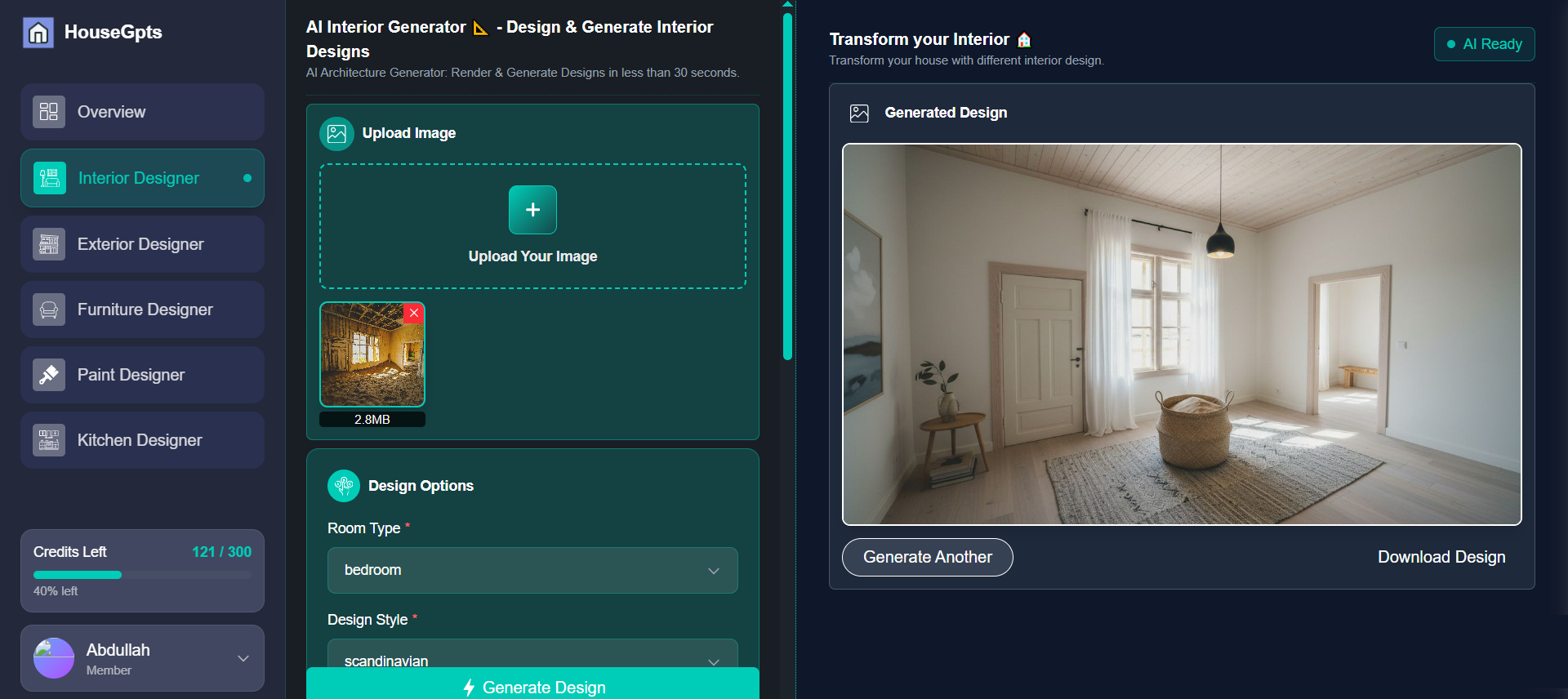
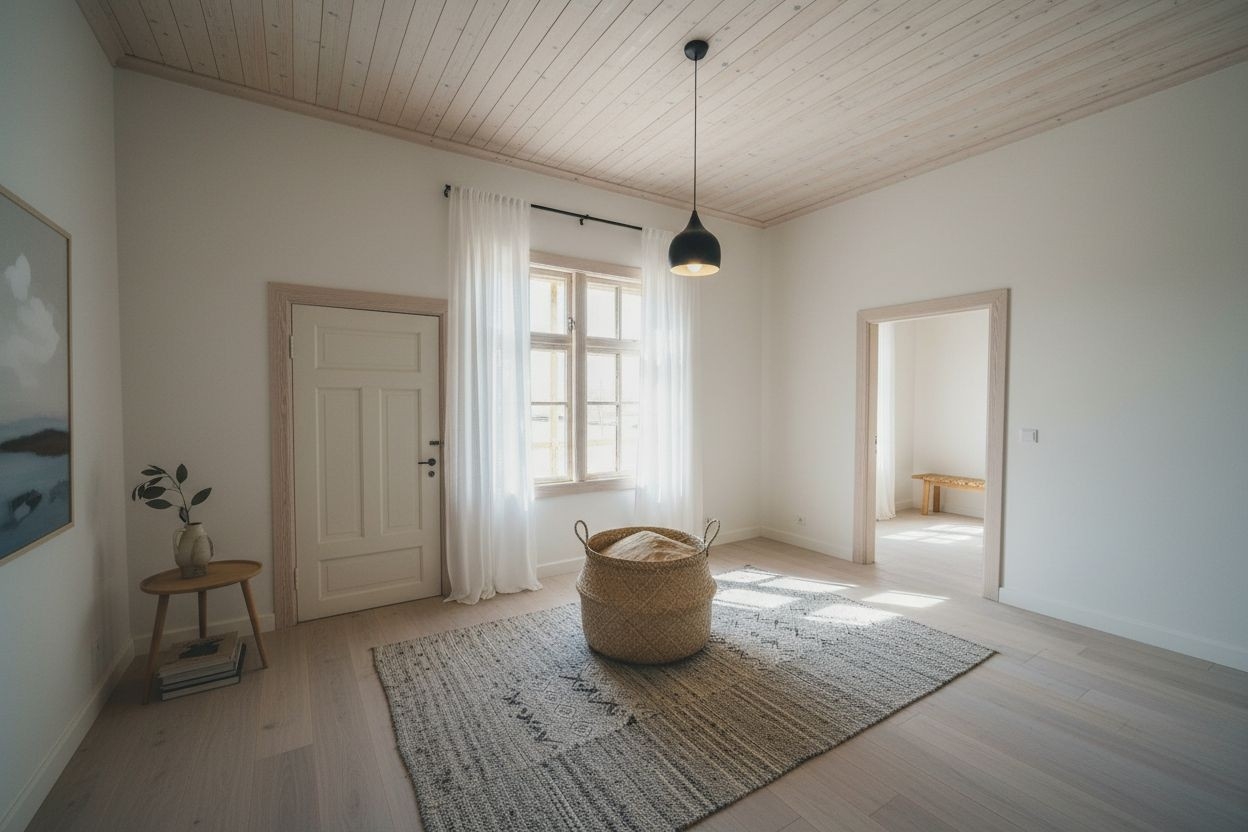
The Challenge: Before

The Transformation: After (AI Generated)
AI Bedroom Designer Free - Transform Your Master Bedroom in 30 Seconds
Your bedroom should be your sanctuary—a space that reflects your style and promotes relaxation. But hiring an interior designer for bedroom concepts costs $1,500-$3,000. AI bedroom designers generate professional designs in 30 seconds for free. Here's how to transform your bedroom without spending thousands on consultations.
Why Use AI for Bedroom Design?
Bedrooms are the most personal spaces in your home, which makes design decisions even harder. You're choosing colors, furniture, and layouts you'll see every single day—and mistakes are expensive to fix.
AI bedroom designers solve this problem by letting you test unlimited design ideas before buying a single piece of furniture. Here's what makes them valuable:
- Visualize before you buy: See exactly how that new bedding or paint color will look in your actual room
- Test bold ideas risk-free: Try accent walls, dramatic colors, or unconventional layouts without commitment
- Save on designer fees: Bedroom design consultations cost $1,500-$3,000; AI tools are free or $39/month
- Instant results: Generate professional designs in 30 seconds instead of waiting weeks for designer mockups
- Get family consensus: Show multiple options to your partner before making decisions
I used AI to redesign my master bedroom and tested 15 different color schemes in under an hour. Discovered I hated the navy accent wall I was planning (saved $400 on paint and labor), and found a better option I wouldn't have considered otherwise.
Best Free AI Bedroom Designers (Tested February 2026)
1. HouseGPTs - Best Overall (2 Free Designs)
After testing 6 different AI bedroom design tools, HouseGPTs consistently delivers the most realistic and usable results for bedrooms.
Why HouseGPTs Wins for Bedrooms:
- Photorealistic rendering: Colors, textures, and lighting look accurate to real life
- Preserves room dimensions: Maintains window placement, door locations, and actual room size
- Bedroom-specific styles: Romantic, cozy, minimalist, modern, traditional, Scandinavian, bohemian
- 2 completely free designs: No credit card, no watermarks, no bait-and-switch
- 30-second generation: Upload photo, select style, download high-res design
- Works for all bedroom types: Master bedrooms, guest rooms, kids' rooms, small spaces
What You Get Free:
- 2 high-resolution bedroom designs (identical quality to paid tier)
- Access to all 20+ design styles
- Downloadable images you can share with contractors or furniture stores
- No time limit—use your 2 designs anytime
Transform Your Bedroom for Free
Upload your photo and get 2 professional AI bedroom designs in 30 seconds. No credit card required.
2. RoomGPT - Unlimited Free (Lower Quality)
What's good: Completely unlimited free renders, no account required, very fast generation.
What's not: Quality is noticeably lower—colors can look off, textures appear flat, and results are inconsistent. Good for quick inspiration, not for making actual purchase decisions.
Best for: Rapid brainstorming when you want to test 20+ ideas in 10 minutes.
3. Homestyler - 3D Builder (Not True AI)
What's good: Excellent 3D room builder with furniture from real brands, good for planning layouts.
What's not: Not actually AI—you manually design everything yourself. Steep learning curve, time-consuming, requires design knowledge.
Best for: People who enjoy the design process and want to shop for specific furniture pieces while designing.
Winner: HouseGPTs for Most Users
If you want professional-quality bedroom designs without spending hours learning software or settling for low-quality renders, HouseGPTs is the clear choice.
How to Use AI Bedroom Designer (Step-by-Step)
Step 1: Prepare Your Bedroom Photo
The quality of your AI design depends heavily on your input photo. Follow these tips:
Photography Best Practices:
- Use natural light: Open curtains/blinds, shoot during daytime (mid-morning or afternoon is best)
- Turn off overhead lights: Natural daylight shows colors more accurately
- Shoot from a corner: Stand in a corner to capture maximum room in one photo
- Include the full bed: Make sure your bed is visible—it's the focal point
- Capture windows and doors: These are fixed elements AI needs to preserve
- Clear clutter (optional): AI works either way, but tidy rooms give cleaner results
What to Show in Your Photo:
- Your bed and headboard
- Windows (with natural light coming through)
- At least 2 walls
- Ceiling and floor (helps AI understand scale)
- Any built-ins or fixed furniture
Pro tip: Take multiple photos from different corners. You can use each photo for a different AI design to see various perspectives of your room.
Step 2: Upload to HouseGPTs
- Go to HouseGPTs.com/dashboard/interior
- Click "Start Free Design"
- Sign in with Google (takes 5 seconds)
- Upload your best bedroom photo
- Select "Bedroom" as room type
Step 3: Choose Your Bedroom Style
This is where it gets fun. HouseGPTs offers 20+ bedroom design styles:
Popular Bedroom Styles:
Modern Minimalist
- Clean lines, neutral colors (white, gray, beige)
- Minimal furniture and decor
- Uncluttered, calming aesthetic
- Perfect for: Small bedrooms, people who prefer simplicity
Scandinavian (Hygge)
- Light wood, white walls, cozy textures
- Natural materials, plants, soft lighting
- Warm, inviting, comfortable
- Perfect for: Creating a cozy retreat, cold climates
Romantic/Luxe
- Soft colors (blush, cream, champagne)
- Upholstered headboards, elegant furniture
- Layered textures, mood lighting
- Perfect for: Master bedrooms, couples, Valentine's makeovers
Contemporary
- Current trends, bold accents, mixed materials
- Statement lighting, geometric patterns
- Sophisticated, stylish, current
- Perfect for: Trend-conscious homeowners, modern homes
Bohemian (Boho)
- Eclectic, colorful, layered textiles
- Plants, macrame, global influences
- Personal, expressive, artistic
- Perfect for: Creative personalities, rental apartments
Traditional/Classic
- Timeless furniture, rich colors, ornate details
- Formal, elegant, sophisticated
- Wood furniture, classic patterns
- Perfect for: Older homes, timeless appeal, resale value
Industrial
- Exposed brick, metal accents, urban feel
- Raw materials, Edison bulbs, concrete
- Edgy, masculine, loft-style
- Perfect for: Lofts, urban apartments, modern industrial homes
Coastal/Beach House
- Light blues, whites, natural textures
- Breezy, relaxed, vacation vibes
- Nautical accents, whitewashed wood
- Perfect for: Beach homes, sunny climates, relaxation focus
Step 4: Generate Your Design
- Click "Generate Design"
- Wait 20-30 seconds while AI processes
- Review your new bedroom design
- Download high-resolution image
Step 5: Smart Strategy for Your 2 Free Designs
Don't waste your free designs on similar styles. Instead:
- Design 1: Try your dream style (even if it feels bold or risky)
- Design 2: Try a completely different aesthetic for comparison
Example strategy:
- Design 1: Romantic/Luxe (your dream)
- Design 2: Scandinavian Minimalist (safe backup option)
This approach helps you understand your true preferences quickly. You might discover you love the bold choice, or confirm your safer instincts.
Using AI Bedroom Designs to Shop Smart
Here's where AI bedroom design becomes incredibly practical: once you have your design, use it as a shopping guide.
How to Shop Based on AI Designs:
1. Paint Colors
Take your AI design to a paint store and say: "I want to match this wall color." Many stores (Home Depot, Lowe's, Sherwin-Williams) can color-match from photos.
2. Bedding and Textiles
Show the AI design on your phone while shopping for:
- Duvet covers and sheets (match color palette)
- Throw pillows (coordinate patterns)
- Curtains (match style and color)
- Area rugs (ensure visual cohesion)
3. Furniture Shopping
Point to specific pieces in your AI design:
- "I'm looking for a bed frame similar to this style"
- "Do you have nightstands that match this aesthetic?"
- "I need a dresser in this general style and finish"
Sales associates appreciate visual references—it saves everyone time and ensures you find pieces that actually match your vision.
4. Lighting Fixtures
AI designs show the type of lighting that works best:
- Pendant lights vs. chandeliers vs. flush mounts
- Bedside lamp styles
- Overall lighting mood (bright vs. ambient)
Use this as a guide when selecting fixtures at lighting stores or online.
Money-Saving Tip:
Don't try to replicate the AI design exactly piece-for-piece (you'll go broke). Instead, focus on:
- Color palette: Match the overall color scheme
- Style vibe: Maintain the general aesthetic (modern, traditional, etc.)
- Key pieces: Invest in 1-2 statement items (bed, rug), go budget-friendly on accessories
You can achieve 80% of the AI design's look for 50% of what an exact match would cost.
Small Bedroom Design with AI
Small bedrooms present unique challenges—you need smart storage, proper scale, and visual tricks to make the space feel larger. Here's how AI helps:
AI Strategies for Small Bedrooms:
1. Test Light Colors First
Generate designs with:
- All-white or light gray walls
- White or light wood furniture
- Minimal dark accents
Light colors make small rooms feel larger. The AI will show you exactly how much brighter and more spacious your room could feel.
2. Minimize Furniture
If your current bedroom feels cramped, the AI might generate a cleaner design with:
- Bed as focal point (remove excess furniture)
- Wall-mounted storage instead of bulky dressers
- Floating nightstands to show more floor
Seeing the "less is more" approach in your actual room can be eye-opening.
3. Strategic Mirror Placement
Some AI designs will show mirrors that reflect windows—this doubles natural light and makes rooms feel twice as large. Note where AI places mirrors and replicate that in real life.
4. Vertical Space Utilization
AI designs often show:
- Floor-to-ceiling shelving
- High-mounted artwork
- Tall headboards that draw eyes up
These tricks make ceilings feel higher and rooms feel bigger.
Master Bedroom vs. Guest Bedroom Design Strategies
Master Bedroom Design Focus:
Your master bedroom is where you spend 8+ hours every day. Prioritize:
- Personal comfort: Choose colors and styles YOU love (not what's trendy)
- Relaxation: Test calming color palettes (soft blues, greens, neutrals)
- Romance: If shared with a partner, generate designs that feel intimate and inviting
- Storage solutions: Ensure AI designs show adequate closet/dresser space
- Quality over trends: Pick timeless styles you won't tire of in 2 years
Guest Bedroom Design Focus:
Guest bedrooms should be welcoming but neutral:
- Universal appeal: Choose styles most people find pleasant (Scandinavian, coastal, contemporary)
- Resale value: Stick to neutral color palettes that future buyers will like
- Hotel vibe: Clean, simple, comfortable—think boutique hotel aesthetic
- Multi-functional: Generate designs that could work as office/guest room hybrid if needed
Use one of your free AI designs for master bedroom (your personal style) and the second for guest bedroom (universal appeal).
Common AI Bedroom Design Mistakes to Avoid
1. Ignoring Your Actual Lighting
Mistake: Choosing dark colors in a north-facing bedroom with little natural light.
Fix: If your room has poor natural light, test AI designs with lighter colors. Dark AI designs might look amazing but will feel cave-like in real life.
2. Over-Accessorizing
Mistake: Trying to buy every single decorative element shown in the AI design.
Fix: Focus on the big stuff (bed, paint, rug, curtains). Add accessories slowly over time as you find pieces you love.
3. Forgetting Functional Needs
Mistake: Falling in love with a minimalist design when you need massive storage.
Fix: Make sure your AI-generated design accommodates your real-life needs (clothing storage, workspace, reading nook, etc.).
4. Not Considering Partner Preferences
Mistake: Generating ultra-feminine or ultra-masculine designs for a shared bedroom.
Fix: Test neutral or balanced styles (Scandinavian, contemporary, coastal) that both partners can agree on.
5. Choosing Trends Over Timelessness
Mistake: Selecting a currently-trendy style (like maximalist boho) that you might hate in 2 years.
Fix: Generate both a trendy design and a timeless design. If you still love the trendy one after seeing the comparison, go for it. If not, stick with timeless.
Budget Bedroom Makeover Using AI
You don't need thousands of dollars to transform your bedroom. Here's a budget-friendly approach using AI design:
The $500 AI-Guided Bedroom Makeover:
| Item | Budget | How AI Helps |
|---|---|---|
| Paint (2 gallons) | $80 | AI shows exact color to buy |
| Bedding set | $150 | AI guides color/pattern selection |
| Curtains | $60 | AI shows style that matches |
| Area rug | $120 | AI demonstrates size/color needed |
| Throw pillows (4) | $40 | AI shows coordinating colors |
| Wall art/decor | $50 | AI indicates placement/style |
| Total | $500 | Professional results |
Without AI, you'd spend $500 on random purchases hoping they work together. With AI, every purchase is intentional and coordinated.
DIY-Friendly AI Bedroom Updates:
- Accent wall: AI shows exactly where and what color (1 day project, $40)
- Furniture rearrangement: AI might show better layout (free, 2 hours)
- Lighting upgrade: AI demonstrates better fixture styles ($100-200)
- Decluttering: AI designs often show cleaner spaces, motivating you to purge (free)
Valentine's Day Special: Romantic Bedroom Design with AI
Valentine's Day is the perfect time to refresh your master bedroom into a romantic retreat. Here's how AI can help:
Romantic Bedroom Elements to Test with AI:
Color Palettes:
- Soft blush and cream: Feminine, warm, inviting
- Deep navy and gold: Sophisticated, luxurious, dramatic
- Sage green and white: Calming, natural, serene
- Charcoal and champagne: Modern, elegant, refined
Key Features AI Can Show You:
- Upholstered tufted headboards (instant luxury)
- Layered bedding (duvet, throw, decorative pillows)
- Soft ambient lighting (bedside lamps, string lights, candles)
- Plush textures (velvet pillows, faux fur throws)
- Statement chandelier or pendant lights
- Coordinated nightstands with flowers or decor
Quick Romantic Bedroom Update (This Weekend):
- Friday: Generate 2 romantic AI bedroom designs
- Saturday morning: Shop for new bedding based on AI design ($100-200)
- Saturday afternoon: Buy candles, flowers, throw pillows matching AI colors ($50)
- Sunday: Rearrange furniture if AI suggested better layout, add new items
- Sunday evening: Enjoy your transformed romantic retreat
Total time: One weekend
Total cost: $150-250
Result: Master bedroom that feels like a boutique hotel
Valentine's Day Bedroom Makeover
Create a romantic retreat this weekend. Get 2 free AI bedroom designs and transform your space.
AI Bedroom Design vs. Interior Designer
| Factor | Interior Designer | AI Tool (HouseGPTs) |
|---|---|---|
| Cost | $1,500-$3,000 | $0 (2 designs free) |
| Timeline | 2-3 weeks for concepts | 30 seconds per design |
| Revisions | $200-300 each | Unlimited (with paid plan) |
| Style options | Designer's aesthetic | 20+ styles, your choice |
| Best for | Complex renovations, structural changes | Aesthetic updates, furniture/color changes |
When to Use AI:
- Cosmetic updates (paint, bedding, furniture, decor)
- Furniture arrangement optimization
- Color palette selection
- Style exploration before committing
- Budget-conscious makeovers under $5,000
When to Hire a Designer:
- Custom built-ins or millwork
- Structural changes (removing walls, adding windows)
- High-end projects over $20,000
- You want someone to manage contractors and purchases
For most bedroom updates, AI is more than sufficient. Save the designer fees for major renovations.
Start Your Free Bedroom Transformation Today
Your bedroom should be a space you love—a personal sanctuary that reflects your style and promotes rest. AI bedroom designers make professional design accessible to everyone, regardless of budget or design experience.
Your Next Steps:
- Right now: Take a photo of your bedroom (2 minutes)
- Next: Upload to HouseGPTs and generate 2 free designs (3 minutes)
- This week: Shop for key items based on your favorite AI design
- This weekend: Transform your bedroom with new paint/bedding/decor
- Enjoy: Your newly designed personal sanctuary
Ready to See Your Dream Bedroom?
Get 2 free professional bedroom designs in 30 seconds. No credit card. No designer fees. Just beautiful results.
Related Bedroom Design Guides
Ready for Your Own AI Redesign?
Start Designing with AI →FAQs about AI Bedroom Designer Free - Transform Your Master Bedroom in 30 Seconds
Everything you need to know
Is there a free AI bedroom designer?
Yes. HouseGPTs offers 2 completely free bedroom designs with no credit card required. Upload a photo, choose a style (modern, romantic, Scandinavian, etc.), and get professional designs in 30 seconds. The free designs are identical quality to paid versions.
How accurate is AI for bedroom design?
AI bedroom designers are highly accurate for visualizing colors, furniture styles, and overall aesthetics. They preserve your room's dimensions and layout. However, AI cannot verify furniture measurements or weight-bearing capacity. Always measure furniture before purchasing to ensure it fits.
Can I use AI bedroom designs for shopping?
Absolutely. Show your AI bedroom design on your phone while shopping for bedding, furniture, paint, and decor. Sales associates appreciate visual references and can help you find items that match your AI design. Many paint stores can color-match directly from AI design photos.
Do I need design skills to use AI bedroom designers?
No design skills needed. AI bedroom designers are simpler than picking paint samples. Upload your photo, select a style you like, and AI generates professional designs automatically in 30 seconds. Anyone can create beautiful bedroom designs.
What bedroom styles can AI create?
AI bedroom designers offer 20+ styles including Modern Minimalist, Scandinavian, Romantic/Luxe, Contemporary, Bohemian, Traditional, Industrial, Coastal, Farmhouse, and more. Test multiple styles with your same bedroom photo to see which aesthetic you prefer.