9 Best Free AI Interior Design Tools in 2026 (Free Plans Compared)
Article Contents
- The 9 best free AI interior design tools at a glance
- How we ranked these free AI interior design tools
- 1. HouseGPTs: the best free AI interior design tool overall
- What you get free
- Why HouseGPTs ranks first
- HouseGPTs pros and cons
- 2. Interior AI: best for the most free renders on one designer
- 3. REimagineHome: best for chat-style edits and shoppable products
- 4. RoomGPT: best for one quick style test
- 5. HomeDesigns AI: best for free credits that refill daily
- 6. Spacely AI: best for architects and designers who work in CAD
- 7. Homestyler: best for building a room in 3D by hand
- 8. Planner 5D: best free floor planner
- 9. ChatGPT and Gemini: best for rough ideas from an AI you already use
- What "free" really means in free AI interior design tools
- Which free AI interior design tool should you use?
- How to get better results from any free AI interior design tool
- Are free AI interior design tools accurate enough for a real renovation?
- The verdict
- Related guides
Quick answer: The best free AI interior design tool in 2026 is HouseGPTs. It redesigns the room in your photo instead of inventing a new one, gives you 2 free full redesigns with no card, and adds up to 11 free runs a day across 7 more tools, including virtual staging, decluttering, material swaps and garden design. If you only care about the most free renders on a single designer, Interior AI (5 a day) is the runner-up. If you want to drag furniture around a floor plan by hand, Planner 5D's free plan is the pick.
We compared 9 free AI interior design tools on what the free plan actually gives you: how many designs you get, whether they carry a watermark, whether the tool keeps your walls, windows and floor where they are, and what you pay once the free part runs out. Every limit and price below was checked on each tool's own website in September 2026.
Disclosure: HouseGPTs is our product, and we ranked it first. We list the free limits, prices and weak spots for every tool on this page, ours included, so you can check the ranking for yourself.
The 9 best free AI interior design tools at a glance
| Tool | What the free plan gives you | Paid from | Edits your real photo? | Best for |
|---|---|---|---|---|
| 1. HouseGPTs | 2 full redesigns + up to 11 free runs a day across 7 tools. No card. | $20/mo billed yearly ($24 monthly) | Yes, keeps your layout | Best overall |
| 2. Interior AI | 5 renders a day, lower resolution | $39/mo | Yes | Most free renders on one designer |
| 3. REimagineHome | 5 free designs, no card | About $14/mo | Yes | Chat-style edits and shoppable products |
| 4. RoomGPT | 1 free redesign | $9 credit pack | Yes | One quick style test |
| 5. HomeDesigns AI | 3 free credits every 24 hours | About $27/mo | Yes | Free credits that refill daily |
| 6. Spacely AI | 40 trial credits, no watermark | About $15/mo | Yes, plus sketches and 3D models | Architects and designers |
| 7. Homestyler | Free account with limited renders | Varies by plan | No, you build the room in 3D | Hands-on 3D design |
| 8. Planner 5D | Unlimited projects, half the furniture catalog | $59.99/yr | Partly (AI tools are paid) | Floor plans and layouts |
| 9. ChatGPT / Gemini | Daily image caps | About $20/mo | Loosely (often changes the room) | Rough ideas |
Prices in USD, checked September 2026. Vendors change free limits often, so confirm on their pricing page before you pay.
How we ranked these free AI interior design tools
Most lists of the best AI interior design tools rank them on how pretty a sample image looks. That misses the point. A beautiful render of a room you don't own won't help you pick a paint color, a sofa or a kitchen layout. We scored each tool on five things, weighted by how much they matter to someone redesigning a real home:
| Criterion | Weight | What we checked |
|---|---|---|
| Real-room accuracy | 30% | Does it keep your walls, windows, doors, floor and camera angle? Can you tell it what must stay? |
| Free-plan value | 25% | How many usable designs you get before paying, and whether they are watermarked, low resolution or locked behind a card. |
| Ease of use | 20% | Can a first-time user get a usable design in a few minutes without a tutorial? |
| Range of tools | 15% | Interiors, kitchens, bathrooms, exteriors, paint, staging and floor plans in one place. |
| Paid value | 10% | Cost per design once the free plan runs out. |
No tool paid to be on this list, and there are no affiliate links. Free limits and prices come from each vendor's own pricing page. Where a vendor does not publish a number, we say so.
1. HouseGPTs: the best free AI interior design tool overall
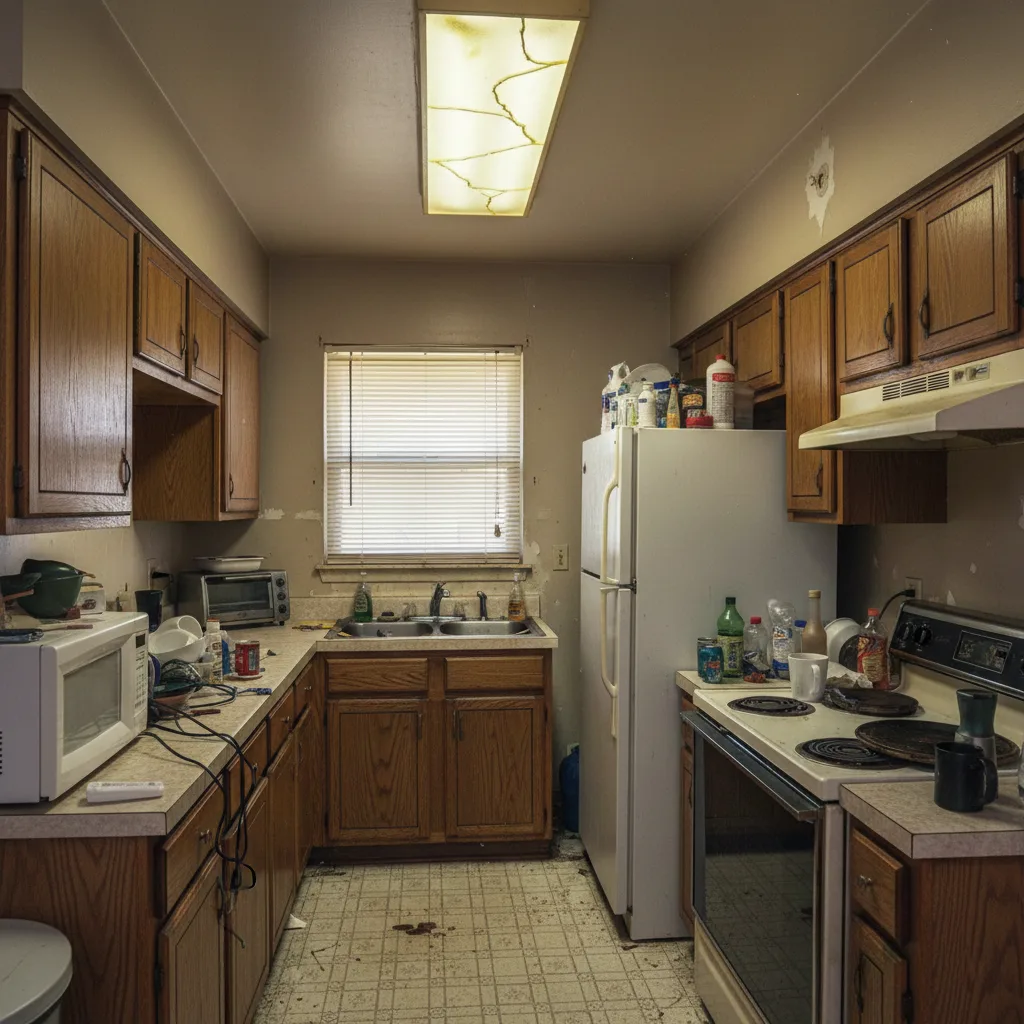
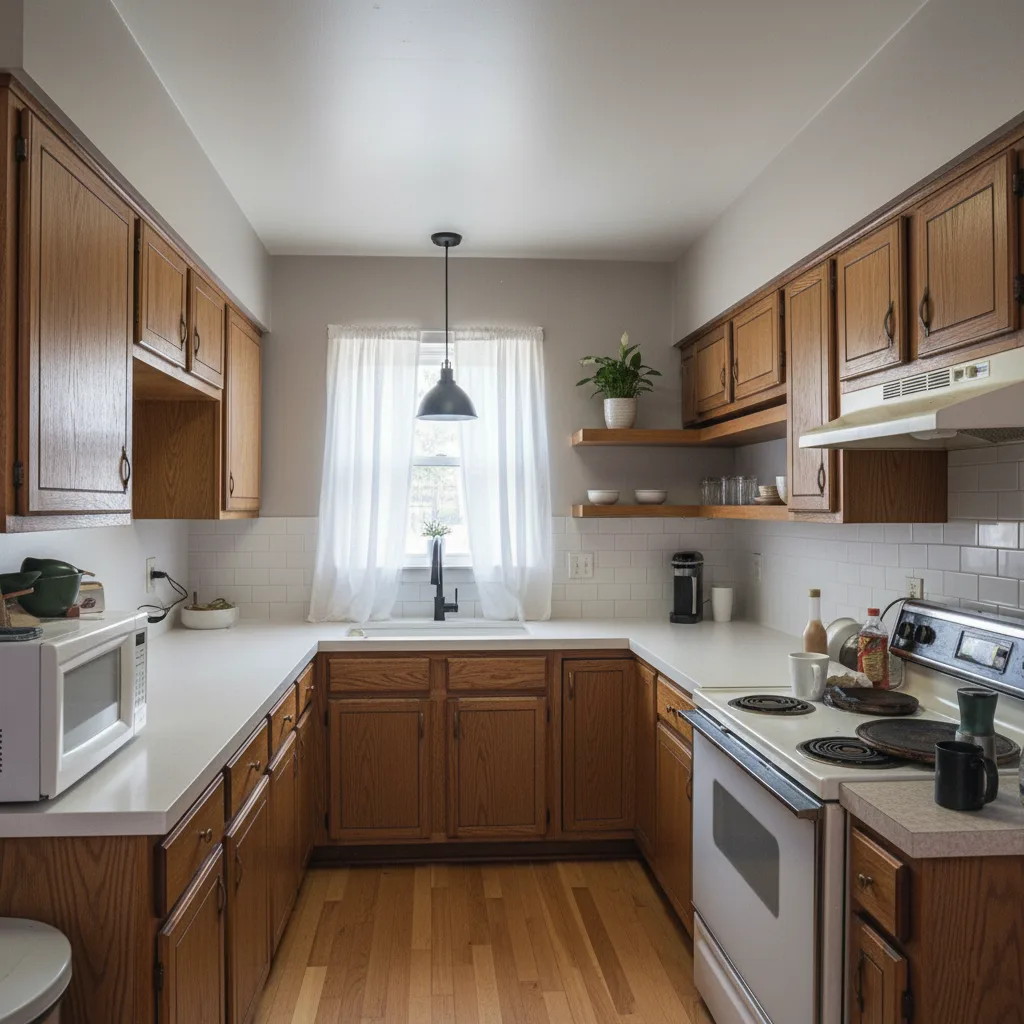
HouseGPTs is an AI home design studio built around one idea: redesign the room you actually have. You upload a photo, pick a room type and a style (or let the AI choose), describe anything that must stay, and get a photorealistic redesign of that same space. Your windows, doors, walls and camera angle stay put, so the result shows your room, not a showroom. It works as a free AI room designer for bedrooms, living rooms, bathrooms, home offices and 80+ other spaces.
What you get free
- 2 full redesigns on the core designers: interior, kitchen, exterior, paint and furniture.
- Up to 11 free runs every day on 7 more tools: 5 virtual staging renders, plus 1 each of declutter, depersonalize, garden design, material swap, sketch to render and twilight photos.
- A free floor planner to draw rooms to scale and furnish the layout.
- 100+ design styles and 80+ room types, from Scandinavian, mid-century and coastal to farmhouse, industrial and art deco.
- No card needed. Free designs are watermarked previews up to 1024 px, which is plenty to judge a design on screen.
Why HouseGPTs ranks first
- It keeps your room. This is the biggest difference between AI interior design tools. HouseGPTs restyles the space in your photo, and you can tell it exactly what to keep, like "keep the sofa and the wood floor." Tools that generate a fresh room often move windows or change the size of the space, which makes the result useless for planning. More on this in can AI redesign my house without changing the layout.
- One account covers the whole house. Most free tools do one job. HouseGPTs covers interiors, kitchens, bathrooms, exteriors, paint colors, furniture, gardens, floor plans and listing photos, so you don't juggle five logins to plan one renovation.
- It works for beginners and pros. New users can upload a photo and hit generate, or switch on "Let AI decide." Experienced users can set the room, the style and a detailed brief.
- The paid plan is cheap per design. Starter is $20 a month billed yearly ($24 month to month) for 500 credits a month. A Basic render costs 2 credits, so that is about 250 designs a month, or roughly 8 cents a design. Paid plans also unlock HD exports with no watermark, commercial use and a choice of four AI rendering engines.
HouseGPTs pros and cons
Pros
- Keeps your walls, windows and layout, and lets you name what must stay
- The widest free toolkit on this list: 2 redesigns plus up to 11 free runs a day
- 100+ styles and 80+ room types
- Low cost per design on paid plans, with commercial use included
Cons
- Only 2 free full redesigns on the core designers (the daily free runs cover the other tools)
- Free output is watermarked and capped at 1024 px
- The top rendering engines are on paid plans only
Best for: homeowners and renters planning a makeover, anyone pricing a kitchen or bathroom remodel, contractors who need to show clients a concept, and real estate agents who need staged, decluttered listing photos.
Upload a photo, pick a style and see your own room redesigned in a few clicks. No card needed.
Try HouseGPTs free2. Interior AI: best for the most free renders on one designer
Interior AI, built by indie maker Pieter Levels, was one of the first AI interior design apps and is still one of the best known. It focuses on a single designer with several modes: redesign a room, restyle it while keeping the layout, stage an empty room, turn a sketch into a render, or restyle an outdoor space. It offers 50+ styles.
- Free plan: 5 renders a day at lower resolution.
- Paid from: $39 a month, or $390 a year, for 1,000 generations a month.
Pros: generous daily free renders, a mature product and a useful layout-keeping mode. Cons: free renders are low resolution, the paid plan costs more than HouseGPTs Starter, and there are no floor plan, paint or garden tools in the same account.
HouseGPTs vs Interior AI: pick Interior AI if all you want is lots of free style tests on one room. Pick HouseGPTs if you are planning a real project that touches more than one room or the outside of the house. Full breakdown: Interior AI vs HouseGPTs.
3. REimagineHome: best for chat-style edits and shoppable products
REimagineHome leans into a conversational workflow. You describe changes in plain language and refine the design over several turns. Its standout feature matches items in the render to real products you can buy.
- Free plan: 5 free designs with no card, on the same AI as the Pro plan.
- Paid from: about $14 a month for the Essential plan (30 credits a month). Pro gives 200 credits a month. A design costs 1 credit, or 2 with product matching.
Pros: a fair free trial, natural-language edits and real product discovery. Cons: the 5 free designs are one-time, not daily, the cheapest plan uses older "legacy" tools, and product matching doubles your credit use. See our REimagineHome alternative guide.
4. RoomGPT: best for one quick style test
RoomGPT started as an open-source project in 2023 and became one of the best-known AI room tools. Its site says more than 4 million people have used it. The flow is as simple as it gets: upload a room, pick a theme, get a new version.
- Free plan: 1 free redesign.
- Paid from: one-time credit packs, starting at $9 for 30 credits. No subscription needed.
Pros: very simple, and you pay as you go. Cons: one free design is barely a test, there are few controls for what must stay, and it only handles interiors.
Looking for a RoomGPT alternative? HouseGPTs works the same way (upload, pick a style, generate) but gives you 2 free redesigns plus daily free runs, and lets you say what must stay.
5. HomeDesigns AI: best for free credits that refill daily
HomeDesigns AI bundles a long list of small AI tools for interiors, exteriors and gardens. Its site reports more than 2.7 million users.
- Free plan: 3 free credits every 24 hours.
- Paid from: about $27 a month.
Pros: free credits come back every day, and there are plenty of tools. Cons: 3 credits a day is thin, and paid plans start higher than HouseGPTs Starter.
6. Spacely AI: best for architects and designers who work in CAD
Spacely AI targets professionals. Besides photos, it renders sketches and 3D model screenshots, and it plugs into SketchUp, Revit, AutoCAD and Rhino.
- Free plan: 40 trial credits, with watermark-free, high-resolution downloads and a commercial license.
- Paid from: about $15 a month. Extra credit packs start at $9 for 200 credits.
Pros: one of the few free plans with no watermark, and strong pro integrations. Cons: trial credits don't refill, and it is more tool than most homeowners need.
7. Homestyler: best for building a room in 3D by hand
Homestyler is a 3D room builder first and an AI tool second. You draw the room, drag in furniture from a large catalog and render it, with AI helpers for decorating ideas. You get total control, at the cost of time.
- Free plan: a free account with a limited number of renders.
- Paid: plans add more and higher-quality renders. Pricing varies by plan.
Pros: precise manual control and 3D walkthroughs. Cons: a real learning curve, and much slower than redesigning from a photo. See our Homestyler alternative guide.
8. Planner 5D: best free floor planner
Planner 5D is the go-to when the problem is layout, not looks. You build floor plans to scale, place furniture and view the result in 3D.
- Free plan: unlimited projects and about half of the furniture catalog, on web and mobile.
- Paid from: Premium at $59.99 a year or $19.99 a month. It adds the full catalog of 10,000+ items, AI floor plan recognition and 100 AI Studio credits a month.
Pros: the most capable free planner here. Cons: most AI features sit behind the paywall, and restyling an existing photo is not its main job. If you want photoreal views of each room from your plan, the HouseGPTs AI Floor Plan Designer is the faster route. More in our Planner 5D alternative guide.
9. ChatGPT and Gemini: best for rough ideas from an AI you already use
You can upload a room photo to ChatGPT or Google Gemini and ask for a redesign. For quick inspiration, that works. For planning, it has real limits:
- General image models often move windows, resize the room or shift the camera angle.
- There are no room types, style presets, staging tools or floor plans.
- Free tiers cap how many images you can make per day, and results vary a lot between runs.
Paid from: about $20 a month for either. Tip: if you use them, start your prompt with "Keep the walls, windows, doors, floor and camera angle exactly the same."
What "free" really means in free AI interior design tools
Almost every tool on this list says "free." Here is the fine print that decides whether a free plan is actually useful:
| Fine print | Why it matters | What we found |
|---|---|---|
| Trial or daily allowance | A one-time trial runs out in minutes. A daily allowance lets you keep testing ideas. | RoomGPT gives 1 design, once. HomeDesigns AI refills 3 credits a day. HouseGPTs gives 2 redesigns plus up to 11 free runs every day. |
| Watermark | Fine for choosing a style. Not fine for listing photos or client decks. | Most free plans watermark. Spacely AI's trial credits do not. |
| Resolution cap | Low-res previews look fine on a phone and fuzzy on a big screen or in print. | HouseGPTs free previews go up to 1024 px. Interior AI's free renders are lower resolution. |
| Card required | A card on file often means a trial that renews automatically. | HouseGPTs and REimagineHome need no card. |
| AI engine | Many tools lock free users to their cheapest model, so free results undersell the paid ones. | HouseGPTs free runs use the Basic engine. Paid plans unlock all four engines. |
| Commercial use | Agents and designers need the right to use images in listings and client work. | Usually paid only. Spacely AI's free credits include a commercial license, and every HouseGPTs paid plan does. |
Which free AI interior design tool should you use?
| If you want to... | Use |
|---|---|
| Redesign your actual room and keep the layout | HouseGPTs AI Interior Designer |
| Plan a kitchen or bathroom remodel | HouseGPTs AI Kitchen Designer |
| Try paint colors before you buy | HouseGPTs AI Paint Designer |
| Boost curb appeal or design a garden | HouseGPTs Exterior and Landscaping |
| Stage an empty room or a listing photo | HouseGPTs Virtual Staging (5 free a day) |
| Show a client a renovation concept | HouseGPTs |
| Get the most free renders on one designer | Interior AI |
| Match a design to real furniture you can buy | REimagineHome |
| Test one style with no commitment | RoomGPT |
| Render from SketchUp or Revit | Spacely AI |
| Build a room in 3D by hand | Homestyler |
| Draw a floor plan to scale | Planner 5D, or the HouseGPTs Floor Plan Designer for photoreal room views |
| Get rough ideas from a chatbot you already pay for | ChatGPT or Gemini |
How to get better results from any free AI interior design tool
Good AI interior design from a photo starts with the photo itself. These six habits improve results in every tool on this list:
- Shoot a clean photo. Stand in a corner at chest height, hold the phone level and use daylight. Wide shots that show the floor and ceiling give the AI more to work with.
- Clear the clutter first. Loose items confuse AI. Tidy up, or run the photo through a free AI declutter tool before you redesign.
- Say what must stay. Name what you're keeping: "keep the sofa, the radiator and the oak floor."
- Change one thing at a time. Swap the paint, then the floor, then the furniture. Huge all-at-once prompts give random results.
- Make 2 or 3 versions and compare. AI design is a fast way to rule options out, not a single right answer.
- Add real limits. Mention your budget, that you rent, or materials you already bought. The output gets practical fast.
Prompts you can copy:
- "Keep the window, radiator and wood floor. Make it a calm Scandinavian bedroom with linen bedding and warm lamps."
- "Same kitchen layout and cabinets. Paint the cabinets sage green, add brass handles and a white quartz countertop."
- "Keep the sofa and the rug. Modern living room with warmer lighting, a large plant and two accent chairs."
- "Renter friendly: no painting or new flooring. Refresh this living room with furniture, textiles and lighting only."
Are free AI interior design tools accurate enough for a real renovation?
For decisions, yes. For construction, no. AI design is great for choosing a style, testing paint and flooring, seeing whether a sofa works visually, and showing a contractor what you mean. It does not replace measurements, structural checks, building codes or a contractor's drawings.
A workflow that works:
- Use AI to narrow down the look. It takes an hour, not a month of saving photos.
- Measure the room and check what actually fits.
- Estimate the budget with a renovation cost calculator.
- Take the AI concept to contractors and compare their quotes side by side.
The verdict
If you want one free AI interior design tool that redesigns your actual room and covers the rest of the house too, start with HouseGPTs. It keeps your layout, gives you the widest free toolkit on this list, and costs about 8 cents a design if you upgrade. Use Interior AI if you want the most free renders on one designer, Spacely AI if you work in CAD, and Planner 5D if you need to draw a floor plan by hand.
2 free redesigns plus daily free staging, declutter and material swaps. No card needed.
Start with HouseGPTsRelated guides
- Is there a free AI for interior design? A step-by-step guide
- 5 best AI room designer tools for home makeovers
- Interior AI vs HouseGPTs: full comparison
- AI paint visualizer: see colors before you buy
- Can AI redesign my house without changing the layout?
Last updated September 30, 2026. Free limits and prices change often, so we re-check them regularly and update this page.
Ready for Your Own AI Redesign?
Start Designing with AI →FAQs about 9 Best Free AI Interior Design Tools in 2026 (Free Plans Compared)
Everything you need to know
What is the best free AI interior design tool in 2026?
HouseGPTs is the best free AI interior design tool for most people in 2026. It redesigns the room in your own photo while keeping the walls, windows and layout, gives 2 free full redesigns plus up to 11 free runs a day across 7 tools, and needs no card. Interior AI is the runner-up if you only want the most free renders on one designer.
Is there a completely free AI interior design tool?
Not without limits. Every tool caps free use with a one-time trial, a daily allowance, watermarks or lower resolution. HouseGPTs combines both: 2 free full redesigns plus daily free runs on virtual staging, decluttering, material swaps, sketch to render and garden design. HomeDesigns AI refills 3 credits every 24 hours, and Interior AI gives 5 lower-resolution renders a day.
Which free AI interior design tool keeps my room's layout?
HouseGPTs is built to keep your layout. It restyles the space in your photo and lets you name what must stay, like a sofa, a window or the floor. Interior AI also has a layout-keeping mode. General chatbots like ChatGPT and Gemini often move windows or change the size of the room.
Can I use ChatGPT or Gemini for interior design?
Yes, for rough inspiration. Upload a room photo and describe the change you want. But general image models often alter the room itself, have no style or room presets, and cap free images per day. For planning a real makeover, a dedicated tool like HouseGPTs gives more consistent results that keep your space recognizable.
Do free AI interior design tools add watermarks?
Most do. HouseGPTs watermarks free previews (up to 1024 px) and removes the watermark on paid plans, which also add HD exports and commercial use. Spacely AI's 40 trial credits are one of the few free options with no watermark.
What is the best free AI interior design app for beginners?
HouseGPTs. You upload a photo, pick a room and style or switch on "Let AI decide," and get a redesign of your own space. There is nothing to model or draw. RoomGPT is similarly simple, but it only gives one free design.
Is HouseGPTs better than RoomGPT?
For most people, yes. RoomGPT gives 1 free redesign and focuses on interiors. HouseGPTs gives 2 free redesigns plus daily free runs, lets you say what must stay, and also covers kitchens, exteriors, paint, gardens, staging and floor plans. RoomGPT is fine for a single quick style test with pay-as-you-go credits.
Can AI design my room from a photo for free?
Yes. Upload a clear, level photo to a free tool like HouseGPTs, choose a style and describe what to keep. You get a redesigned version of that same room in a few clicks. Free results are usually watermarked previews, which is enough to decide on a direction.
Are AI interior design renders accurate enough for a renovation?
They are accurate enough to choose styles, colors, materials and furniture, and to show a contractor what you want. They are not construction documents. Confirm measurements, structure, electrical work and building codes with a professional before you build or buy.
Can I use free AI interior design images for real estate listings?
Usually not on a free plan. Free output is often watermarked and may not include a commercial license. HouseGPTs paid plans include watermark-free HD exports with commercial use. Many MLS rules also require virtually staged photos to be labeled as staged.