AI Living Room Designer - Transform Your Space for Free (2026 Guide)
Article Contents
- Why Use AI for Living Room Design?
- Best Free AI Living Room Designers (February 2026)
- 1. HouseGPTs - Best Overall (2 Free Professional Designs)
- 2. RoomGPT - Unlimited Free (Basic Quality)
- 3. Homestyler - 3D Room Builder (Manual Design)
- Winner: HouseGPTs for Speed + Quality
- How to Use AI Living Room Designer (Step-by-Step)
- Step 1: Prepare Your Living Room Photo
- Step 2: Upload to HouseGPTs
- Step 3: Choose Your Living Room Style
- Step 4: Generate Your Design
- Step 5: Smart Strategy for Your 2 Free Designs
- Common Living Room Design Challenges (AI Solutions)
- Challenge 1: Awkward Room Layout
- Challenge 2: Dark Living Room
- Challenge 3: Small Living Room
- Challenge 4: Open Concept Zoning
- Challenge 5: Focal Point Confusion
- Using AI Living Room Designs to Shop Smart
- 1. Furniture Shopping
- 2. Paint Selection
- 3. Rug and Textile Selection
- 4. Lighting Fixtures
- 5. Decor and Accessories
- Budget-Friendly Approach:
- Small Living Room Design with AI
- AI Strategies for Small Spaces:
- Open Concept Living Room Design
- AI Solutions for Open Concept:
- Living Room AI Design vs. Interior Designer
- When AI is Enough:
- When to Hire a Designer:
- Budget Living Room Makeover Using AI
- The $800 Weekend Transformation:
- $3,000 Major Makeover (Includes Furniture):
- Common Living Room Design Mistakes (Avoid with AI)
- 1. Furniture Too Large for Space
- 2. Floating Furniture in Large Rooms
- 3. Wrong Rug Size
- 4. Poor Traffic Flow
- 5. Ignoring Focal Points
- 6. Inconsistent Style
- Start Your Living Room Transformation Today
- Your Next Steps:
- Related Living Room Design Resources
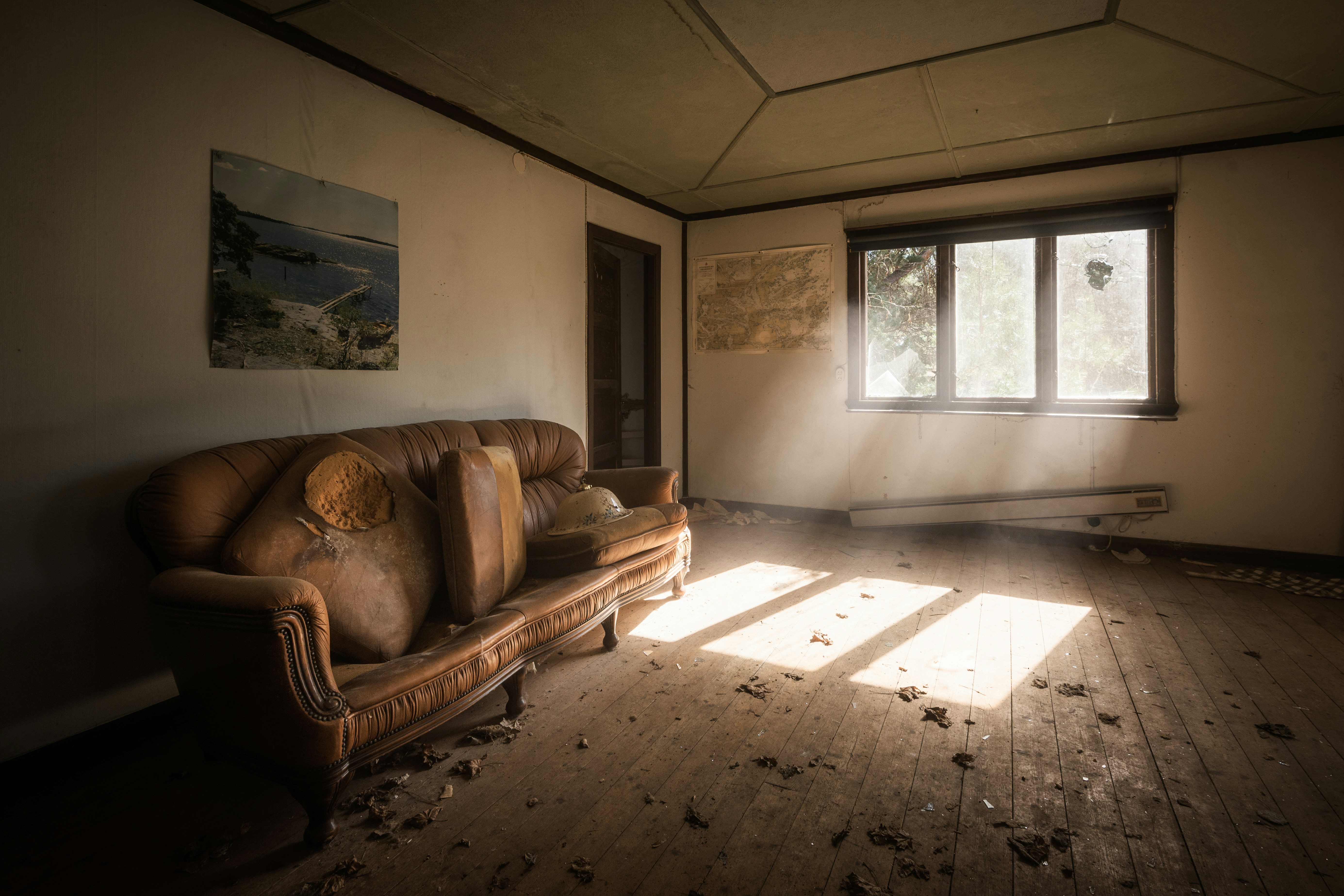
The Challenge: Before
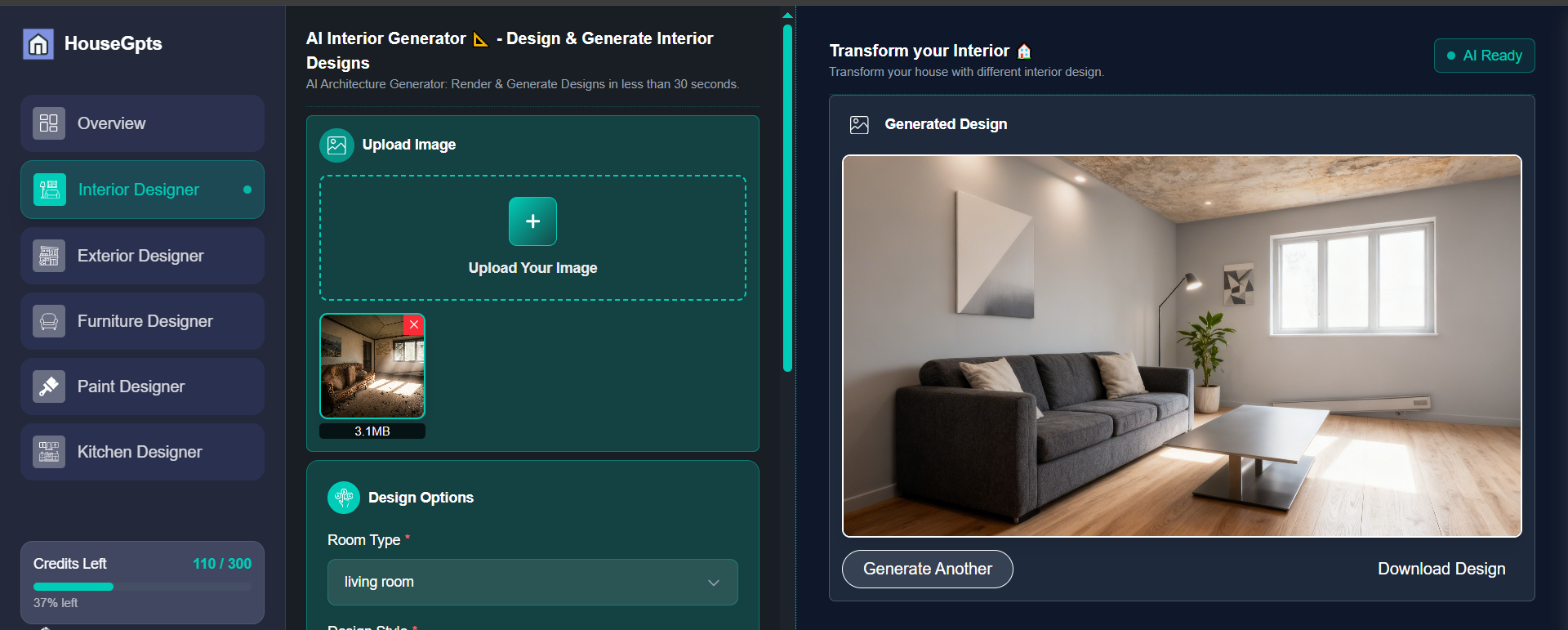
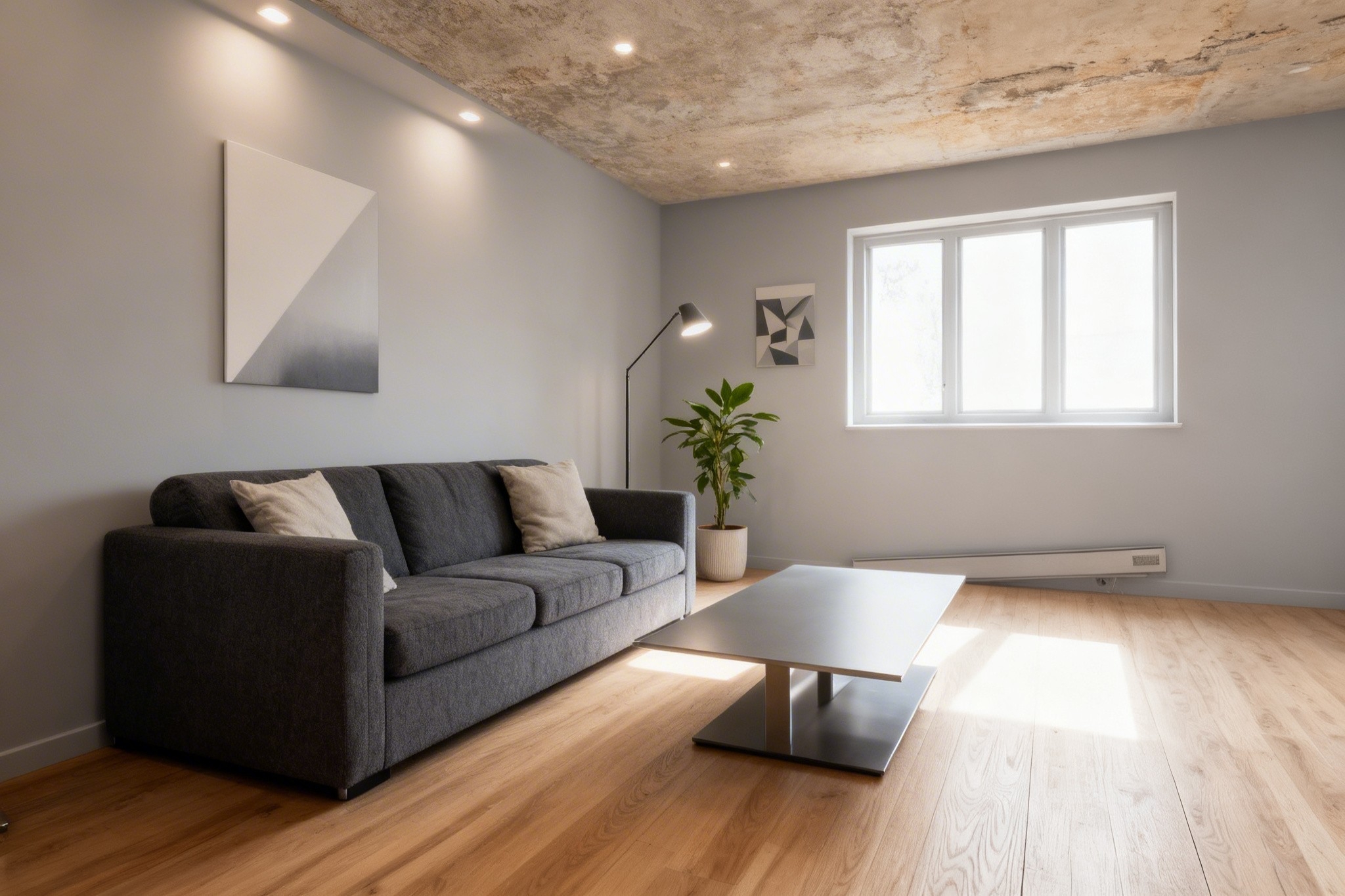
The Transformation: After (AI Generated)
AI Living Room Designer - Transform Your Space for Free (2026 Guide)
Your living room is where life happens—family gatherings, movie nights, hosting friends, daily relaxation. But hiring an interior designer to reimagine this space costs $2,000-$4,000 for concepts alone. AI living room designers generate professional designs in 30 seconds for free. Here's how to transform your living room without the designer price tag.
Why Use AI for Living Room Design?
Living rooms are the most versatile spaces in your home—and the hardest to get right. You need to balance aesthetics, functionality, traffic flow, and multiple uses (entertaining, relaxing, working, playing).
Traditional interior designers excel at this, but their fees are steep. AI living room designers offer a better approach:
- Test unlimited layouts: See how different furniture arrangements work in your actual space
- Visualize color schemes: Try bold accent walls or new paint colors without commitment
- Explore style options: Compare modern, traditional, eclectic, and more in minutes
- Save designer fees: $2,000-$4,000 saved on consultation and concept development
- Make confident decisions: See the transformation before buying a single piece of furniture
- Get family consensus: Show everyone the options before making expensive purchases
I used AI to redesign my open-concept living room and discovered my planned gray sectional would actually make the space feel dark and cramped. The AI showed me a lighter configuration that looked 10x better—saved me from a $3,000 furniture mistake.
Best Free AI Living Room Designers (February 2026)
1. HouseGPTs - Best Overall (2 Free Professional Designs)
After testing 7 AI living room design tools, HouseGPTs consistently delivers the most realistic and actionable results for living spaces.
Why HouseGPTs Wins for Living Rooms:
- Handles complex layouts: Works with open concepts, L-shaped rooms, awkward spaces, split-levels
- Realistic furniture placement: Understands proper scale, traffic flow, and conversation areas
- Multiple seating arrangements: Shows you different furniture configurations in the same space
- 20+ living room styles: Modern, traditional, mid-century, farmhouse, industrial, eclectic, and more
- Photorealistic rendering: Colors, textures, and lighting that look accurate to real life
- 2 completely free designs: Professional quality, no credit card, no watermarks
Perfect For:
- Homeowners planning living room makeovers
- People with awkward or difficult room layouts
- Anyone considering new furniture purchases
- Testing paint colors and accent walls
- Open concept spaces needing zone definition
- Small living rooms needing optimization
Transform Your Living Room for Free
Upload your photo and get 2 professional AI living room designs in 30 seconds. No credit card required.
2. RoomGPT - Unlimited Free (Basic Quality)
Pros: Completely unlimited renders, no account needed, very fast generation, good for rapid ideation.
Cons: Lower quality output, inconsistent results, furniture often looks unrealistic or poorly scaled.
Best for: Quick brainstorming when you want to test 20+ ideas in 15 minutes without caring about quality.
3. Homestyler - 3D Room Builder (Manual Design)
Pros: Excellent furniture catalog from real brands, good for shopping while designing, detailed 3D visualization.
Cons: Not true AI—you manually place every item yourself. Steep learning curve, time-consuming (hours vs. seconds).
Best for: Design enthusiasts who enjoy the manual design process and want to shop for specific furniture.
Winner: HouseGPTs for Speed + Quality
If you want professional living room designs without spending hours learning software or settling for low-quality renders, HouseGPTs is the clear choice.
How to Use AI Living Room Designer (Step-by-Step)
Step 1: Prepare Your Living Room Photo
Living rooms are typically the largest rooms to photograph, so follow these tips carefully:
Photography Best Practices:
- Shoot from a corner: This captures the maximum space in one frame
- Use natural daylight: Open curtains/blinds, shoot mid-morning or afternoon
- Turn off artificial lights: Natural light shows colors more accurately
- Include major furniture: Show your sofa, chairs, coffee table (AI needs context)
- Capture focal points: Fireplace, TV wall, windows—these are fixed elements AI preserves
- Show full walls: Get at least 2-3 walls in the photo
- Clear some clutter (optional): Remove random items, but keep furniture
What to Include:
- Main seating area (sofa/sectional)
- Windows and natural light sources
- Fireplace or TV wall (if applicable)
- At least 2 full walls
- Ceiling height and architectural details
- Flooring type
Pro tip: If you have an open-concept living/dining/kitchen, take separate photos of each zone. AI works best when it can focus on one area at a time.
Step 2: Upload to HouseGPTs
- Go to HouseGPTs.com/dashboard/interior
- Click "Start Free Design"
- Sign in with Google (5 seconds)
- Upload your living room photo
- Select "Living Room" as room type
Step 3: Choose Your Living Room Style
This is where AI living room design gets exciting. Here are the most popular styles:
Modern Contemporary
- Look: Clean lines, neutral palette, minimal ornamentation
- Colors: White, gray, black, with bold accent colors
- Furniture: Low-profile sofas, geometric coffee tables, sleek media consoles
- Best for: New homes, urban apartments, minimalists
Mid-Century Modern
- Look: Iconic 1950s-60s design, retro-cool, timeless appeal
- Colors: Warm woods, mustard yellow, teal, orange accents
- Furniture: Tapered legs, curved sofas, Eames-style chairs
- Best for: Ranch homes, design enthusiasts, vintage lovers
Scandinavian (Hygge)
- Look: Light, airy, cozy, functional minimalism
- Colors: White walls, light wood, soft grays, natural textiles
- Furniture: Simple shapes, natural materials, plush textiles
- Best for: Small spaces, cold climates, anyone wanting cozy simplicity
Traditional/Classic
- Look: Timeless elegance, formal, rich details
- Colors: Warm neutrals, deep reds, navy, gold accents
- Furniture: Tufted sofas, ornate coffee tables, classic patterns
- Best for: Older homes, formal entertaining, traditional tastes
Farmhouse/Rustic
- Look: Warm, welcoming, lived-in comfort
- Colors: White, cream, natural wood, soft pastels
- Furniture: Overstuffed sofas, reclaimed wood tables, vintage accents
- Best for: Country homes, families, casual lifestyles
Industrial
- Look: Urban loft, exposed materials, edgy aesthetic
- Colors: Gray, black, brown, metal accents
- Furniture: Leather sofas, metal coffee tables, Edison bulbs
- Best for: Lofts, urban apartments, modern industrial homes
Eclectic/Bohemian
- Look: Personal, collected, globally-inspired, artistic
- Colors: Rich jewel tones, patterns, mixed textiles
- Furniture: Mix of styles, vintage finds, layered textiles
- Best for: Creative personalities, well-traveled, rental apartments
Coastal/Beach House
- Look: Relaxed, breezy, vacation vibes
- Colors: White, soft blue, sandy beige, natural textures
- Furniture: Slipcovered sofas, wicker accents, driftwood tables
- Best for: Beach homes, sunny climates, casual entertaining
Step 4: Generate Your Design
- Click "Generate Design"
- Wait 20-30 seconds while AI processes your living room
- Review the transformation
- Download high-resolution image
Step 5: Smart Strategy for Your 2 Free Designs
Don't waste your free designs testing minor variations. Instead:
- Design 1: Try your dream style (even if it seems bold or risky)
- Design 2: Try a completely different aesthetic for comparison
Strategic examples:
- Design 1: Modern Contemporary (clean, bold) + Design 2: Farmhouse (warm, cozy)
- Design 1: Mid-Century Modern (retro) + Design 2: Traditional (classic)
- Design 1: Industrial (edgy) + Design 2: Scandinavian (soft)
This approach helps you understand your true style preferences. You might discover you love something unexpected, or confirm your instincts about what works in your space.
Common Living Room Design Challenges (AI Solutions)
Challenge 1: Awkward Room Layout
Problem: L-shaped rooms, rooms with multiple doorways, narrow spaces, or odd proportions.
AI Solution: AI analyzes your space and suggests furniture arrangements that work with—not against—the architecture. You'll see:
- Where to place seating for optimal traffic flow
- How to create conversation areas despite awkward shapes
- Whether your current furniture is too large/small for the space
- Strategic placement of rugs to define zones
Challenge 2: Dark Living Room
Problem: North-facing, few windows, or blocked natural light makes the room feel cave-like.
AI Solution: Generate designs with:
- Light paint colors (white, cream, pale gray)
- Strategically placed mirrors
- Light-colored furniture
- Minimal dark accents
The AI will show you exactly how much brighter your room could feel with these changes.
Challenge 3: Small Living Room
Problem: Room feels cramped, furniture overwhelms the space, nowhere to move.
AI Solution: Test designs that show:
- Smaller-scale furniture (loveseat instead of sectional)
- Floating furniture (pulled away from walls)
- Multi-functional pieces (storage ottomans)
- Light colors that visually expand space
Challenge 4: Open Concept Zoning
Problem: Living room flows into dining/kitchen with no clear separation.
AI Solution: Generate designs showing:
- Rug placement to define living zone
- Furniture orientation creating "rooms within rooms"
- Console tables as visual barriers
- Coordinated color schemes that distinguish spaces
Challenge 5: Focal Point Confusion
Problem: Fireplace on one wall, TV on another, windows on a third—where should seating face?
AI Solution: AI shows you optimal furniture arrangement based on your priorities:
- TV as focal point: Seating faces TV, fireplace becomes decorative
- Fireplace as focal point: Seating in conversational arrangement, TV mounted above or on side wall
- View as focal point: Seating faces windows, TV and fireplace secondary
See each option in your actual space before committing to a layout.
Using AI Living Room Designs to Shop Smart
Once you have your AI-generated living room design, use it as a strategic shopping guide:
1. Furniture Shopping
Show your AI design on your phone or tablet while furniture shopping:
- Sofa/sectional: "I'm looking for something in this style and color range"
- Coffee table: "This is the aesthetic I'm going for—what do you have that matches?"
- Accent chairs: "I need chairs that complement this sofa style"
- Media console: "Looking for storage in this finish"
Sales associates love visual references—it saves everyone time and ensures better matches.
2. Paint Selection
Take your AI design to a paint store:
- Many stores (Home Depot, Sherwin-Williams, Benjamin Moore) can color-match from photos
- Ask: "I want to match this wall color—what's closest in your collection?"
- Get sample quarts of 2-3 similar shades to test at home
3. Rug and Textile Selection
Your AI design shows the ideal rug size, color, and pattern:
- Size: Note how large the AI rug appears—measure similar dimensions in-store
- Color: Match the rug color to your AI design's palette
- Pattern: Use AI as a guide for pattern scale (subtle vs. bold)
4. Lighting Fixtures
AI designs often show different lighting approaches:
- Floor lamps in corners (for ambient lighting)
- Table lamps on end tables (for task lighting)
- Statement chandeliers or pendants (for style)
- Recessed lighting (for overall brightness)
Use this as a guide when selecting fixtures and bulb temperatures.
5. Decor and Accessories
Don't try to replicate every decorative element in the AI design. Instead, focus on:
- Color palette: Pull 3-4 main colors from the design and stick to them
- Style consistency: If AI shows modern design, buy modern accessories
- Scale: Note the size of artwork, plants, and decor in AI design
Budget-Friendly Approach:
You don't need to buy everything at once:
- Phase 1 ($500-1,000): Paint walls, new rug, key lighting
- Phase 2 ($1,000-3,000): Main sofa or sectional
- Phase 3 ($500-1,500): Accent chairs, coffee table
- Phase 4 ($300-500): Accessories, artwork, plants
The AI design keeps you on track across months of purchases, ensuring everything coordinates.
Small Living Room Design with AI
Small living rooms require strategic design choices. Here's how AI helps:
AI Strategies for Small Spaces:
1. Scale Furniture Appropriately
AI often shows smaller furniture that leaves breathing room:
- Loveseat + 2 chairs instead of oversized sectional
- Armless or low-back seating (feels less bulky)
- Furniture with visible legs (shows more floor = larger feel)
- Glass or acrylic coffee tables (visually lightweight)
2. Use Light Colors
Generate designs with neutral, light palettes:
- White or cream walls
- Light gray or beige furniture
- Light wood tones
- Pop of color in small doses (pillows, art)
3. Create Multipurpose Zones
AI can show how one small room serves multiple functions:
- Sofa + console table behind = living + work zone
- Ottoman with storage = seating + coffee table + storage
- Wall-mounted desk in corner = living + office
4. Maximize Vertical Space
AI designs often incorporate tall elements:
- Floor-to-ceiling bookshelves
- Tall narrow media consoles
- High-mounted artwork or gallery walls
- Vertical plants (tall fiddle leaf fig vs. wide potted plants)
5. Strategic Mirror Placement
Look for mirrors in AI designs—they double visual space and reflect light:
- Large mirror above sofa
- Mirrored furniture (coffee table, side tables)
- Mirrors opposite windows (doubles natural light)
Open Concept Living Room Design
Open concept spaces are trendy but tricky—you need to define zones without walls. AI helps:
AI Solutions for Open Concept:
1. Rug Definition
AI designs typically show large rugs that anchor living zones:
- 8x10 or 9x12 rugs under all front furniture legs
- Rug defines "living room" separate from dining area
- Coordinating but different rugs in each zone
2. Furniture as Dividers
AI shows furniture placement that creates visual boundaries:
- Sofa backs facing kitchen/dining (creates separation)
- Console tables behind sofas (barrier + display surface)
- Bookcases perpendicular to walls (room dividers)
3. Coordinated Color Schemes
AI generates designs where living/dining/kitchen coordinate but have distinct identities:
- Same overall palette (e.g., gray + white + wood)
- Different accent colors per zone (living = blue, dining = green)
- Consistent style throughout (all modern or all farmhouse)
4. Lighting Zones
AI designs show different lighting approaches per area:
- Living: Floor lamps + table lamps (ambient)
- Dining: Chandelier or pendant (task + drama)
- Kitchen: Recessed + under-cabinet (functional)
Living Room AI Design vs. Interior Designer
| Factor | Interior Designer | AI Tool (HouseGPTs) |
|---|---|---|
| Cost | $2,000-$4,000 | $0 (2 designs free) |
| Timeline | 2-4 weeks for concepts | 30 seconds per design |
| Revisions | $200-400 each | Unlimited (with paid plan) |
| Style options | Designer's aesthetic | 20+ styles, your choice |
| Furniture sourcing | Often included | You shop based on AI guide |
| Best for | Complete renovations, structural changes | Aesthetic updates, furniture/color changes |
When AI is Enough:
- Furniture replacement or rearrangement
- Paint color selection
- Style transformation without structural changes
- Budget makeovers under $5,000
- Testing ideas before committing
When to Hire a Designer:
- Removing walls or major structural changes
- Custom built-ins or millwork
- High-end projects over $30,000
- You want someone to manage contractors and purchases
- Complex lighting or electrical planning
Hybrid approach: Use AI to develop your vision ($0-39), then hire designer for 2-hour consultation to validate plan ($300-500). This gives you professional input for 85% less than full design services.
Budget Living Room Makeover Using AI
The $800 Weekend Transformation:
| Update | Cost | Impact |
|---|---|---|
| Paint walls (2 gallons) | $80 | Huge |
| Large area rug | $200 | Huge |
| Throw pillows (6) | $120 | Medium |
| Curtains/drapes | $150 | Large |
| Floor lamp | $80 | Medium |
| Wall art (2-3 pieces) | $100 | Medium |
| Plants + pots | $70 | Small |
| Total | $800 | Dramatic |
AI's role: Shows you exactly how these changes will look together before spending. No guessing, no mismatches, no returns.
$3,000 Major Makeover (Includes Furniture):
- Paint + rug + accessories: $800
- New sofa or sectional: $1,200-1,800
- Coffee table: $300-500
- Accent chair: $400-600
- Lighting upgrades: $200-300
Total: $2,900-$4,000 for a completely transformed living room that looks professionally designed.
Common Living Room Design Mistakes (Avoid with AI)
1. Furniture Too Large for Space
Mistake: Buying an oversized sectional that overwhelms a small room.
AI Prevention: Generate designs to see if furniture scale is appropriate before purchasing.
2. Floating Furniture in Large Rooms
Mistake: Pushing all furniture against walls in a large space, creating awkward empty center.
AI Prevention: AI often shows furniture pulled away from walls, creating intimate conversation areas.
3. Wrong Rug Size
Mistake: Tiny rug that looks like a bath mat in a large room.
AI Prevention: AI demonstrates proper rug size (front legs of all furniture should be on the rug).
4. Poor Traffic Flow
Mistake: Furniture blocking natural walkways, forcing people to navigate awkwardly.
AI Prevention: AI arranges furniture with clear paths between doorways and zones.
5. Ignoring Focal Points
Mistake: Seating facing random directions with no clear purpose.
AI Prevention: AI orients furniture toward logical focal points (fireplace, TV, windows, conversation).
6. Inconsistent Style
Mistake: Mixing too many styles (modern sofa + traditional chairs + industrial coffee table).
AI Prevention: AI maintains style consistency, showing you cohesive combinations.
Start Your Living Room Transformation Today
Your living room should be a space you love—functional, beautiful, and reflecting your personal style. AI living room designers make professional design accessible to everyone, regardless of budget or design experience.
Your Next Steps:
- Right now: Take a photo of your living room (2 minutes)
- Next: Upload to HouseGPTs and generate 2 free designs (3 minutes)
- This week: Decide which design direction you prefer
- This month: Start shopping for key pieces based on your favorite AI design
- Ongoing: Gradually implement changes as budget allows
See Your Dream Living Room in 30 Seconds
Get 2 free professional living room designs. No credit card. No designer fees. Just beautiful results.
Related Living Room Design Resources
Ready for Your Own AI Redesign?
Start Designing with AI →FAQs about AI Living Room Designer - Transform Your Space for Free (2026 Guide)
Everything you need to know
Is there a free AI living room designer?
Yes. HouseGPTs offers 2 completely free living room designs with no credit card required. Upload a photo, choose a style (modern, traditional, farmhouse, etc.), and get professional designs in 30 seconds. The free designs are identical quality to paid versions.
How accurate is AI for living room design?
AI living room designers are highly accurate for visualizing furniture arrangements, color schemes, and style transformations. They preserve your room's dimensions and architectural features. However, AI cannot verify furniture measurements or structural feasibility. Always measure furniture before purchasing.
Can I use AI designs to shop for furniture?
Absolutely. Show your AI living room design on your phone while furniture shopping. Sales associates can help you find pieces that match your AI design's style, colors, and scale. Many shoppers use AI designs as visual shopping guides.
What living room styles can AI create?
AI living room designers offer 20+ styles including Modern Contemporary, Mid-Century Modern, Scandinavian, Traditional, Farmhouse, Industrial, Eclectic/Bohemian, Coastal, and more. Test multiple styles with the same photo to compare options.
How much does AI living room design cost?
HouseGPTs offers 2 free living room designs with no credit card required. For unlimited designs, the paid plan costs $39/month. This saves $2,000-$4,000 compared to hiring an interior designer for living room concepts.