AI Open Concept Design - How to Zone Your Space Without Walls (2026)
Article Contents
- The Open Concept Problem Nobody Talks About
- What Is AI Open Concept Design?
- The 7 Strategies for Zoning Open Concept Spaces
- Strategy 1: The Rug Method (Easiest and Most Effective)
- Strategy 2: Furniture as Dividers
- Strategy 3: Lighting Zones (Professional Designer Secret)
- Strategy 4: Color Zoning (Subtle but Powerful)
- Strategy 5: Ceiling Definition
- Strategy 6: Half-Walls and Partial Dividers
- Strategy 7: The Traffic Flow Method
- Common Open Concept Layouts (AI Solutions for Each)
- Layout 1: Kitchen-Living-Dining in One Line
- Layout 2: Kitchen Island as Central Hub
- Layout 3: L-Shaped Open Concept
- Layout 4: Great Room with High Ceilings
- How to Use AI for Your Open Concept Space
- Step 1: Photograph Your Space
- Step 2: Upload to HouseGPTs
- Step 3: Generate Multiple Zoning Options
- Step 4: Analyze the Results
- Open Concept Design Mistakes AI Prevents
- 1. All Furniture Against Walls
- 2. Undersized Rugs
- 3. Matching Everything
- 4. One Overhead Light for Entire Space
- 5. TV Visible from Kitchen
- 6. No Sound Absorption
- Budget Open Concept Zoning Plans
- The $600 Basic Zoning:
- The $2,000 Professional Zoning:
- Real Open Concept Transformation
- The Problem:
- The AI Process:
- Changes Made:
- The Result:
- Transform Your Open Concept Space Today
- Your Action Plan:
- Related Open Concept Design Resources
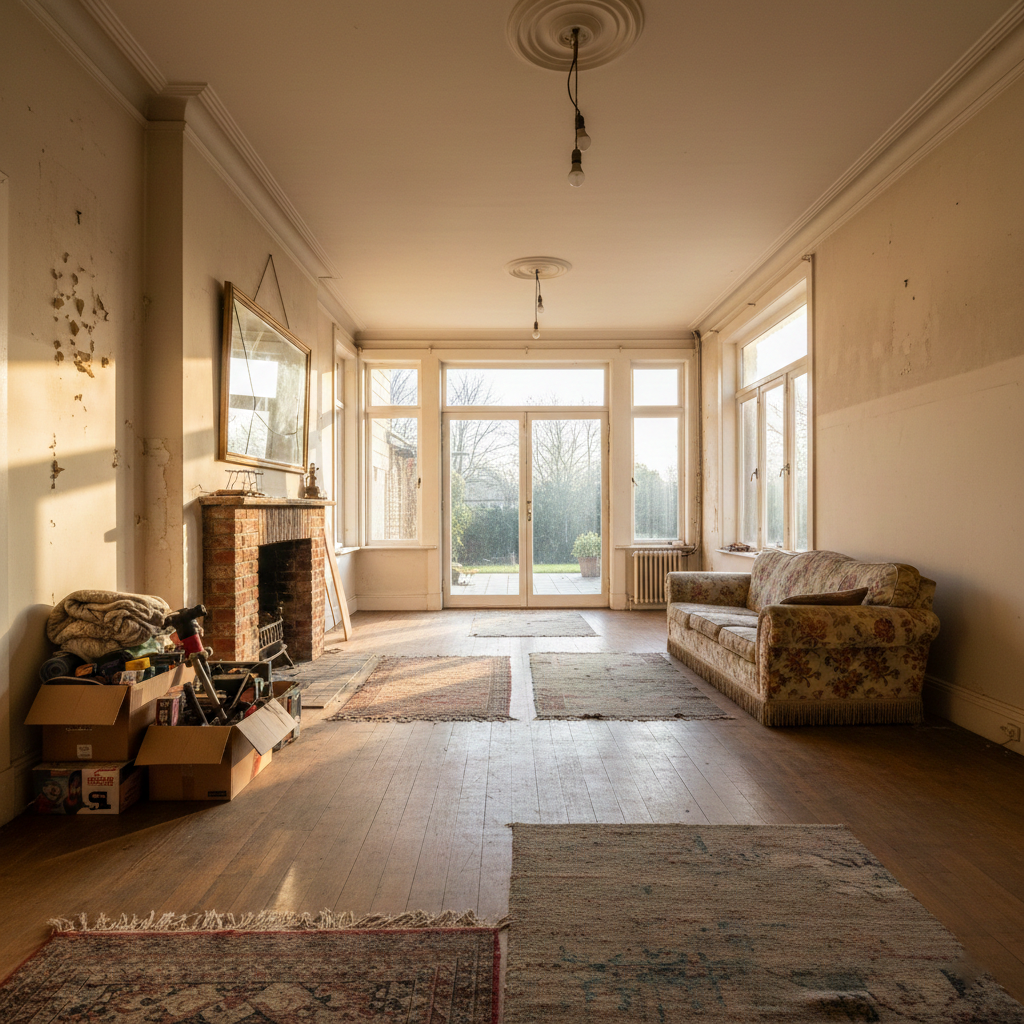
The Challenge: Before
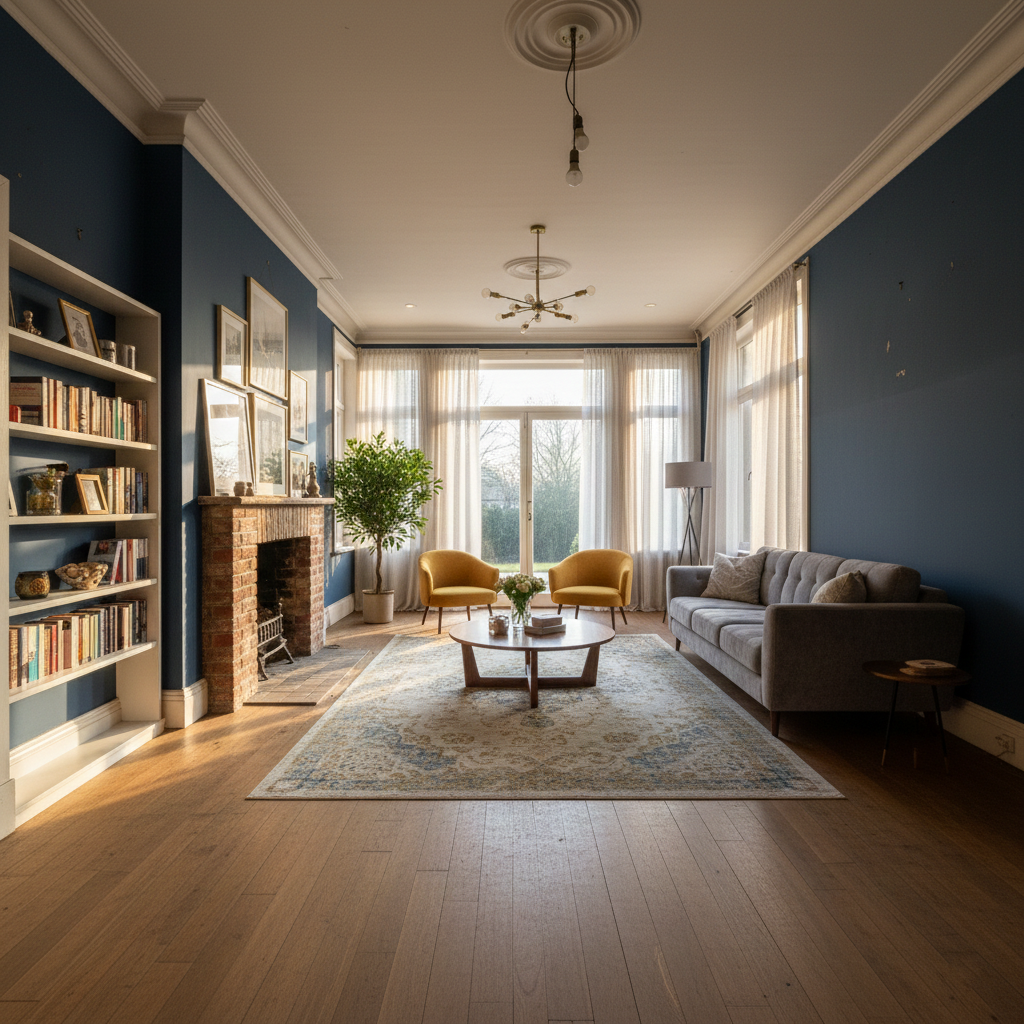
The Transformation: After (AI Generated)
AI Open Concept Design - How to Zone Your Space Without Walls (2026)
Open concept homes are beautiful in theory—spacious, airy, and modern. But in reality? They're design nightmares. Your kitchen flows into your living room which flows into your dining area, and nothing feels defined. AI open concept designers solve this by showing you exactly how to create distinct zones without building a single wall.
The Open Concept Problem Nobody Talks About
Over 60% of new homes built since 2015 have open concept floor plans. Builders and real estate agents love them. "It makes the space feel bigger!" they say. "Perfect for entertaining!"
But after you move in, you realize the problems:
- No clear living room: Where does the living area actually start and end?
- Kitchen chaos visible: Dirty dishes on display from the sofa
- Dining table awkwardness: Is it part of the kitchen or living room?
- TV sound bleeds: Can't watch a movie without the kitchen hearing everything
- No privacy: Someone's always in your space
- Furniture placement confusion: Where the hell does anything go?
- Echo problems: Hard surfaces everywhere, no sound absorption
- Temperature inconsistency: Kitchen hot, living room freezing
The biggest mistake people make with open concept spaces is treating them like one giant room. You need to create "rooms within the room"—and that's exactly what AI design tools help you visualize.
What Is AI Open Concept Design?
AI open concept designers analyze your floor plan and generate professional designs showing how to create distinct zones using:
- Furniture placement: Strategic positioning creates visual boundaries
- Area rugs: Define each zone with flooring changes
- Lighting layers: Different lighting for each functional area
- Color blocking: Subtle color changes signal different zones
- Architectural elements: Half-walls, columns, beams (if applicable)
- Partial dividers: Bookshelves, screens, console tables
- Ceiling treatments: Coffered ceilings or beams define areas
Upload a photo of your open concept space, and AI shows you multiple zoning strategies in 30 seconds—before you buy a single piece of furniture or commit to a layout.
See Your Open Concept Transformed
Upload your open floor plan photo and get 2 free AI designs showing how to define zones perfectly.
The 7 Strategies for Zoning Open Concept Spaces
Strategy 1: The Rug Method (Easiest and Most Effective)
Area rugs are the #1 tool for defining zones in open concept homes. They create visual boundaries without blocking flow.
How AI Shows You Rug Zoning:
- Living room rug: 8x10 or 9x12 under all front furniture legs (sofa, chairs, coffee table)
- Dining room rug: Large enough for all chairs to sit on rug even when pulled out (typically 8x10 minimum)
- Kitchen runner: Optional, defines the cooking zone
- Entry rug: Small rug at entrance creates transition zone
Rug Rules AI Applies:
- Each rug should be a different size (helps brain recognize separate zones)
- Coordinate colors but don't match exactly (living = gray, dining = blue-gray)
- Leave 12-18 inches between rugs (creates visual separation)
- All rugs should have consistent style (all modern, all traditional)
Cost: $400-1,200 for 2-3 quality rugs
Impact: Instant, dramatic zone definition
AI advantage: See exactly what size and color rugs work before buying
Strategy 2: Furniture as Dividers
The biggest mistake in open concept design is pushing all furniture against walls. AI shows you how to float furniture to create barriers.
Back-of-Sofa Solutions:
- Sofa facing away from kitchen: Creates visual wall between living and dining/kitchen
- Console table behind sofa: Physical barrier + display surface + storage
- Bookshelf behind sofa: Low bookshelf (3-4 feet) creates division without blocking light
- Sofa perpendicular to kitchen: Creates L-shape that defines living zone
Other Furniture Dividers AI Suggests:
- Kitchen island with seating: Barrier between kitchen work zone and dining/living
- Dining buffet or sideboard: Separates dining from living without closing off space
- Open bookshelf (not against wall): Room divider that maintains visual connection
- Piano or desk: Large furniture piece defines transition point
Strategy 3: Lighting Zones (Professional Designer Secret)
Different lighting for each zone is how designers make open concepts feel intentional. AI designs show you optimal lighting placement.
3-Zone Lighting Plan:
Living Room Lighting:
- Table lamps on end tables (warm, 2700K)
- Floor lamp in reading corner (task lighting)
- Optional: Recessed lights on dimmer (ambient)
- Goal: Cozy, relaxed atmosphere
Dining Room Lighting:
- Statement chandelier or pendant over table (3000K)
- Hung 30-36 inches above table surface
- On dimmer for dinner parties vs. casual meals
- Goal: Focal point, defines the dining zone
Kitchen Lighting:
- Recessed lights throughout (4000K, bright white)
- Under-cabinet task lighting (3500K)
- Pendant lights over island (statement piece)
- Goal: Bright, functional, clearly separate from living zones
The rule: Each zone has a different primary light source. This tells your brain "these are different rooms."
Strategy 4: Color Zoning (Subtle but Powerful)
You can't paint different walls in open concept (usually), but AI shows you how to use color to define zones.
Color Zoning Techniques:
- Accent wall in living area: One wall darker, rest neutral (creates visual anchor)
- Kitchen backsplash color: Different from living room accent (defines kitchen)
- Furniture color blocking: Living room = gray sofa, dining = wood tones, kitchen = white cabinets
- Textile coordination: Living room pillows = blue, dining chairs = green-blue, kitchen towels = teal
AI advantage: Test whether navy accent wall in living room clashes with your kitchen cabinets BEFORE painting.
Strategy 5: Ceiling Definition
If you have high ceilings or are willing to invest, ceiling treatments create powerful zone definition.
Ceiling Strategies AI Can Visualize:
- Coffered ceiling over living area: Architectural detail signals special zone
- Tray ceiling over dining: Recessed ceiling defines dining table area
- Exposed beams: Running perpendicular to space creates visual lines
- Different ceiling colors: Living = white, kitchen = light gray (subtle)
Cost: $1,500-$5,000+ depending on treatment
Best for: New construction or major renovations
Strategy 6: Half-Walls and Partial Dividers
If your lease or HOA allows it, partial walls create definition without closing off space.
Options AI Can Show:
- Half-wall with columns: 3-4 feet high, maintains sightlines
- Pony wall behind sofa: Built-in barrier with top surface for decor
- Glass partition: Modern, maintains light flow, defines zones
- Slatted divider: Partial visual block, trendy aesthetic
Cost: $800-$3,000 for basic half-wall
Permission required: Structural changes need approval
Strategy 7: The Traffic Flow Method
AI analyzes your space and shows you how to create natural "paths" that guide movement between zones.
Traffic Flow Principles:
- Clear path from entry to kitchen: 36-48 inches wide minimum
- Living room conversation area: Furniture arranged so people naturally gather there
- Kitchen work triangle: Stove, sink, fridge positioned for efficiency
- Avoid furniture in walkways: AI shows you where people will naturally walk
Common Open Concept Layouts (AI Solutions for Each)
Layout 1: Kitchen-Living-Dining in One Line
Challenge: Kitchen, dining, living all along one wall in sequence
AI Solution:
- Living room rug perpendicular to the line (creates depth)
- Sofa facing kitchen with console table behind (visual barrier)
- Dining rug at 90-degree angle to living rug
- Three distinct pendant lights (one per zone)
Layout 2: Kitchen Island as Central Hub
Challenge: Large island in middle, spaces radiate around it
AI Solution:
- Island with seating on one side (creates barrier)
- Living room behind island (island becomes back of "living room")
- Dining table adjacent to island (connected but separate rug)
- Open shelving or bookshelf opposite island (defines living boundary)
Layout 3: L-Shaped Open Concept
Challenge: Kitchen on one wall, living/dining on perpendicular walls
AI Solution:
- Living room faces away from kitchen
- Dining table between kitchen and living (transition zone)
- Two large rugs (living + dining) that don't touch
- Console table behind sofa doubles as buffet for dining
Layout 4: Great Room with High Ceilings
Challenge: Massive open space, cathedral ceilings, everything echoes
AI Solution:
- Large statement chandelier centers the space
- Multiple rugs (3-4) break up floor visually
- Ceiling beams (if possible) create visual zones
- Furniture grouped in "islands" not pushed to walls
- Heavy curtains, upholstered furniture (sound absorption)
How to Use AI for Your Open Concept Space
Step 1: Photograph Your Space
Open concept photos need to capture the FULL space:
- Stand in one corner and shoot to opposite corner (captures maximum area)
- Take 3-4 photos from different angles
- Use natural daylight (open all curtains)
- Show existing furniture even if you plan to change it
- Include all zones (kitchen, dining, living) in at least one photo
Step 2: Upload to HouseGPTs
- Go to HouseGPTs.com/dashboard/interior
- Upload your open concept photo
- Select "Living Room" as primary room type
- Add requirements: "Open concept kitchen-living-dining, show zone definition"
Step 3: Generate Multiple Zoning Options
Test different zoning strategies:
- Design 1: Rug-focused zoning (easiest to implement)
- Design 2: Furniture divider approach (sofa as barrier)
- Design 3: Lighting + color zoning (professional designer style)
Step 4: Analyze the Results
Look for these elements in your AI designs:
- Clear living zone: Can you tell where living room starts and ends?
- Defined dining area: Does the dining table feel intentional?
- Kitchen separation: Is kitchen visually distinct from living?
- Traffic flow: Are there clear paths between zones?
- Visual balance: Does any zone overwhelm the others?
Open Concept Design Mistakes AI Prevents
1. All Furniture Against Walls
Mistake: Sofa against wall, dining table against wall, everything pushed to edges.
Why it's wrong: Makes the giant open space feel even MORE undefined.
AI solution: Shows you how floating furniture creates "rooms within rooms."
2. Undersized Rugs
Mistake: Tiny 5x7 rug under coffee table only.
Why it's wrong: Looks like a bath mat, doesn't define anything.
AI solution: Shows you that living room needs minimum 8x10, ideally 9x12.
3. Matching Everything
Mistake: Same color sofa, dining chairs, and kitchen cabinets.
Why it's wrong: No visual differentiation between zones.
AI solution: Shows you how coordinating (not matching) creates distinct zones.
4. One Overhead Light for Entire Space
Mistake: Single ceiling fan with light trying to illuminate 600+ sq ft.
Why it's wrong: Flat, boring lighting makes space feel like a warehouse.
AI solution: Shows you layered lighting (table lamps, pendant, recessed) creates zones.
5. TV Visible from Kitchen
Mistake: TV placement where it's visible from every angle including kitchen sink.
Why it's wrong: Distracting, makes cooking and TV-watching conflict.
AI solution: Shows you TV placement where it's visible from living area only.
6. No Sound Absorption
Mistake: Hard floors, hard furniture, bare walls everywhere.
Why it's wrong: Everything echoes, space feels cold and hollow.
AI solution: Shows you rugs, curtains, upholstered furniture that absorb sound.
Budget Open Concept Zoning Plans
The $600 Basic Zoning:
| Item | Cost | Impact |
|---|---|---|
| Living room rug (8x10) | $200 | Huge |
| Dining room rug (8x10) | $150 | Huge |
| Console table behind sofa | $150 | Medium |
| Floor lamp (living) | $80 | Medium |
| Dining pendant light | $120 | Large |
| Total | $700 | Dramatic |
The $2,000 Professional Zoning:
- Everything from basic plan: $700
- Open bookshelf room divider: $400
- Multiple lighting upgrades (3 lamps + 2 pendants): $500
- Accent wall paint (DIY): $60
- Curtains for living area: $200
- Additional decor and accessories: $200
- Total: $2,060
AI advantage: See the exact result before spending. No guessing, no returns, no regrets.
Real Open Concept Transformation
The Problem:
Sarah's 900 sq ft open concept condo felt like a gymnasium. Kitchen, dining, living all in one space. Sofa against the wall. No rugs. Single overhead light. Everything echoed.
"It felt like I was living in an airport terminal," she said.
The AI Process:
- Uploaded photo of her space
- Generated 3 different zoning designs
- Chose rug-focused + furniture divider approach
- Spent $850 total on implementation
Changes Made:
- Moved sofa to face kitchen (creates visual barrier)
- Added console table behind sofa ($180)
- Living room rug 8x10 ($220)
- Dining rug 6x9 ($140)
- Two floor lamps in living area ($160)
- Pendant light over dining table ($150)
- Total: $850
The Result:
"It feels like three separate rooms now. Friends can't believe it's the same apartment. The AI showed me exactly what to do—I never would have thought to float the sofa or add that console table. Best $850 I ever spent."
Transform Your Open Concept Space Today
Open concept homes don't have to feel like echo chambers. With the right zoning strategies, you can create defined, functional spaces that feel intentional and beautiful.
Your Action Plan:
- Today: Take photos of your open concept space (10 minutes)
- Today: Upload to HouseGPTs and generate 2 free designs (5 minutes)
- This week: Identify top 3 zoning strategies from AI designs
- This weekend: Rearrange furniture (free!) based on AI layout
- This month: Buy key items (rugs, lighting, dividers) from AI design
See Your Open Concept Zoned Perfectly
Get 2 free professional AI designs showing how to define zones in your open floor plan. No walls required.
Related Open Concept Design Resources
Ready for Your Own AI Redesign?
Start Designing with AI →FAQs about AI Open Concept Design - How to Zone Your Space Without Walls (2026)
Everything you need to know
How do you zone an open concept space without walls?
Zone open concept spaces using five key strategies: 1) Area rugs to define each zone visually, 2) Float furniture away from walls to create barriers, 3) Different lighting for each zone (table lamps in living, pendant over dining, recessed in kitchen), 4) Color blocking with accent walls or coordinated decor, 5) Partial dividers like console tables or bookshelves. AI design tools show you exactly how to implement these strategies in your specific space.
What is the best way to separate living room and kitchen in open concept?
The most effective separation is positioning your sofa to face away from the kitchen with a console table behind it. This creates a visual and functional barrier. Add a large area rug under the living room furniture and a separate rug for dining to define zones. Different lighting in each area (lamps in living, recessed in kitchen) reinforces the separation. AI can show you the optimal furniture placement for your specific layout.
Can AI design open concept floor plans?
Yes. AI open concept designers analyze your space and generate professional designs showing how to create distinct zones without walls. Upload a photo of your open floor plan, and AI shows you furniture placement, rug sizes, lighting positions, and color strategies to define living, dining, and kitchen zones. You see realistic visualizations in 30 seconds before moving a single piece of furniture.
What size rug for open concept living room?
Minimum 8x10 feet, ideally 9x12 feet. The rug should be large enough that all front furniture legs (sofa, chairs, coffee table) sit on it. In open concept spaces, undersized rugs make the problem worse by failing to define the zone. AI design tools show you exactly what size rug works for your specific room dimensions before you buy.
How do you make open concept feel cozy?
Make open concept cozy by: 1) Using multiple rugs to define intimate zones, 2) Adding layered lighting (lamps, not just overhead), 3) Floating furniture to create smaller conversation areas, 4) Including soft textiles (curtains, throw blankets, pillows) for sound absorption, 5) Using warm colors in living zones. AI designs show you how these elements work together in your actual space.
What are the disadvantages of open concept homes?
Open concept disadvantages include: lack of privacy, kitchen messes visible from living areas, noise travels everywhere, difficulty defining zones, temperature inconsistency, echo problems from hard surfaces, and furniture placement confusion. However, strategic zoning with rugs, furniture placement, and lighting solves most of these issues. AI design tools show you solutions specific to your layout.
How much does it cost to zone an open concept space?
Basic zoning costs $600-700: two large area rugs ($350), console table or bookshelf divider ($150-200), and updated lighting ($100-200). Professional-level zoning costs $1,500-2,500 adding curtains, accent wall paint, additional lighting, and decor. AI design prevents costly mistakes by showing you exactly what works before you buy anything.
Should you use the same flooring in open concept?
Yes, keep the same hard flooring throughout open concept spaces—changing flooring types creates visual chop and makes spaces feel smaller. Instead, use large area rugs to define zones. The rugs create visual boundaries while maintaining the flow that makes open concept appealing. AI shows you optimal rug sizes, colors, and placements for your space.