AI Home Office Designer - Create Your Perfect Work From Home Setup (2026)
Article Contents
- Why Your Home Office Design Matters More Than You Think
- What Is an AI Home Office Designer?
- How to Use AI to Design Your Home Office (Step-by-Step)
- Step 1: Photograph Your Current Space
- Step 2: Upload to HouseGPTs
- Step 3: Choose Your Office Style
- Step 4: Generate and Analyze
- The Science of Productive Home Office Design
- 1. Desk Placement (Most Critical Factor)
- 2. Lighting Design for Productivity
- 3. Color Psychology for Focus
- 4. Storage and Organization
- 5. Acoustics and Sound Management
- Home Office Designs for Different Work Types
- The Tech Professional's Office
- The Creative Professional's Office
- The Consultant/Executive's Office
- The Content Creator's Office
- The Small Space Remote Worker
- Video Call Background Design with AI
- Research Shows:
- Best AI-Designed Video Call Backgrounds:
- Budget Home Office Makeover Using AI
- The $500 WFH Setup Upgrade:
- The $200 Quick Win Upgrade:
- Converting Spare Rooms into Home Offices with AI
- Spare Bedroom to Office Conversion:
- Home Office Mistakes to Avoid (AI Prevents These)
- 1. Desk Facing the Wall
- 2. Single Overhead Light
- 3. No Storage Planning
- 4. Ignoring Acoustics
- 5. Mixing Work and Life in Same Visual Space
- 6. Wrong Chair Positioning
- Transform Your Home Office Today
- Your Next Steps:
- Related Home Design Resources
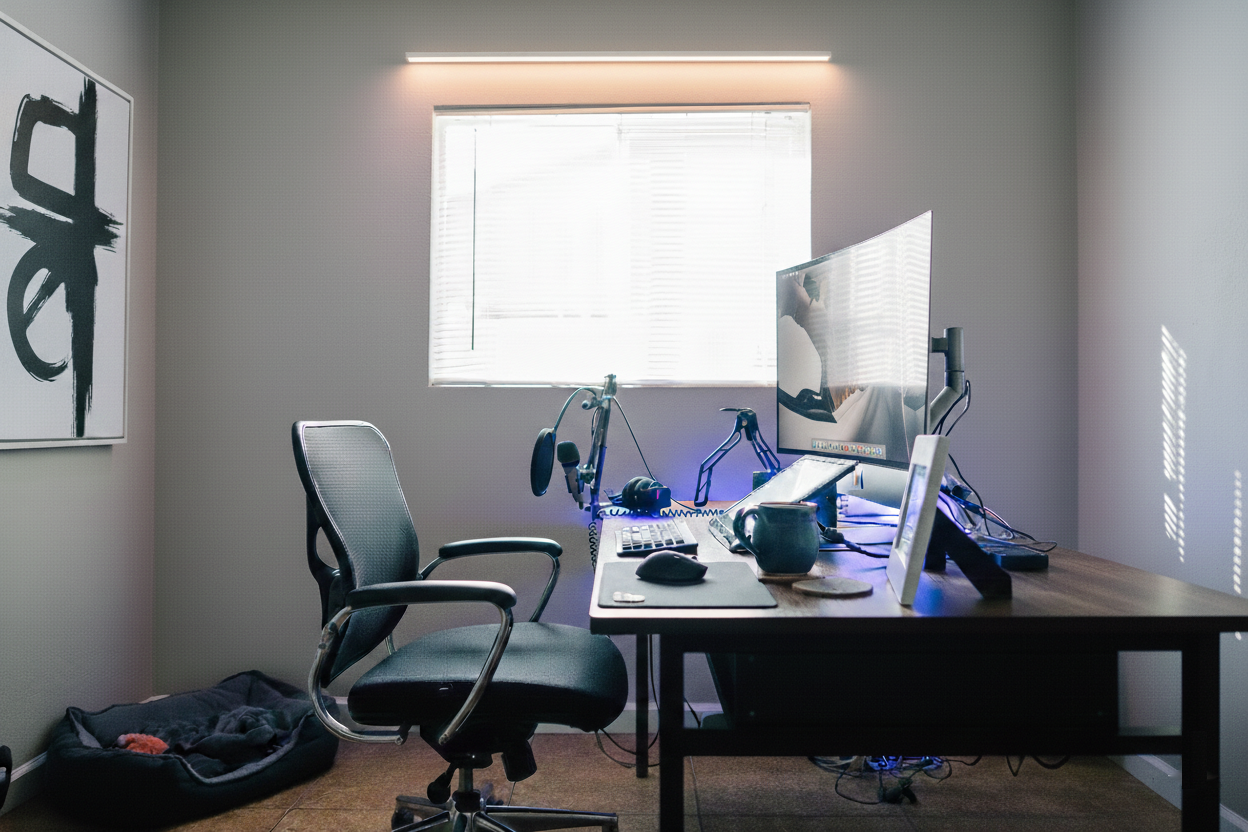
The Challenge: Before
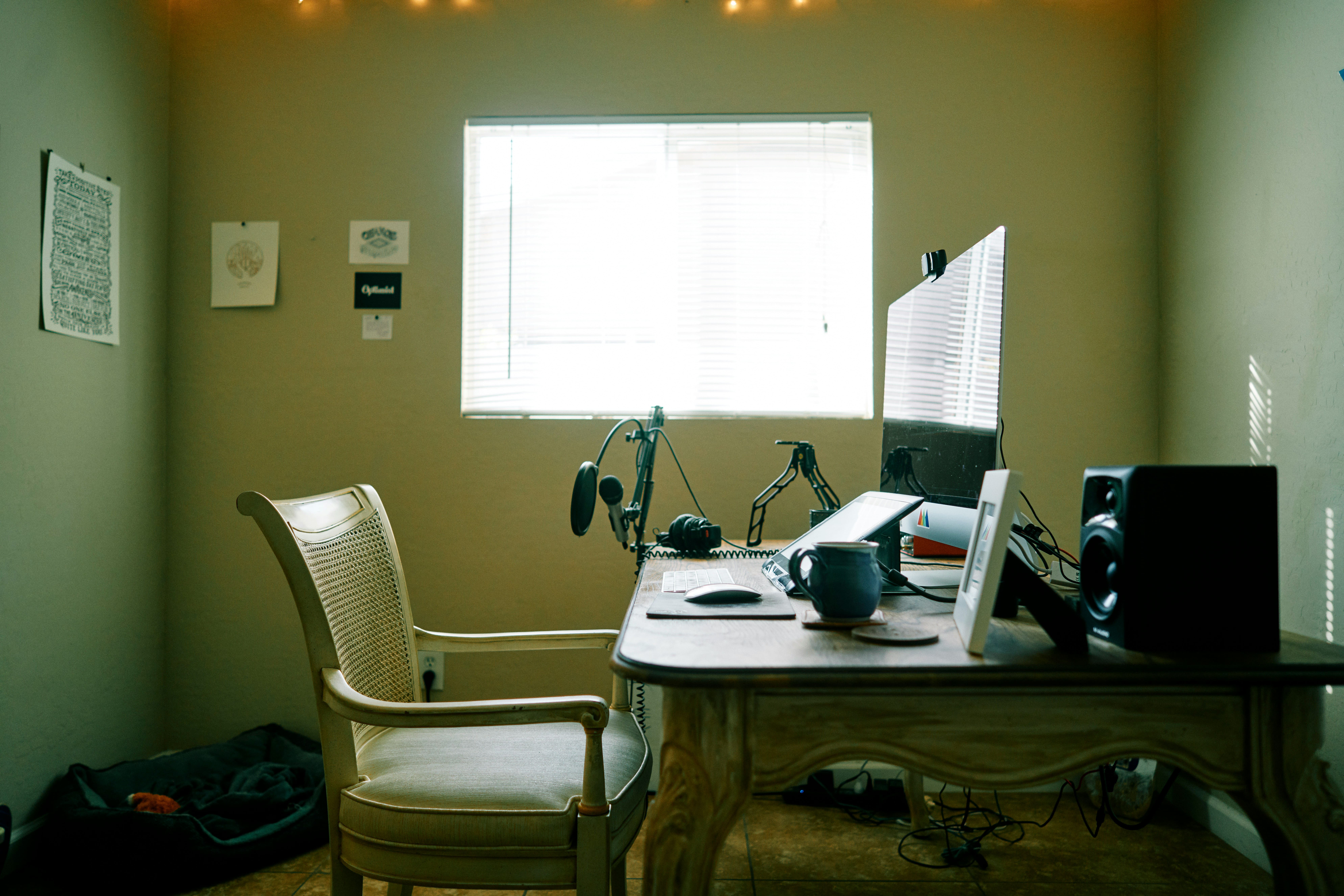
The Transformation: After (AI Generated)
AI Home Office Designer - Create Your Perfect Work From Home Setup (2026)
Your home office directly impacts your productivity, focus, and mental health. A poorly designed workspace costs you hours every week in distraction and discomfort. AI home office designers transform any space into a productive, professional setup in 30 seconds—without expensive interior designers or furniture consultants.
Why Your Home Office Design Matters More Than You Think
Remote work isn't going anywhere. Over 50 million Americans now work from home at least part-time, and studies consistently show that your workspace design directly affects:
- Productivity: Well-designed offices increase output by 20-32% (University of Exeter study)
- Focus: Proper lighting reduces eye strain and improves concentration
- Mental health: Cluttered, ugly spaces increase stress and anxiety
- Video call perception: Your background affects how colleagues and clients perceive you professionally
- Work-life balance: A defined workspace helps your brain separate work from relaxation
Most remote workers are working in spaces that weren't designed for work—spare bedrooms, dining room corners, kitchen tables. AI home office design tools help you optimize whatever space you have.
What Is an AI Home Office Designer?
An AI home office designer analyzes your current space and generates professional workspace designs optimized for productivity, comfort, and aesthetics. Upload a photo of your current office (or the space you want to convert), choose a style, and get photorealistic designs showing:
- Desk placement optimization: Best position for focus, natural light, and video calls
- Storage solutions: Built-ins, shelving, and organization systems
- Lighting design: Natural light optimization + artificial lighting layers
- Color psychology: Colors that boost focus and reduce stress
- Acoustic considerations: Visual solutions for noise reduction
- Video call backgrounds: Professional, attractive spaces for remote meetings
- Ergonomic setup visualization: See how proper ergonomics look in your space
Design Your Dream Home Office Free
Upload your space photo and get 2 professional AI office designs in 30 seconds. No credit card required.
How to Use AI to Design Your Home Office (Step-by-Step)
Step 1: Photograph Your Current Space
Whether you have a dedicated office or just a corner of a room, take clear photos:
For Dedicated Home Office Rooms:
- Shoot from the doorway to capture the full room
- Include all walls, windows, and architectural features
- Show current desk setup and furniture
- Capture natural light sources
For Corner Office Setups:
- Photograph the full corner showing adjacent walls
- Include surrounding room context
- Show available space measurements if possible
For Spare Bedroom Conversions:
- Photograph as if it's already an office (remove bed clutter if possible)
- Show closet doors and windows
- Capture full room dimensions
Step 2: Upload to HouseGPTs
- Go to HouseGPTs.com/dashboard/interior
- Click "Start Free Design"
- Sign in with Google (5 seconds)
- Upload your office space photo
- Select "Home Office" as room type
Step 3: Choose Your Office Style
Different work styles benefit from different office aesthetics:
Modern Minimalist Office
- Look: Clean desk, hidden cables, minimal decor, neutral colors
- Colors: White, light gray, natural wood accents
- Best for: Deep focus work, programmers, writers, analysts
- Productivity benefit: Reduces visual distraction, promotes concentration
Scandinavian Home Office
- Look: Light wood, white walls, plants, cozy textiles
- Colors: Warm whites, light oak, soft greens
- Best for: Creative professionals, designers, writers
- Productivity benefit: Calming environment reduces stress
Industrial Home Office
- Look: Exposed elements, metal accents, dark colors, Edison bulbs
- Colors: Charcoal, black, warm brown, metal tones
- Best for: Creative directors, architects, entrepreneurs
- Productivity benefit: Energizing environment, great video call background
Biophilic (Nature-Inspired) Office
- Look: Plants everywhere, natural materials, earthy tones
- Colors: Forest greens, warm browns, terracotta
- Best for: Anyone working long hours, people prone to burnout
- Productivity benefit: Nature reduces cortisol, improves mood and focus
Executive/Traditional Office
- Look: Rich wood tones, leather, bookshelves, formal aesthetic
- Colors: Deep walnut, navy, hunter green, warm whites
- Best for: Executives, lawyers, consultants, anyone in client-facing video calls
- Productivity benefit: Professional appearance builds credibility
Creative/Eclectic Office
- Look: Personal, colorful, inspiring, collected
- Colors: Bold accents, mixed patterns, personal artwork
- Best for: Artists, marketers, content creators, designers
- Productivity benefit: Inspiration-rich environment sparks creativity
Step 4: Generate and Analyze
After generating your AI office design, analyze it for:
- Desk placement: Is it facing the right direction for focus and natural light?
- Storage visibility: Does the design show adequate storage for your needs?
- Lighting layers: Are there multiple light sources for different tasks?
- Video call background: Would this look professional on camera?
- Personal comfort: Does this feel like a space where YOU could work well?
The Science of Productive Home Office Design
1. Desk Placement (Most Critical Factor)
Where you place your desk dramatically affects focus:
Best Desk Positions (AI Will Show You These):
- Facing the room (command position): See the door, feel in control, reduces subconscious anxiety
- Perpendicular to window: Natural light from the side prevents glare and shadows
- Away from high-traffic areas: Reduces distraction from household movement
Worst Desk Positions:
- Back to the door: Creates subconscious anxiety (can't see who enters)
- Facing the window: Glare makes screens hard to see, creates silhouette on video calls
- Against a blank wall: Boring, reduces creativity and focus
AI advantage: Generate designs with different desk orientations to see which looks best and most functional.
2. Lighting Design for Productivity
Lighting is the single biggest factor affecting focus and eye health:
The 3-Layer Lighting System:
Layer 1: Ambient (Overall Brightness)
- Overhead ceiling light or pendant
- Should illuminate the full room evenly
- Color temperature: 4000-5000K (cool white for focus)
Layer 2: Task (Work-Specific)
- Desk lamp positioned to avoid screen glare
- Directs light where you need it
- Color temperature: 3500-4500K (neutral white)
Layer 3: Accent (Mood and Video Calls)
- Shelf lighting, wall sconces, or bias lighting behind monitor
- Reduces eye strain and adds depth
- Color temperature: 2700-3500K (warm for evenings)
AI tip: Look for AI designs that show multiple light sources. Single overhead lighting is a productivity killer.
3. Color Psychology for Focus
Best Colors for Home Office Walls:
- Blue: Improves focus and concentration (#1 choice for analytical work)
- Green: Reduces anxiety, improves creativity (great for long work sessions)
- White/Light gray: Clean, distraction-free, maximizes light
- Sage: Calming without being boring, trending in 2026
Colors to Avoid in Home Offices:
- Red: Increases heart rate and anxiety (great for gyms, terrible for focus)
- Yellow: Energizing but can cause eye fatigue over long sessions
- Orange: Stimulating, makes it hard to wind down after work
- Beige: Boring and uninspiring (you'll feel sleepy)
AI strategy: Test "soft blue walls" vs. "sage green walls" vs. "light gray walls" for your office and see which feels most like YOUR ideal work environment.
4. Storage and Organization
Clutter kills productivity. Research shows visual clutter competes for your attention even when you're not looking at it.
AI-Designed Storage Solutions:
- Floor-to-ceiling bookshelves: Maximum storage, impressive video background
- Floating wall shelves: Lightweight storage, keeps floor clear
- Built-in desk with storage: Seamless, professional appearance
- Filing cabinet (doubles as nightstand): Multi-functional for small spaces
- Cable management: AI designs typically show clean, cable-free desks
Use AI to visualize: "Minimalist desk with floating shelves" vs. "Built-in desk with floor-to-ceiling storage" to see which works in your space.
5. Acoustics and Sound Management
AI can show visual acoustic solutions:
- Bookshelves with books: Absorb sound naturally
- Large rugs: Reduce echo and ambient noise
- Heavy curtains: Block external noise + light control
- Upholstered furniture: Absorbs sound better than hard surfaces
- Plants: Marginally absorb sound + massive mood benefit
Home Office Designs for Different Work Types
The Tech Professional's Office
Needs: Multiple monitors, powerful lighting, minimal distraction
AI prompt: "Modern minimalist home office, dual monitor setup, under-desk cable management, floating shelves, soft blue accent wall"
- Wide desk (minimum 60 inches) for multiple monitors
- Monitor arms to maximize desk space
- Bias lighting behind monitors (reduces eye strain)
- Keyboard tray to maintain ergonomic posture
- Minimal decor (zero visual distraction)
The Creative Professional's Office
Needs: Inspiration, large work surface, display space for work
AI prompt: "Creative home office, inspiration wall, large desk surface, eclectic decor, warm industrial lighting, plants"
- Large L-shaped or corner desk for spreading out materials
- Inspiration/mood board wall (cork board, magnetic board)
- Art storage and display solutions
- Good natural light for color accuracy
- Personal objects that spark creativity
The Consultant/Executive's Office
Needs: Professional video call background, authoritative aesthetic
AI prompt: "Executive home office, floor-to-ceiling bookshelves, dark wood desk, leather chair, professional lighting, navy or forest green walls"
- Full bookshelf background for video calls
- High-quality desk lamp that lights your face on calls
- Professional, uncluttered desk surface
- Dark, authoritative color palette
- Framed credentials or artwork visible on camera
The Content Creator's Office
Needs: Great video/photo background, lighting for recording
AI prompt: "Content creator home office, stylish background wall, ring light placement, bookshelf with plants and decor, warm ambient lighting"
- Intentional, styled background (everything visible on camera matters)
- Soft box or ring light placement for flattering face lighting
- Acoustic panels styled as artwork
- Color-coordinated decor for aesthetic consistency
- Easy-access equipment storage
The Small Space Remote Worker
Needs: Space efficiency, multi-functionality, separation from living space
AI prompt: "Small home office corner setup, wall-mounted desk, floating shelves, hidden storage, Murphy bed combo" (if applicable)
- Wall-mounted fold-down desk (saves floor space when not working)
- Vertical storage (floor-to-ceiling uses height, not floor area)
- Room divider or curtain to separate office from living space
- Light colors to maximize perceived space
- Multi-functional furniture (ottoman with storage, desk that serves as dining table)
Video Call Background Design with AI
This is one of the biggest underrated benefits of AI office design. Your video call background affects how you're perceived professionally.
Research Shows:
- People with tidy, professional backgrounds are perceived as more competent
- Bookshelves signal intelligence and credibility
- Plants signal approachability and creativity
- Messy backgrounds reduce trust ratings by 23%
Best AI-Designed Video Call Backgrounds:
Option 1: The Bookshelf Wall
- Floor-to-ceiling shelves with organized books and minimal decor
- A few plants for warmth
- Consistent color palette throughout
- AI prompt: "Floor-to-ceiling bookshelves, organized books, small plants, minimal but personal decor"
Option 2: The Art Gallery Wall
- Curated artwork and prints
- Clean, white or light gray wall
- Shows creativity and personality
- AI prompt: "Gallery wall with framed art prints, clean white wall, minimal desk setup"
Option 3: The Plant Wall
- Multiple plants at different heights
- Natural, biophilic backdrop
- Warm and approachable for client calls
- AI prompt: "Multiple plants, hanging plants, shelf plants, natural wood desk, green background"
Option 4: The Accent Wall
- Bold color or textured wall behind desk
- Simple, uncluttered
- Memorable and professional
- AI prompt: "Navy blue accent wall, minimal desk, clean and professional, single artwork"
Pro tip: Generate multiple background options with AI and test them on a video call (record yourself for 30 seconds) to see which looks best on camera.
Budget Home Office Makeover Using AI
The $500 WFH Setup Upgrade:
| Item | Cost | AI Guidance |
|---|---|---|
| Paint walls (1-2 gallons) | $50 | AI shows exact color that boosts focus |
| Floating shelves (3) | $80 | AI shows optimal placement and spacing |
| Desk lamp (adjustable) | $60 | AI shows position for zero screen glare |
| Plants (3-4 varieties) | $60 | AI shows size and placement for visual balance |
| Cable management kit | $30 | AI designs show clean, cable-free desks |
| Wall art (2-3 prints) | $80 | AI shows style and placement |
| Area rug | $100 | AI shows size and color coordination |
| Curtains/blinds | $60 | AI shows light control options |
| Total | $520 | Professional WFH setup |
The $200 Quick Win Upgrade:
- Paint accent wall: $40
- 3 plants: $45
- New desk lamp: $60
- Floating shelf: $30
- Cable management: $25
- Total: $200
Result: Dramatically better video call background + 15-20% productivity boost from better lighting and organization.
Converting Spare Rooms into Home Offices with AI
Got a spare bedroom you want to convert? AI helps you visualize the transition:
Spare Bedroom to Office Conversion:
Option 1: Full Conversion
Remove bed entirely, convert to dedicated office
- Pros: Maximum workspace, professional environment, mental separation
- Cons: Lose guest accommodation
- AI prompt: "Spare bedroom converted to home office, large desk, bookshelves, no bed, professional setup"
Option 2: Murphy Bed + Office Hybrid
Office by day, guest room by night
- Pros: Multi-functional, space-efficient
- Cons: More expensive ($2,000-$4,000 for Murphy bed)
- AI prompt: "Murphy bed home office combo, fold-down desk, wall bed, dual purpose room"
Option 3: Corner Office in Spare Room
Keep the guest bed, add dedicated office corner
- Pros: Still have guest room, defined workspace
- Cons: Smaller office area
- AI prompt: "Home office corner in bedroom, L-shaped desk, floating shelves, room divider, guest bed remaining"
Generate all 3 options with AI and compare before deciding.
Home Office Mistakes to Avoid (AI Prevents These)
1. Desk Facing the Wall
Mistake: Staring at a blank wall all day kills creativity.
AI Prevention: Generates designs showing desk facing into room or toward a window.
2. Single Overhead Light
Mistake: One ceiling light creates harsh shadows and eye strain.
AI Prevention: Shows layered lighting with desk lamp, ambient, and accent lights.
3. No Storage Planning
Mistake: Beautiful desk but nowhere to put anything creates instant clutter.
AI Prevention: Shows storage solutions integrated into the design.
4. Ignoring Acoustics
Mistake: Hard surfaces everywhere = echo on video calls.
AI Prevention: Shows rugs, curtains, and soft furnishings that reduce echo.
5. Mixing Work and Life in Same Visual Space
Mistake: Desk surrounded by bedroom furniture makes it impossible to mentally "leave work."
AI Prevention: Shows visual separation techniques (room dividers, distinct color zones).
6. Wrong Chair Positioning
Mistake: Chair positioned wrong relative to desk and light sources.
AI Prevention: Shows optimal furniture arrangement for ergonomics and lighting.
Transform Your Home Office Today
You spend 8+ hours a day in your home office. It deserves to be a space that energizes and inspires you rather than draining your motivation.
Your Next Steps:
- Today: Take photos of your current office setup (5 minutes)
- Today: Generate 2 free AI office designs (5 minutes)
- This week: Identify the cheapest high-impact changes (paint, plants, lighting)
- This weekend: Implement quick wins (rearrange desk, add plants, cable management)
- Next month: Execute bigger changes based on AI design
Design Your Dream Home Office
Get 2 free professional AI office designs in 30 seconds. Transform your WFH setup today.
Related Home Design Resources
Ready for Your Own AI Redesign?
Start Designing with AI →FAQs about AI Home Office Designer - Create Your Perfect Work From Home Setup (2026)
Everything you need to know
Can AI design a home office?
Yes. AI home office designers analyze your space and generate professional workspace designs optimized for productivity, lighting, and aesthetics. Upload a photo of your current office or spare room, select a style, and receive photorealistic designs showing optimal desk placement, storage solutions, lighting, and decor in 30 seconds.
What makes a good home office design?
A productive home office needs: proper desk placement (facing into room, perpendicular to windows), layered lighting (ambient, task, accent), focus-boosting colors (blue, green, neutral grays), adequate storage to eliminate clutter, acoustic solutions to reduce echo, and visual separation from living spaces. AI home office designers incorporate all these principles automatically.
What is the best color for a home office?
Blue is scientifically proven to improve focus and concentration. Sage green reduces anxiety and improves creativity. Light gray and white maximize brightness and reduce distraction. Avoid red (increases anxiety), beige (causes sleepiness), and orange (over-stimulating for focus work). Use AI paint visualizer to test colors in your actual office before painting.
How much does it cost to design a home office with AI?
HouseGPTs offers 2 free AI home office designs with no credit card required. Unlimited designs cost $39/month. This saves thousands compared to hiring an interior designer ($1,500-$3,000 for home office concepts). The actual office makeover can be done for as little as $200-$500 using AI designs as your guide.
How do I convert a spare bedroom to a home office?
Three main approaches: 1) Full conversion - remove bed entirely for dedicated office space. 2) Murphy bed combo - fold-down bed allows office by day, guest room by night. 3) Corner office - keep guest bed but add dedicated desk corner. Use AI to visualize all three options in your actual room before deciding which fits your needs and budget.
How can I improve my video call background with AI design?
AI can design professional video call backgrounds by optimizing what's visible behind your desk. Best options include: floor-to-ceiling bookshelves, gallery walls with curated artwork, plant walls with varied greenery, or bold accent walls. Research shows professional backgrounds increase perceived competence. Generate multiple AI designs and test each on a video call before implementing.
What furniture do I need for a home office?
Essential home office furniture: ergonomic desk (minimum 48 inches wide), adjustable chair with lumbar support, monitor stand or arm, desk lamp, and storage (shelves, filing cabinet, or drawers). AI home office designs show you how different furniture configurations look in your actual space so you can plan purchases confidently.
How do I make a small home office look bigger?
AI-proven strategies for small home offices: use light colors (white, light gray) to maximize brightness, install floating shelves instead of floor-standing furniture, use a wall-mounted fold-down desk to reclaim floor space when not working, add a large mirror to double perceived space, choose transparent or glass furniture that doesn't visually block space, and maximize natural light.