AI Paint Visualizer - See Paint Colors on Your Walls Before Buying (2026)
Article Contents
- The Paint Color Problem (We've All Been There)
- What Is an AI Paint Visualizer?
- How It Works:
- Best AI Paint Visualizer Tools (February 2026)
- 1. HouseGPTs Paint Visualizer - Most Accurate
- 2. Sherwin-Williams ColorSnap Visualizer
- 3. Benjamin Moore Personal Color Viewer
- 4. Behr ColorSmart
- Winner: HouseGPTs for Realistic Results
- How to Use AI Paint Visualizer (Step-by-Step)
- Step 1: Photograph Your Room
- Step 2: Upload to AI Paint Visualizer
- Step 3: Choose Your Paint Color
- Step 4: Generate and Review
- Step 5: Compare Multiple Colors
- Most Popular Paint Colors to Try (2026 Trends)
- Neutrals (Always Safe):
- Trending Colors (Bold Choices):
- Pro Tip: Test Before You Trend
- Common Paint Visualizer Mistakes (Avoid These)
- 1. Only Testing One Color
- 2. Ignoring Lighting in Your Photo
- 3. Forgetting About Trim and Ceilings
- 4. Not Considering Paint Finish
- 5. Trusting Your Computer Screen Colors
- 6. Not Testing in Different Rooms
- AI Paint Visualizer vs. Traditional Paint Samples
- Recommended Strategy: Use Both
- How to Choose Paint Colors Using AI Visualizer
- Step 1: Consider Your Room's Purpose
- Step 2: Account for Natural Light
- Step 3: Coordinate with Existing Elements
- Step 4: Test Undertones
- Real Example: Using AI Paint Visualizer to Choose Colors
- The Challenge:
- The AI Solution:
- Results:
- Paint Finish Guide (Matte, Eggshell, Satin, Semi-Gloss, Gloss)
- Matte/Flat Finish
- Eggshell Finish
- Satin Finish
- Semi-Gloss Finish
- Gloss/High-Gloss Finish
- Quick Finish Selection Guide:
- Budget Paint vs. Premium Paint (Does It Matter?)
- Paint Quality Tiers:
- Real Cost Comparison (12x12 Room):
- Start Visualizing Paint Colors Today
- Your Next Steps:
- Related Paint & Design Resources
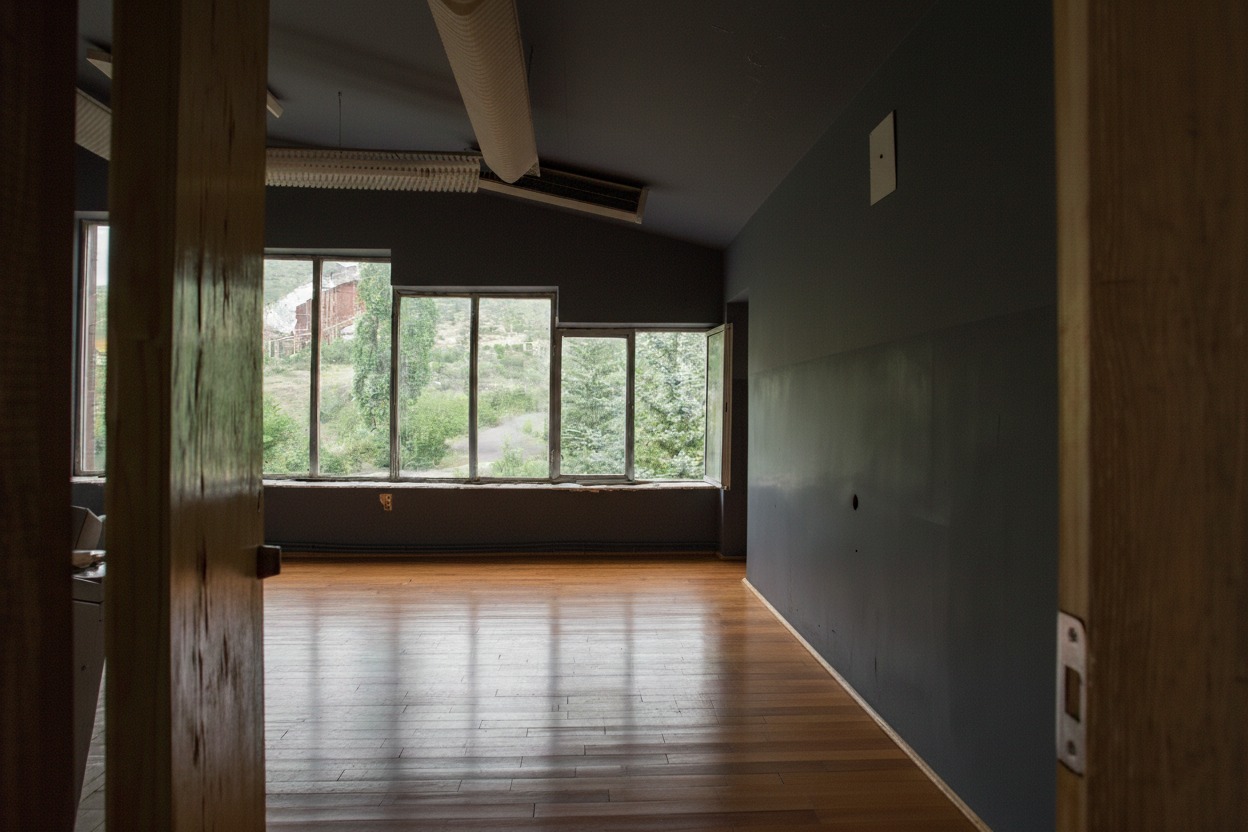
The Challenge: Before
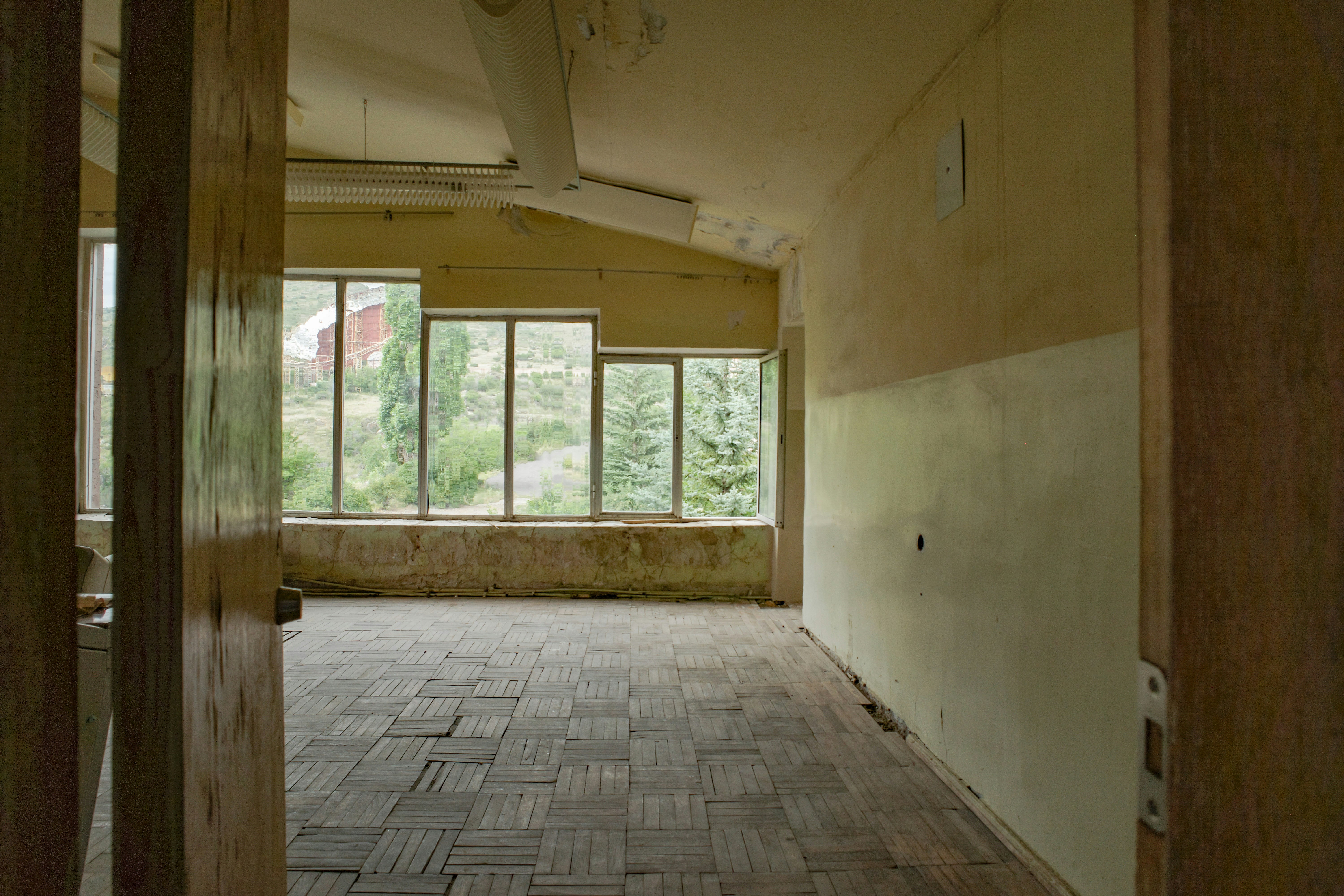
The Transformation: After (AI Generated)
AI Paint Visualizer - See Paint Colors on Your Walls Before Buying (2026)
Stop wasting money on paint samples that end up looking wrong. AI paint visualizers let you test unlimited colors on your actual walls instantly. Upload a photo, try any color, and see photorealistic results in 30 seconds—before buying a single can of paint.
The Paint Color Problem (We've All Been There)
You spend $8 on a paint sample. Roll it on your wall. Step back. And... it looks completely different than you imagined.
Sound familiar? You're not alone. Here's why choosing paint colors is so hard:
- Lighting changes everything: Colors look different in natural light vs. artificial light vs. different times of day
- Paint chips lie: A tiny 2x2 inch chip looks nothing like an entire wall
- Context matters: The same color looks different next to your furniture, floors, and other walls
- It's expensive to guess wrong: $200-400 in paint + labor if you have to repaint
- Sample fatigue: After buying 5-10 samples, you're more confused than when you started
That's where AI paint visualizers change the game.
What Is an AI Paint Visualizer?
An AI paint visualizer is a tool that uses artificial intelligence to show you exactly how different paint colors will look on your actual walls—instantly, without painting anything.
How It Works:
- Upload a photo of your room
- Select a paint color (or describe it)
- AI analyzes your room's lighting, surfaces, and context
- Generates a photorealistic image showing that color on your walls
- View results in 20-30 seconds
Unlike traditional paint visualizer apps that just overlay a flat color, AI paint visualizers understand:
- How light interacts with paint (shadows, highlights, reflections)
- Paint finish (matte absorbs light, gloss reflects it)
- How colors look next to your existing furniture and decor
- Architectural details (moldings, trim, textures)
The result? You see exactly what your room will look like after painting—before spending a dollar on supplies.
Best AI Paint Visualizer Tools (February 2026)
1. HouseGPTs Paint Visualizer - Most Accurate
HouseGPTs AI Paint Visualizer uses advanced AI to create photorealistic paint previews that account for your room's actual lighting and context.
Why HouseGPTs Wins for Paint Visualization:
- Photorealistic results: Accounts for lighting, shadows, and finish sheen
- Works with any color: Type any paint name or describe the color you want
- Preserves everything else: Furniture, floors, and decor stay identical (only paint changes)
- Multiple finishes: See matte, eggshell, satin, semi-gloss, or gloss
- 2 free visualizations: Test colors risk-free, no credit card required
- 30-second generation: Instant results vs. painting sample squares
Best For:
- Testing Sherwin-Williams, Benjamin Moore, or Behr colors
- Comparing multiple paint options quickly
- Seeing accent wall ideas before committing
- Getting realistic lighting previews
- Avoiding expensive painting mistakes
See Your Paint Color Instantly
Upload your room photo and test unlimited paint colors in 30 seconds. No samples needed.
2. Sherwin-Williams ColorSnap Visualizer
Pros: Direct integration with Sherwin-Williams colors, easy to find exact paint names, mobile app available.
Cons: Basic overlay technology (not AI), results look flat and unrealistic, limited to SW colors only.
Best for: People already committed to Sherwin-Williams who just need color names.
3. Benjamin Moore Personal Color Viewer
Pros: Works with Benjamin Moore's extensive color library, save favorite colors, share with others.
Cons: Not true AI (manual color masking), time-consuming to use, results vary in quality, BM colors only.
Best for: Benjamin Moore loyalists who want to browse their specific color collections.
4. Behr ColorSmart
Pros: Free, works with Behr colors (sold at Home Depot), color matching from photos.
Cons: Very basic technology, inaccurate lighting representation, limited features.
Best for: Quick, rough ideas when shopping at Home Depot.
Winner: HouseGPTs for Realistic Results
If you want to see exactly how a paint color will look in your room with accurate lighting and context, HouseGPTs AI Paint Visualizer delivers the most realistic previews.
How to Use AI Paint Visualizer (Step-by-Step)
Step 1: Photograph Your Room
Good input photos = accurate paint previews. Here's how to take the best photos:
Photography Best Practices:
- Use natural daylight: Open curtains, turn off lights, shoot mid-morning or afternoon
- Capture full walls: Show entire walls you want to paint, not just corners
- Include context: Show furniture, floors, and adjacent walls (helps AI understand color relationships)
- Straight-on angle: Don't shoot from extreme angles (makes visualization less accurate)
- Clear the clutter: Remove random items, but keep major furniture
- Multiple angles: Take 2-3 photos from different spots in the room
What to Include:
- The wall(s) you plan to paint
- Windows and natural light sources
- Major furniture pieces
- Flooring
- Adjacent walls (for color coordination)
- Trim and moldings
Step 2: Upload to AI Paint Visualizer
- Go to HouseGPTs.com/dashboard/paint
- Click "Upload Photo"
- Select your best room photo
- Confirm the upload
Step 3: Choose Your Paint Color
You have several ways to specify the color you want to test:
Option 1: Describe the Color
Type descriptions like:
- "Soft sage green"
- "Warm beige"
- "Light gray with blue undertones"
- "Navy blue accent wall"
- "Creamy white"
Option 2: Use Specific Paint Names
Enter exact paint colors:
- "Sherwin-Williams Agreeable Gray"
- "Benjamin Moore Hale Navy"
- "Behr Swiss Coffee"
- "Farrow & Ball Railings"
Option 3: Specify Paint Finish
Include finish preferences:
- "Matte white walls"
- "Eggshell finish light gray"
- "Semi-gloss trim in pure white"
- "Satin finish navy blue"
Step 4: Generate and Review
- Click "Generate Paint Preview"
- Wait 20-30 seconds
- Review your painted room visualization
- Download or save your favorite options
Step 5: Compare Multiple Colors
Don't settle on the first color you try. Use your free visualizations to test:
- Warm vs. cool: Beige vs. gray, for example
- Light vs. dark: See how room brightness changes
- Bold vs. neutral: Try both safe and adventurous options
- Accent walls: Test one wall in a bold color, others neutral
Save all versions and compare side-by-side before making your final decision.
Most Popular Paint Colors to Try (2026 Trends)
Neutrals (Always Safe):
1. Warm Grays (Greige)
- Sherwin-Williams Agreeable Gray: Most popular paint color in America, warm undertones
- Benjamin Moore Revere Pewter: Perfect greige, works with everything
- Why it works: Neutral but not boring, hides imperfections, timeless
2. Soft Whites
- Benjamin Moore Simply White: Crisp without being stark
- Sherwin-Williams Pure White: Clean, bright, modern
- Why it works: Makes spaces feel larger, maximizes light, pairs with any decor
3. Warm Beiges
- Behr Swiss Coffee: Creamy, cozy, inviting
- Sherwin-Williams Accessible Beige: Warm neutral that feels like home
- Why it works: Adds warmth without color commitment, high resale value
Trending Colors (Bold Choices):
4. Sage Green
- Sherwin-Williams Clary Sage: Soft, calming, on-trend
- Benjamin Moore Saybrook Sage: Gray-green hybrid, sophisticated
- Why it's trending: Nature-inspired, calming, works with wood tones
5. Navy Blue
- Benjamin Moore Hale Navy: Rich, moody, dramatic
- Sherwin-Williams Naval: Deep blue with authority
- Why it's trending: Makes a statement, pairs with brass/gold accents
6. Terracotta/Rust
- Sherwin-Williams Cavern Clay: Warm, earthy, Southwestern vibe
- Why it's trending: Brings warmth, works with natural materials
Pro Tip: Test Before You Trend
Trendy colors are fun, but use AI to make sure they work in YOUR space before committing. A color that looks amazing in a magazine might feel wrong in your room.
Common Paint Visualizer Mistakes (Avoid These)
1. Only Testing One Color
Mistake: Falling in love with the first color you try.
Fix: Always test at least 3-5 options. You might discover something better.
2. Ignoring Lighting in Your Photo
Mistake: Using a dark photo or one with artificial lighting only.
Fix: Take photos in natural daylight to see how paint looks in the best conditions.
3. Forgetting About Trim and Ceilings
Mistake: Only visualizing wall color without considering trim.
Fix: Think about the whole room—walls, trim, ceiling work together.
4. Not Considering Paint Finish
Mistake: Choosing color but forgetting that matte vs. gloss changes everything.
Fix: Specify finish in your AI prompt: "matte gray" vs. "satin gray"
5. Trusting Your Computer Screen Colors
Mistake: Assuming AI preview is 100% color-accurate on your screen.
Fix: Use AI to narrow down to 2-3 finalists, then buy small samples of those to confirm in person.
6. Not Testing in Different Rooms
Mistake: Using same color throughout house without testing each room.
Fix: Lighting varies by room—test the same color in each space individually.
AI Paint Visualizer vs. Traditional Paint Samples
| Factor | AI Paint Visualizer | Traditional Samples |
|---|---|---|
| Cost | Free - $39/month | $5-8 per sample × 5-10 colors = $25-80 |
| Time | 30 seconds per color | 2-3 days (shopping, painting, drying, viewing) |
| Quantity | Unlimited colors to test | Limited by budget and patience |
| Accuracy | Very accurate for color/lighting preview | 100% accurate (it's real paint) |
| Mess | Zero mess | Paint squares on walls, cleanup required |
| Best For | Narrowing down to final 2-3 colors quickly | Final confirmation before buying gallons |
Recommended Strategy: Use Both
- Start with AI: Test 10-20 colors in 15 minutes, narrow to top 3
- Buy samples of finalists: Paint 2x2 ft squares of your top 3 choices
- View samples at different times: Morning, afternoon, evening, night lighting
- Make final decision: Choose winner and buy paint with confidence
This approach saves $40-60 in sample costs (only buying 3 instead of 10) and 80% of your time.
How to Choose Paint Colors Using AI Visualizer
Step 1: Consider Your Room's Purpose
Different rooms benefit from different color strategies:
Bedrooms:
- Goal: Relaxation and sleep
- Best colors: Soft blues, greens, warm neutrals, muted tones
- Avoid: Bright reds, oranges, or highly stimulating colors
- Test with AI: "Soft sage green bedroom walls, matte finish"
Living Rooms:
- Goal: Welcoming, versatile, social
- Best colors: Warm grays, greiges, soft whites, accent walls in bold colors
- Avoid: Colors that clash with existing furniture
- Test with AI: "Agreeable gray walls with navy accent wall"
Kitchens:
- Goal: Clean, bright, energizing
- Best colors: Whites, light grays, soft blues, warm beiges
- Avoid: Dark colors (make space feel smaller), trendy colors (kitchens are expensive to repaint)
- Test with AI: "Pure white kitchen walls, semi-gloss finish"
Bathrooms:
- Goal: Spa-like, clean, moisture-resistant
- Best colors: Soft blues, greens, whites, light grays
- Avoid: Matte finishes (use satin or semi-gloss for moisture resistance)
- Test with AI: "Soft blue bathroom walls, satin finish"
Step 2: Account for Natural Light
Your room's lighting dramatically affects paint color:
North-Facing Rooms (Cool, Blue Light):
- Problem: Colors appear cooler and darker
- Solution: Choose warm colors (beiges, warm grays, soft yellows)
- Test with AI: Compare "warm beige" vs. "cool gray" in your north-facing room
South-Facing Rooms (Warm, Bright Light):
- Advantage: Colors appear true and vibrant
- Solution: Can handle cooler colors or bold choices
- Test with AI: Try bolder colors like navy, sage, or terracotta
East-Facing Rooms (Morning Sun):
- Character: Warm in morning, cooler in afternoon
- Solution: Warm or neutral colors work well
- Test with AI: Visualize at different times if possible
West-Facing Rooms (Evening Sun):
- Character: Cool in morning, warm golden light in evening
- Solution: Almost any color works
- Test with AI: Consider how color looks in evening glow
Step 3: Coordinate with Existing Elements
Your paint color must work with elements you're NOT changing:
Flooring:
- Warm wood floors: Pair with warm neutrals or greens
- Cool gray floors: Work with cool grays, blues, or crisp whites
- Dark floors: Can handle darker walls or high contrast
- Light floors: Work with almost any wall color
Fixed Elements (Counters, Tile, Cabinets):
- Upload photos showing these elements
- Test colors that complement (not clash with) existing finishes
- If you have beige tile, avoid cool grays that will clash
Furniture:
- Include furniture in your AI photos
- Make sure paint doesn't clash with major pieces
- If you have a navy sofa, test wall colors that complement navy
Step 4: Test Undertones
This is where AI really shines. Colors have hidden undertones that only appear on walls:
- "Gray" can have: Blue undertones, green undertones, purple undertones, or beige undertones
- "White" can look: Stark and cold, creamy and warm, or have pink/yellow/blue tints
- "Beige" can lean: Pink, yellow, or gray
AI advantage: See these undertones in YOUR lighting before painting.
Test similar colors with different undertones:
- "Warm gray with beige undertones" vs. "Cool gray with blue undertones"
- "Creamy white" vs. "Pure white"
- "Greige" vs. "True gray"
Real Example: Using AI Paint Visualizer to Choose Colors
The Challenge:
Sarah wanted to paint her living room but was overwhelmed by choices. She'd bought 8 paint samples over 3 weeks and still couldn't decide.
The AI Solution:
Day 1: Upload and Test
- Took photo of living room in natural daylight
- Uploaded to HouseGPTs Paint Visualizer
- Tested 12 different colors in 20 minutes:
- Agreeable Gray
- Revere Pewter
- Accessible Beige
- Simply White
- Clary Sage
- And 7 others
- Narrowed to top 3: Agreeable Gray, Revere Pewter, Clary Sage
Day 2: Family Vote
- Showed all 3 AI visualizations to family
- Everyone preferred Clary Sage (surprisingly—Sarah thought they'd pick gray)
- Bought ONE paint sample to confirm
Day 3: Sample Confirmation
- Painted 2x2 ft square of Clary Sage
- Viewed at different times of day
- Confirmed it matched AI preview
- Bought paint and completed project
Results:
- Sample costs saved: $56 (bought 1 sample instead of 9)
- Time saved: 2 weeks (made decision in 3 days instead of 3 weeks)
- Outcome: Perfect color, no regrets, family loves it
- Bonus: Discovered a color she wouldn't have tried without AI
The AI visualization gave Sarah confidence to try a less-safe color (sage green) that ended up being perfect for her space.
Paint Finish Guide (Matte, Eggshell, Satin, Semi-Gloss, Gloss)
Paint color is only half the equation—finish matters just as much:
Matte/Flat Finish
- Look: No shine, velvety appearance
- Pros: Hides wall imperfections, sophisticated, absorbs light
- Cons: Hard to clean, shows scuffs easily, not moisture-resistant
- Best for: Adult bedrooms, low-traffic areas, ceilings
- Avoid: Kitchens, bathrooms, kids' rooms, hallways
Eggshell Finish
- Look: Slight sheen, like an eggshell
- Pros: Hides minor imperfections, easier to clean than matte, versatile
- Cons: Shows some imperfections, moderate durability
- Best for: Living rooms, dining rooms, bedrooms
- Most popular: This is the default choice for most rooms
Satin Finish
- Look: Soft sheen, silky appearance
- Pros: Easy to clean, moisture-resistant, durable
- Cons: Shows wall imperfections, can look too shiny in some lights
- Best for: Kitchens, bathrooms, kids' rooms, high-traffic hallways
- Pro tip: Best finish for bathrooms (moisture resistance + cleanability)
Semi-Gloss Finish
- Look: Noticeable shine, reflective
- Pros: Very durable, easy to clean, moisture-resistant
- Cons: Highlights every wall imperfection, can feel too shiny for walls
- Best for: Trim, doors, cabinets, bathrooms, kitchens
- Classic combo: Eggshell walls + semi-gloss trim
Gloss/High-Gloss Finish
- Look: Mirror-like shine, very reflective
- Pros: Extremely durable, wipeable, dramatic look
- Cons: Shows every single imperfection, overwhelming on full walls
- Best for: Doors, trim, furniture, accent pieces
- Rarely used: Too shiny for most residential walls
Quick Finish Selection Guide:
| Room | Recommended Finish | Why |
|---|---|---|
| Bedrooms | Matte or Eggshell | Low traffic, cozy feel |
| Living Rooms | Eggshell | Balance of cleanability and appearance |
| Kitchens | Satin or Semi-Gloss | Easy to wipe grease and spills |
| Bathrooms | Satin or Semi-Gloss | Moisture resistance essential |
| Kids' Rooms | Satin | Cleanable, durable |
| Hallways | Eggshell or Satin | High traffic needs durability |
| Trim/Doors | Semi-Gloss | Classic, wipeable, durable |
| Ceilings | Flat/Matte | Hides imperfections, no glare |
AI Paint Visualizer tip: Specify finish in your prompt: "satin finish light gray walls" to see how sheen affects the look.
Budget Paint vs. Premium Paint (Does It Matter?)
Paint Quality Tiers:
Budget Paint ($20-30/gallon):
- Brands: Behr Marquee, Valspar Ultra, Glidden Premium
- Pros: Affordable, available at big box stores, decent coverage
- Cons: May need 3 coats, less durable, color fades faster
- Best for: Rental properties, short-term solutions, low-traffic rooms
Mid-Range Paint ($40-60/gallon):
- Brands: Sherwin-Williams Duration, Benjamin Moore Regal Select, Behr Dynasty
- Pros: Good coverage (2 coats), durable, wide color selection
- Cons: More expensive, not always at big box stores
- Best for: Most residential projects, lived-in homes
- Sweet spot: Best value for most homeowners
Premium Paint ($70-100+/gallon):
- Brands: Benjamin Moore Aura, Sherwin-Williams Emerald, Farrow & Ball
- Pros: Superior coverage (often 1 coat), exceptional durability, richest colors
- Cons: Expensive, overkill for many projects
- Best for: High-end homes, feature walls, rooms you'll keep 10+ years
Real Cost Comparison (12x12 Room):
| Paint Quality | Gallons Needed | Total Cost | Labor Time |
|---|---|---|---|
| Budget ($25/gal) | 3 gallons (3 coats) | $75 | 12 hours |
| Mid-Range ($50/gal) | 2 gallons (2 coats) | $100 | 8 hours |
| Premium ($80/gal) | 1.5 gallons (1-2 coats) | $120 | 5 hours |
Verdict: Mid-range paint offers the best value. You save $45 over premium but get WAY better results than budget.
AI Paint Visualizer works with all brands: The color matters more than the brand. Use AI to pick your color, then choose paint quality based on budget and room importance.
Start Visualizing Paint Colors Today
Stop wasting money on paint samples that look wrong. AI paint visualizers let you test unlimited colors on your actual walls in seconds—before buying a single can.
Your Next Steps:
- Today: Take clear photos of rooms you want to paint (5 minutes)
- Today: Upload to HouseGPTs Paint Visualizer and test 5-10 colors (15 minutes)
- This week: Narrow to top 2-3 favorites
- This week: Buy small samples of finalists to confirm in person
- Next weekend: Paint with confidence knowing you chose the perfect color
See Your Paint Color Instantly
Upload your room photo and test unlimited paint colors in 30 seconds. No samples, no mess, no guessing.
Related Paint & Design Resources
Ready for Your Own AI Redesign?
Start Designing with AI →FAQs about AI Paint Visualizer - See Paint Colors on Your Walls Before Buying (2026)
Everything you need to know
What is an AI paint visualizer?
An AI paint visualizer is a tool that uses artificial intelligence to show you exactly how different paint colors will look on your walls before you buy paint. Upload a photo of your room, select or describe a paint color, and the AI generates a photorealistic preview in 20-30 seconds showing that color on your actual walls with accurate lighting and context.
How accurate are AI paint visualizers?
AI paint visualizers are highly accurate for previewing colors and how they interact with your room's lighting. They account for shadows, highlights, and existing decor. However, computer screens can't show 100% true color, so it's recommended to use AI to narrow down to 2-3 finalists, then buy small paint samples of those to confirm in person before purchasing gallons.
Are AI paint visualizers free?
Many AI paint visualizers offer free trials or limited free uses. HouseGPTs provides 2 free paint visualizations with no credit card required. Paid plans typically cost $39/month for unlimited visualizations. This is significantly cheaper than buying 5-10 paint samples at $5-8 each ($25-80 total).
Can I use specific paint brands like Sherwin-Williams or Benjamin Moore?
Yes. AI paint visualizers work with any paint brand. You can enter specific paint names like 'Sherwin-Williams Agreeable Gray' or 'Benjamin Moore Hale Navy' and the AI will visualize that color on your walls. You can also describe colors generically like 'soft sage green' or 'warm beige' without specifying a brand.
Do AI paint visualizers show different paint finishes?
Yes. Advanced AI paint visualizers like HouseGPTs can show different paint finishes including matte, eggshell, satin, semi-gloss, and gloss. The AI accounts for how each finish reflects light differently—matte absorbs light while gloss creates shine and reflections. Specify the finish in your prompt for accurate results.
How many paint colors can I test with AI?
With free plans, you typically get 2-5 visualizations. Paid plans offer unlimited paint color testing. Compare this to traditional paint samples where you're limited by budget ($5-8 per sample) and patience. AI lets you test 10-20 colors in 15 minutes to find the perfect match before buying any paint.
Should I still buy paint samples after using AI visualizer?
Yes, but fewer of them. Use AI to test 10-20 colors and narrow down to your top 2-3 favorites. Then buy small paint samples of only those finalists to confirm how they look in person. This strategy saves $40-60 in sample costs and weeks of time compared to buying samples without AI guidance first.
Can AI paint visualizers work with accent walls?
Yes. AI paint visualizers can show accent walls by specifying which wall you want in a different color. For example, you can request 'three walls in light gray, one accent wall in navy blue' and the AI will visualize that combination. This helps you see if accent wall ideas work before committing to them.
What kind of photo do I need for AI paint visualizer?
Take a clear, well-lit photo showing the full wall(s) you want to paint. Use natural daylight (open curtains, turn off lights), shoot from a straight-on angle (not extreme corners), and include furniture and floors for context. The clearer your photo and the better the lighting, the more accurate your AI paint preview will be.
Will AI paint visualizer work for dark-to-light color changes?
Yes. AI paint visualizers can show dramatic color changes like dark walls painted white or vice versa. However, in real life, painting from dark to light (or vice versa) requires primer and multiple coats. The AI shows you the final result, but your painter will need to do proper prep work to achieve that look.