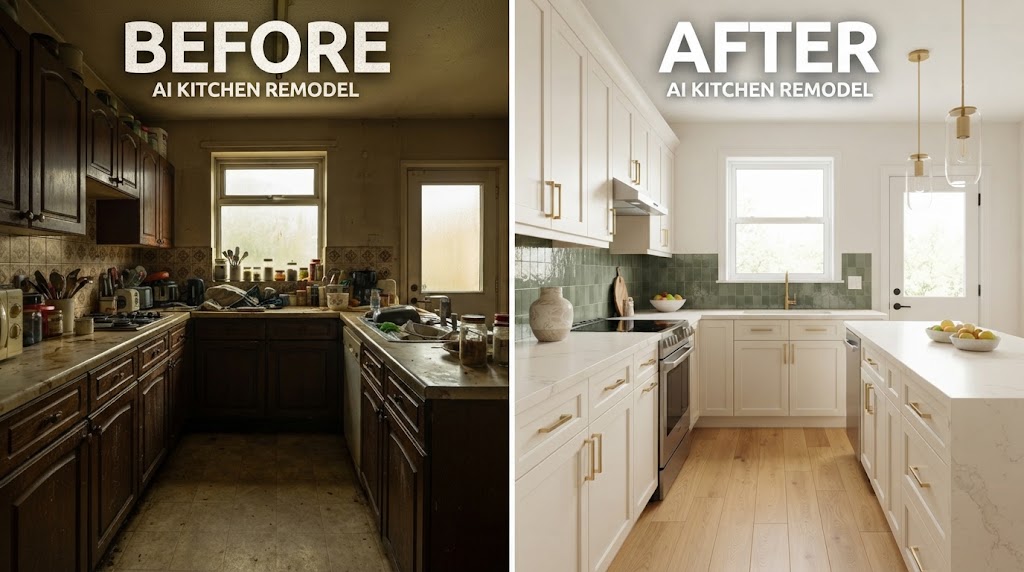
AI Kitchen Remodel: See Your New Kitchen Before You Renovate
Article Contents
- What Is an AI Kitchen Remodel?
- How Does AI Kitchen Design Work?
- 1. Take a Photo of Your Kitchen
- 2. Upload Your Photo
- 3. Choose Your Design Style
- 4. Describe the Changes
- 5. Compare Different Designs
- Why Use AI Before a Kitchen Renovation?
- Visualise Your Ideas
- Experiment Without Construction
- Make Decisions With More Confidence
- Share Ideas With a Designer or Contractor
- AI Kitchen Remodel From a Photo
- Can AI Redesign My Kitchen Without Changing the Layout?
- What Can You Change With AI?
- Kitchen Cabinets
- Worktops
- Backsplash
- Flooring
- Lighting
- Kitchen Islands
- AI Kitchen Remodel Ideas to Try
- 1. Modern White Kitchen
- 2. Warm Wood Kitchen
- 3. Two-Tone Kitchen
- 4. Luxury Kitchen
- 5. Small Kitchen Makeover
- 6. Scandinavian Kitchen
- 7. Industrial Kitchen
- AI Kitchen Design for Small Kitchens
- AI Kitchen Remodel vs Traditional Design
- How to Get Better AI Kitchen Remodel Results
- Use a Clear Photo
- Make One Change at a Time
- Keep Your Favourite Designs
- Important Things AI Cannot Tell You
- How Much Can an AI Kitchen Remodel Save?
- Best Workflow for an AI Kitchen Renovation
- Final Thoughts
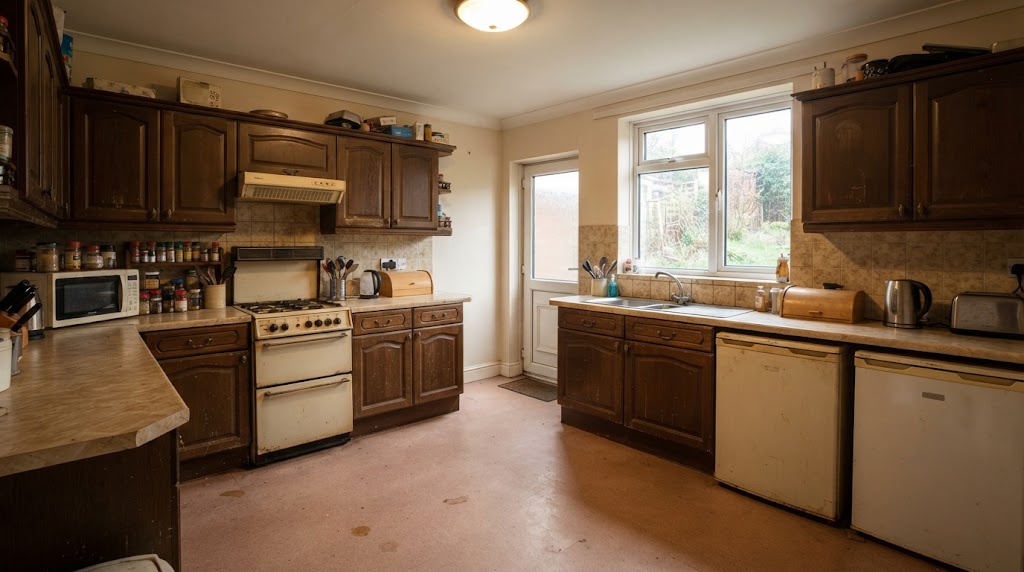
The Challenge: Before
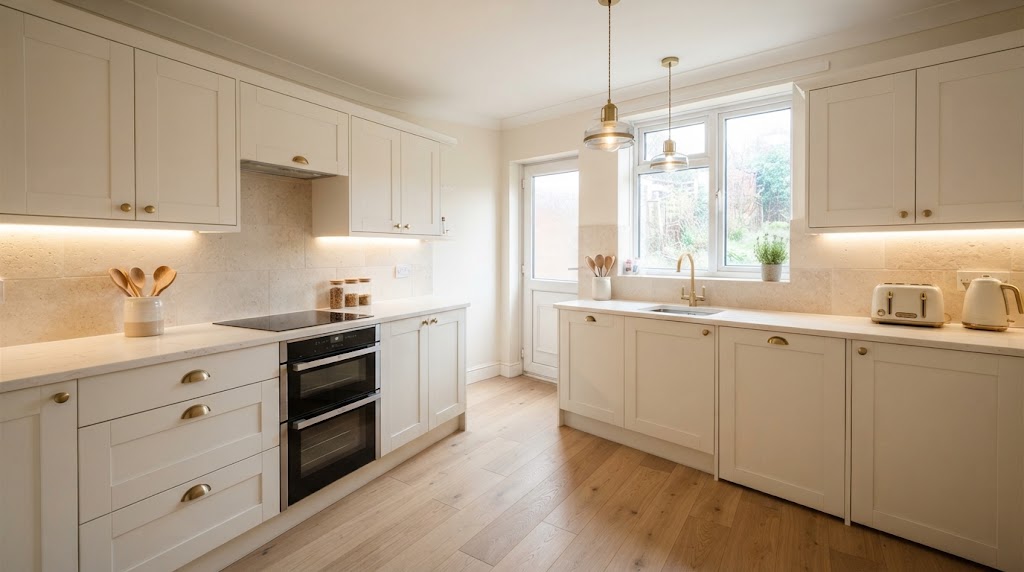
The Transformation: After (AI Generated)
Remodelling a kitchen can be exciting, but it can also be stressful. Before you commit to new cabinets, worktops, flooring, or appliances, you want to know what your finished kitchen will actually look like. That is where an AI kitchen remodel tool can help.
AI-powered kitchen design tools allow you to upload a photo of your existing kitchen and visualise different renovation ideas within seconds. You can experiment with cabinet colours, worktops, backsplashes, flooring, lighting and overall styles without changing your actual kitchen.
Instead of trying to imagine the finished result from a catalogue or mood board, you can see your new kitchen before you renovate.
What Is an AI Kitchen Remodel?
An AI kitchen remodel uses artificial intelligence to transform an image of your existing kitchen into a new design concept.
You typically start by uploading a photo of your kitchen. The AI analyses the room and generates a redesigned version based on your selected style or instructions.
For example, you could ask for:
Modern white kitchen cabinets
Warm wooden cabinets
Marble-effect worktops
A contemporary kitchen island
Matte black fixtures
New pendant lighting
A brighter colour scheme
Scandinavian-style interiors
Minimalist kitchen design
Traditional farmhouse styling
The main advantage is that you can explore different possibilities before spending money on renovation work.
How Does AI Kitchen Design Work?
Most AI kitchen design tools follow a simple process.
1. Take a Photo of Your Kitchen
Start with a clear photo showing as much of the kitchen as possible.
For better results:
Take the photo in good lighting
Keep the camera level
Capture the main cabinets and worktops
Avoid excessive clutter
Include the floor and walls where possible
A wider image can help AI understand the room more accurately.
2. Upload Your Photo
Upload the image to an AI kitchen design tool.
Depending on the platform, you may be able to select a kitchen style, choose specific materials, or describe the changes you want.
3. Choose Your Design Style
You can experiment with different kitchen aesthetics.
Popular options include:
Modern
Contemporary
Minimalist
Scandinavian
Industrial
Farmhouse
Traditional
Luxury
Rustic
Mid-century modern
You can create several versions and compare them.
4. Describe the Changes
Some AI tools allow you to provide a text prompt.
For example:
"Redesign this kitchen with light oak cabinets, a white quartz worktop, a soft green backsplash, warm pendant lights and a modern kitchen island."
The AI then creates a visual concept based on your instructions.
5. Compare Different Designs
Instead of choosing the first design you see, create multiple variations.
You might compare:
Design A: White cabinets + marble-effect worktop
Design B: Navy cabinets + white worktop
Design C: Natural oak cabinets + beige stone worktop
This makes it easier to decide which direction suits your home.
Why Use AI Before a Kitchen Renovation?
A kitchen renovation can involve a significant investment. Making design decisions before work begins can help you avoid expensive changes later.
Visualise Your Ideas
One of the biggest benefits of AI kitchen remodelling is visualisation.
You may know that you want a "modern kitchen", but that description can mean many different things. AI lets you see how different colours, materials and styles could look together.
Experiment Without Construction
You can test ideas digitally without removing a single cabinet.
Try different:
Cabinet colours
Worktop materials
Backsplashes
Flooring
Wall colours
Lighting
Hardware
Kitchen styles
If you dislike a design, generate another one.
Make Decisions With More Confidence
It can be difficult to select expensive materials from small samples.
AI visualisations provide a broader picture of how your choices might work together in the entire room.
Share Ideas With a Designer or Contractor
AI-generated concepts can also become useful references when discussing your renovation with a kitchen designer or contractor.
Instead of saying, "I want something warmer and more modern," you can show them an image representing the style you have in mind.
AI Kitchen Remodel From a Photo
One of the most useful features is AI kitchen remodel technology from photos.
Rather than designing an entirely new room from scratch, you can start with your existing kitchen.
This is particularly useful if you want to keep important elements such as:
The existing room shape
Windows
Doors
Plumbing positions
General cabinet layout
Appliance locations
You can then explore visual changes while maintaining the overall appearance of your current space.
However, AI-generated images should be treated as design concepts rather than technical renovation plans. The actual dimensions, structural requirements, electrical work, and plumbing should always be checked by an appropriate professional.
Can AI Redesign My Kitchen Without Changing the Layout?
Yes. Many AI kitchen design tools can be used to explore a new appearance while keeping the existing layout as a reference.
For example, you could ask AI to:
"Redesign this kitchen without changing the existing layout. Keep the cabinets and appliances in their current positions, but change the cabinet colour, worktop, backsplash, flooring and lighting."
This can be especially useful if you are happy with the way your kitchen functions but want it to look more modern.
You can explore a kitchen makeover without a complete kitchen replacement.
What Can You Change With AI?
An AI kitchen remodel can help you experiment with many visual elements.
Kitchen Cabinets
Try:
White shaker cabinets
Dark blue cabinets
Sage green cabinets
Natural oak
Walnut
Matte black
Two-tone cabinets
Worktops
You can visualise:
Quartz
Marble
Granite
Concrete
Wood
Stone-effect surfaces
Backsplash
Experiment with:
Subway tiles
Large-format tiles
Marble-effect panels
Patterned tiles
Neutral ceramic tiles
Mosaic designs
Flooring
Try:
Wood-effect flooring
Stone tiles
Porcelain
Patterned tiles
Light oak flooring
Dark flooring
Lighting
Lighting can dramatically change the appearance of a kitchen.
You can visualise:
Pendant lights
Under-cabinet lighting
Recessed lighting
Statement fixtures
Warm ambient lighting
Kitchen Islands
If your space allows for one, AI can help you visualise different island styles, sizes and finishes.
You can compare an island with:
Seating
Storage
A contrasting worktop
Waterfall edges
Pendant lighting
Remember that an AI image cannot confirm whether a particular island will physically fit your room. Always check measurements before construction.
AI Kitchen Remodel Ideas to Try
If you are not sure where to start, experiment with several concepts.
1. Modern White Kitchen
Use white or off-white cabinets, light worktops, simple hardware, and warm lighting for a clean and timeless appearance.
2. Warm Wood Kitchen
Try natural oak or walnut cabinetry combined with neutral walls and stone-effect worktops.
3. Two-Tone Kitchen
Use one colour for the upper cabinets and another for the lower cabinets or island.
For example, combine light cabinets with a darker island.
4. Luxury Kitchen
Try marble-effect surfaces, premium-looking cabinetry, statement lighting and metallic hardware.
5. Small Kitchen Makeover
Ask AI to make a compact kitchen appear brighter and more spacious using lighter colours, reflective surfaces and carefully selected lighting.
6. Scandinavian Kitchen
Experiment with pale wood, soft neutral colours, simple cabinets and minimalist accessories.
7. Industrial Kitchen
Try darker cabinetry, exposed-style materials, metal details and statement lighting.
AI Kitchen Design for Small Kitchens
Small kitchens can be challenging to remodel because every centimetre matters.
AI can help you explore visual solutions before making changes.
For example, you could ask for:
"Redesign this small kitchen to look brighter and more spacious. Keep the existing layout, use light cabinets, a pale worktop, minimal open shelving and warm under-cabinet lighting."
You can compare several versions to find the look you prefer.
However, remember that AI can make a room appear larger than it physically is. Always measure the available space before purchasing cabinets or appliances.
AI Kitchen Remodel vs Traditional Design
Traditional kitchen planning often involves samples, drawings, catalogues, and conversations with designers.
AI adds another layer: instant visual experimentation.
Feature | AI Kitchen Remodel | Traditional Planning |
|---|---|---|
Visual concepts | Very fast | Usually slower |
Style experimentation | Easy | More time-consuming |
Photo-based redesign | Yes | Depends on designer |
Material experimentation | Easy | Requires samples |
Technical measurements | Not reliable | Professional |
Final construction plan | No | Yes |
Cost estimate | Usually limited | More accurate with suppliers |
Best use | Visual inspiration | Construction and implementation |
The best approach is not necessarily AI versus a professional designer. You can use AI to develop your ideas and then take those concepts to a qualified kitchen professional.
How to Get Better AI Kitchen Remodel Results
The quality of your starting photo and instructions can make a major difference.
Use a Clear Photo
Avoid blurry or extremely dark images.
Be Specific
Instead of:
"Make my kitchen better."
Try:
"Keep the existing kitchen layout. Replace the dark cabinets with warm white shaker cabinets, add a light quartz worktop, pale green backsplash tiles and warm pendant lighting."
Make One Change at a Time
If you are unsure what you want, generate several versions with different major elements.
For example:
Change cabinet colour.
Change the worktop.
Change the backsplash.
Change the lighting.
Compare the complete designs.
Keep Your Favourite Designs
Save the concepts you like so you can compare them later.
Important Things AI Cannot Tell You
AI kitchen visualisation is powerful, but it has limitations.
An AI image does not automatically tell you whether:
Cabinets will fit your measurements
A wall can be removed
Plumbing can be relocated
Electrical wiring meets regulations
An appliance has sufficient ventilation
A worktop will be structurally supported
Building regulations apply
Materials are available in your area
The renovation will stay within your budget
AI is best used for visual planning and inspiration, not as a replacement for professional construction advice.
How Much Can an AI Kitchen Remodel Save?
The biggest potential saving is not necessarily the cost of the AI tool itself. It is the ability to identify design preferences before ordering materials or beginning construction.
Changing your mind after cabinets, worktops, or tiles have been installed can be expensive.
By creating several visual concepts beforehand, you can make decisions earlier.
You can also use your preferred design as a discussion tool when requesting quotes from kitchen suppliers and contractors.
Best Workflow for an AI Kitchen Renovation
A practical workflow looks like this:
Step 1: Photograph your existing kitchen.
Step 2: Upload the photo to an AI kitchen design tool.
Step 3: Generate several design styles.
Step 4: Choose your favourite colour and material combinations.
Step 5: Create a more detailed version of your preferred design.
Step 6: Measure the actual kitchen.
Step 7: Discuss the concept with a kitchen designer or contractor.
Step 8: Confirm materials, dimensions, costs, and installation requirements.
Step 9: Make the final renovation plan.
This approach lets AI handle the visual experimentation while professionals handle the technical side.
Final Thoughts
An AI kitchen remodel gives homeowners a simple way to experiment with renovation ideas before committing to expensive changes. By starting with a photo of your existing kitchen, you can explore different cabinets, worktops, backsplashes, flooring, lighting and styles in minutes.
The biggest advantage is simple: you can see your new kitchen before you renovate.
Use AI to turn your ideas into visual concepts, compare several possibilities and communicate your preferences more clearly. Then use accurate measurements and professional advice to turn the concept into a real renovation plan.
Your dream kitchen does not have to remain an idea in your head. With AI kitchen design, you can visualise the possibilities before the first cabinet is removed.
Ready for Your Own AI Redesign?
Start Designing with AI →FAQs about AI Kitchen Remodel: See Your New Kitchen Before You Renovate
Everything you need to know
Can AI redesign my existing kitchen?
Yes. Many AI interior design tools can use a photo of your existing kitchen to create redesigned visual concepts.
Can I use AI without changing my kitchen layout?
Yes. You can request that the existing layout, appliances, and major architectural features remain unchanged while visual elements such as colours, finishes, and lighting are redesigned.
Is an AI kitchen design accurate?
AI images can provide useful visual inspiration, but they should not be considered accurate architectural or construction drawings. Measurements and technical details should be verified separately.
Can AI design a small kitchen?
Yes. AI can generate ideas for compact kitchens, including lighter colour schemes, storage concepts and different cabinet styles. Physical measurements are still essential.
Can AI show different cabinet colours?
Yes. You can generate multiple concepts using different cabinet colours and finishes to compare the overall appearance.
Can AI help me choose a kitchen style?
Absolutely. You can test styles such as modern, traditional, Scandinavian, industrial, farmhouse and luxury before committing to a particular direction.
Should I use AI or hire a kitchen designer?
Ideally, use both for different purposes. AI is excellent for quickly exploring visual ideas, while a professional can handle measurements, technical planning, materials, installation, and construction requirements.