
AI Paint Visualizer: See Any Color on Your Walls Instantly for free
Upload a photo of any room, exterior, cabinet, or piece of furniture and instantly preview real paint colours on it — no test pots, no painted patches, no guessing from a tiny chip. Perfect for homeowners, renters, and pros choosing colours with confidence.
No credit card required • Get 2 free designs
Real Paint Transformations: Before & After
See how our AI paint visualiser repainted a flat, builder-beige room into a warm, modern space — keeping the furniture, trim, and light fixtures exactly where they are. Only the colour changes, so you can judge the effect on your real walls.
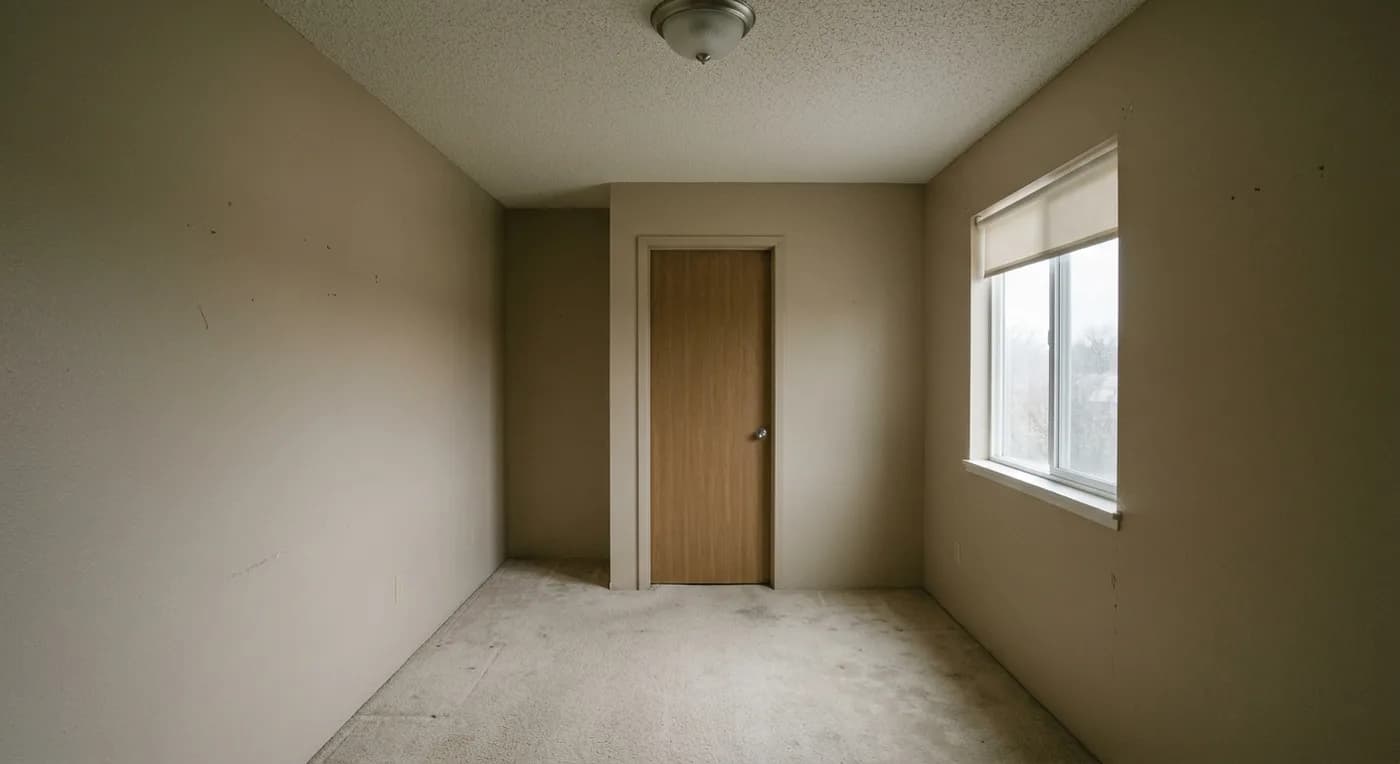
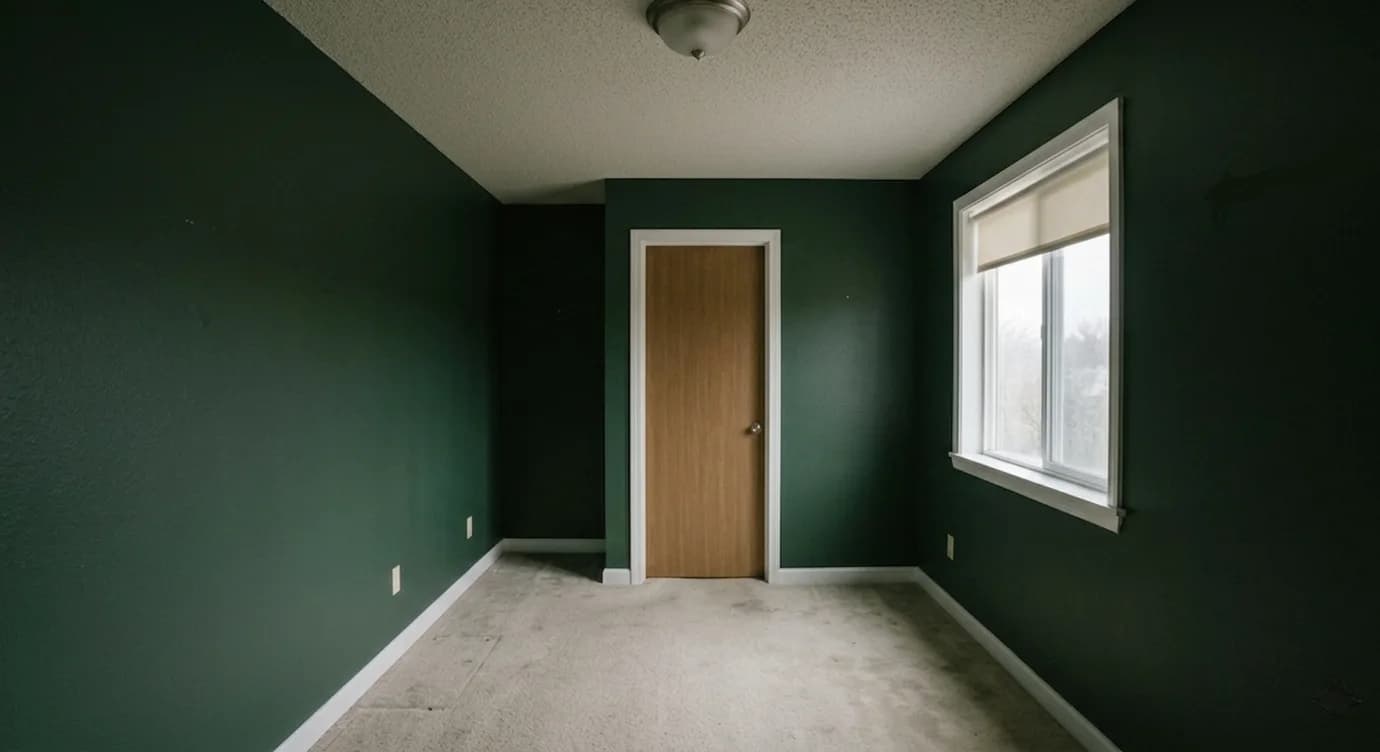
What Changed With This Paint Color:
- ✓ Flat beige walls repainted in a warm, modern deep green
- ✓ Existing white trim kept for crisp contrast against the new colour
- ✓ Furniture, flooring, and fixtures left untouched to show the true effect
- ✓ Room reads warmer and more intentional with the same natural light
- ✓ Tested at full wall scale instead of guessing from a paint chip
- ✓ Easy to compare against two or three alternative colours side by side
What Is an AI Paint Visualizer?
An AI paint visualiser is a tool that lets you preview real paint colours on your own space from a single photo. Instead of buying sample pots and painting patches on the wall, you upload a picture of the room or exterior and the AI repaints the surfaces in any colour you choose, while keeping the furniture, trim, flooring, and lighting exactly as they are.
Paint is the cheapest way to transform a space and the easiest to get wrong. A colour that looks perfect on a tiny chip in the store can turn cold, dull, or overwhelming once it covers an entire wall under your room's real light. Seeing the full surface, in context, removes that risk before you buy a single can.
It's used by homeowners and renters choosing wall colours, people picking whole-house exterior schemes, anyone deciding on a cabinet or furniture refinish, and pros who want to show clients a colour direction without lifting a brush.
How to Use the AI Paint Visualizer (Step-by-Step)
Step 1: Upload Your Photo
Photograph the room, facade, cabinets, or furniture you want to repaint, in even daylight. The clearer the photo, the more accurately the AI can apply colour to each surface.
Step 2: Choose Your Color & Surface
Pick a colour direction — warm neutral, deep moody, soft pastel, bold accent — and tell the AI what to repaint: walls, exterior, kitchen cabinets, or a furniture piece.
Step 3: Add Specific Requirements (Optional)
Add notes like 'sage green walls with white trim', 'charcoal front door', 'navy kitchen island', or 'keep the ceiling white' to control exactly which surfaces change.
Step 4: Generate & Compare
Generate in about 30 seconds, then repeat with two or three colours to compare them in the same space. Download your favourite to take to the paint store.
Ready to Find Your Perfect Color?
Start Free Paint Visualizer →Popular Paint Color Directions for 2026
Our AI paint visualiser handles any colour. Here are the directions homeowners are choosing most this year:
Warm Neutrals
Greige, mushroom, and soft taupe — colours that read warm and timeless, work in almost any light, and make a great whole-home backdrop.
Deep & Moody
Charcoal, deep green, and navy for dining rooms, studies, and feature walls. Dramatic and cosy, especially with crisp white trim.
Soft Earthy Greens
Sage and olive tones bring a calm, organic feel and pair beautifully with wood and natural textures — a dominant trend for 2026.
Soft Pastels
Muted blush, pale blue, and buttery yellow for bedrooms and nurseries — gentle colour that stays light and airy.
Bold Accent Walls
A single saturated wall — terracotta, teal, or mustard — to add personality without committing the whole room to a strong colour.
Crisp Whites & Off-Whites
From bright gallery white to warm cream, the right white depends entirely on your light — exactly why previewing on your real walls matters.
💡 Whites and greiges are the trickiest colours to choose from a chip — always preview them on your actual walls, in your actual light, before buying.
AI Paint Visualizer vs Test Pots & Color Consultants
| Factor | AI Paint Visualizer | Test Pots / Consultant |
|---|---|---|
| Cost | Free – $39/month | $10+ per test pot, or $100 – $400 per consultation |
| Speed | ~30 seconds per colour | Hours to days; pots need drying time |
| Colours Tested | Unlimited, instantly | A few patches at a time |
| Best For | Quick comparison, whole-room preview, narrowing options | Final precise colour matching, complex schemes |
| Effort | Upload a photo | Buy pots, paint patches, wait, repaint |
When to use AI: Use AI to narrow dozens of options down to your top two or three in minutes, seeing each across the whole wall instead of a small patch.
When to hire a pro: Confirm your shortlist with a real sample on the wall before the final purchase — screens and lighting vary, so a physical check is still worth it for the winner.
Who Should Use an AI Paint Visualizer?
🏠 Homeowners Choosing Colors
Preview wall colours across a whole room before buying paint. Avoid the classic mistake of a chip that looks nothing like the finished wall.
🔑 Renters & First-Timers
See how a colour would look in your space and build confidence before painting — or just to picture what's possible in a rental.
🚪 Exterior & Curb-Appeal Projects
Test whole-house body, trim, and door combinations on your real facade before committing to a colour scheme that's expensive to redo.
🗄️ Cabinet & Furniture Refinishers
Preview a painted kitchen island, repainted cabinets, or a refinished dresser before stripping and spraying anything.
🎨 Designers & Decorators
Show clients colour directions instantly and get sign-off early, without buying samples or scheduling a paint day.
AI Paint Visualization by Surface
The same tool works across every paintable surface in and around your home:
Interior Walls
Preview wall colour room by room and see how the same shade behaves under different light. Test trim and ceiling contrast at the same time to judge the full effect.
Exterior & Front Door
Visualise whole-house colour schemes — body, trim, and a statement front door — on your real facade before committing to a job that's costly to undo.
Kitchen Cabinets
Repainting cabinets is the cheapest kitchen upgrade. Preview two-tone layouts or a bold island colour before you sand and spray a single door.
Furniture & Accents
Test a painted dresser, bookcase, or accent piece. See whether a bold colour lifts the room or fights with everything else before you start.
Find Your Perfect Paint Color Today with AI
Join thousands of homeowners using HouseGPTs to preview paint colours on their real walls before buying a single can. Get started free — no credit card required.
Start Visualizing Colors Free →✓ 2 free designs • ✓ No credit card • ✓ Results in 30 seconds