
AI Furniture Designer: Restyle Any Piece in Seconds for free
Upload a photo of a sofa, dresser, chair, or any piece of furniture and watch AI restyle it — new upholstery, finish, colour, and form — or visualise an entirely new piece in your room. Perfect for shoppers, renters, restorers, and designers planning a refresh.
No credit card required • Get 2 free designs
Real Furniture Transformations: Before & After
See how our AI furniture designer reimagined a dated, worn armchair into a clean, modern piece — and showed exactly how it would sit in the room. The proportions and placement stay true so you can judge scale and style at the same time.
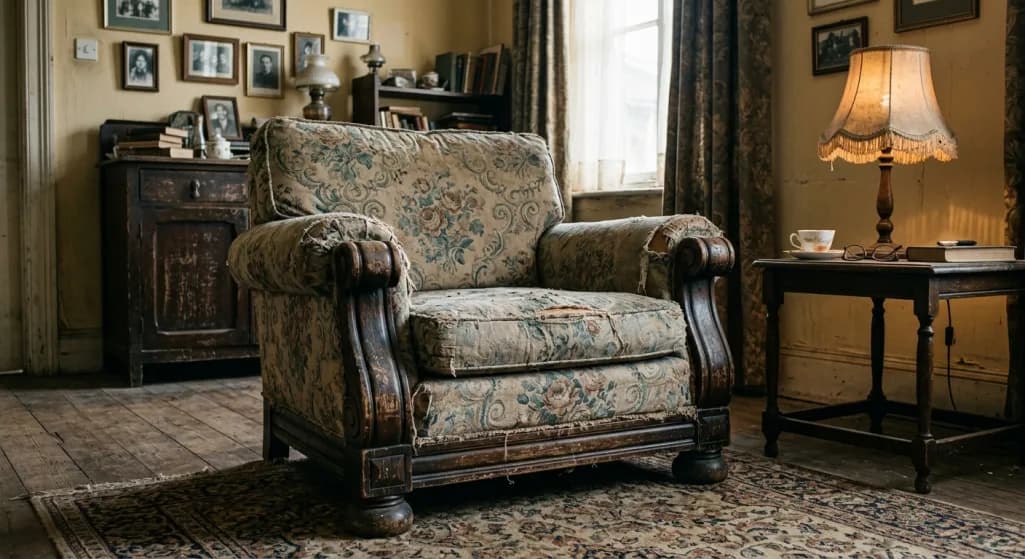
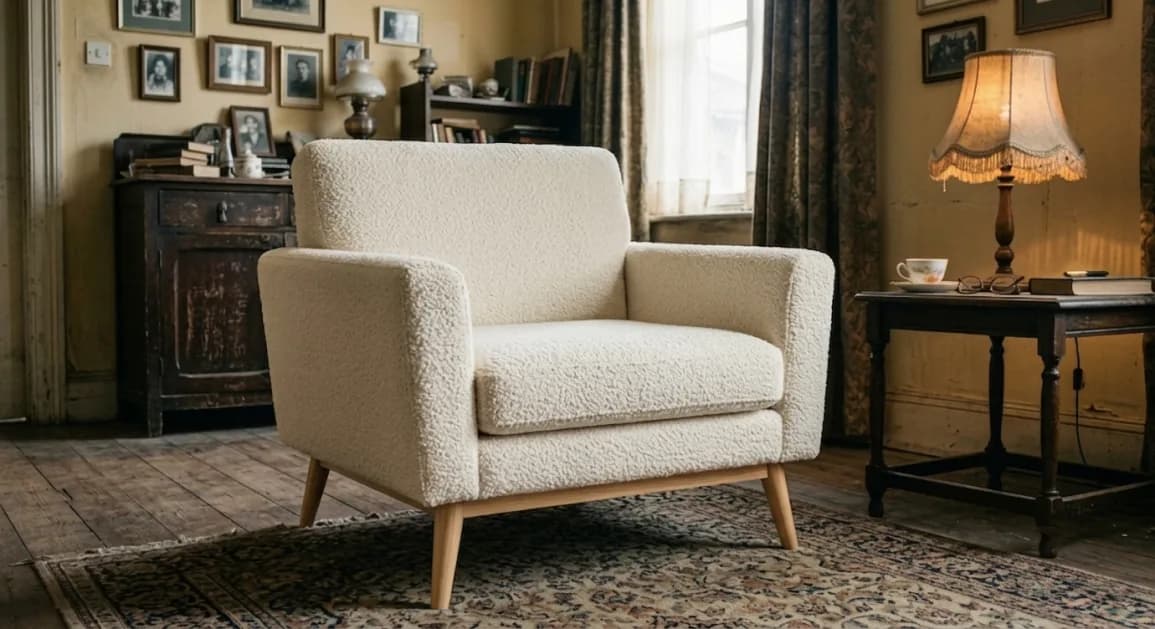
What Changed in This Furniture Redesign:
- ✓ Worn floral fabric reimagined in a soft, modern bouclé
- ✓ Heavy dark-wood arms lightened to a warm, contemporary tone
- ✓ Bulky silhouette refined to cleaner, more current proportions
- ✓ New colourway tested against the room before any reupholstery
- ✓ Scale kept true so you can judge how the piece fits the space
- ✓ Easy to compare two or three directions before committing
What Is an AI Furniture Designer?
An AI furniture designer is a tool that restyles furniture from a single photo. Upload a piece you own — or a room you want to furnish — and the AI re-renders it in a new style, fabric, finish, or colour, or visualises a different piece entirely in the same space, all while keeping the room's scale and perspective intact.
Furniture is one of the most expensive and commitment-heavy parts of a home, and the hardest to judge in advance. A sofa that looks perfect in a showroom can be the wrong scale, colour, or style for your actual room. AI furniture design lets you test the look and the fit before you buy, reupholster, or refinish anything.
It's used by online shoppers checking how a piece will look at home, renters and decorators planning a refresh, furniture restorers previewing a reupholstery or refinish, and designers presenting options to clients without ordering samples.
How to Use the AI Furniture Designer (Step-by-Step)
Step 1: Upload Your Photo
Photograph the furniture piece — or the room you want to furnish — in good light, capturing the whole item and enough of its surroundings to judge scale.
Step 2: Choose a Style or Finish
Pick a direction like Modern, Mid-Century, Scandinavian, Industrial, or Traditional, and the fabric or finish you have in mind — bouclé, leather, velvet, oak, walnut, matte black.
Step 3: Add Specific Requirements (Optional)
Add notes like 'reupholster in cream bouclé with light wood legs', 'refinish in walnut', or 'show a low-profile sectional in this space' to steer the result.
Step 4: Generate & Compare
Generate (most designs are ready in seconds) and compare directions side by side. Download your favourite to guide a purchase, an upholsterer, or a refinishing project.
Ready to Restyle Your Furniture?
Start Free Furniture Design →Popular Furniture Styles for 2026
Our AI furniture designer covers every major style. Here are the most requested looks:
Modern Furniture
Clean lines, low profiles, and neutral upholstery. Pieces that feel uncluttered and let the room's architecture breathe.
Mid-Century Modern
Tapered legs, warm walnut tones, organic curves, and rich accent colours — timeless silhouettes that suit almost any space.
Scandinavian
Light woods, soft neutral fabrics, and functional, comfortable forms. Warm minimalism that keeps rooms feeling airy.
Industrial
Metal frames, leather, and reclaimed wood for a sturdy, urban character with plenty of texture.
Bouclé & Curved
Soft bouclé upholstery and rounded silhouettes — the cosy, tactile trend that softens modern rooms.
Traditional & Classic
Turned legs, tufted upholstery, and rich woods for a refined, established look that ages well.
💡 Reupholstering or refinishing? Preview the new fabric and finish on the actual piece first — texture and colour change the feel of a piece far more than the photo suggests.
AI Furniture Designer vs Showrooms & Custom Upholstery
| Factor | AI Furniture Designer | Showroom / Upholsterer |
|---|---|---|
| Cost | Free to try; Pro from $39/month (see Pricing) | Sample fees, delivery, or restyling labour |
| Speed | Most designs ready in seconds; time varies by model | Days to weeks for samples or quotes |
| Options Tested | Unlimited styles & fabrics | A few swatches at a time |
| Best For | Previewing fit, style & colour before you commit | Final material feel, precise custom work |
| Seeing It In Your Room | Yes — on your real space | Rarely — you imagine it from a swatch |
When to use AI: Use AI to decide style, colour, and scale before you buy or restyle — and to see the piece in your actual room rather than a showroom.
When to hire a pro: Order physical swatches and use a professional upholsterer when you need to feel the material and get precise, durable custom work made.
Who Should Use an AI Furniture Designer?
🛋️ Online Furniture Shoppers
Check how a sofa, bed, or dresser will actually look and fit in your room before you buy — and avoid the costly hassle of returning oversized furniture.
🔑 Renters & Decorators
Plan a furniture refresh and test pieces and colours against your space without buying anything first.
🔨 Furniture Restorers & DIYers
Preview a reupholstery or refinish on the actual piece before stripping, sanding, or sewing — so you commit to the right fabric and finish.
🏢 Real Estate Stagers
Visualise furnished rooms in empty or sparsely furnished listings to help buyers picture the space in use.
🎨 Interior Designers
Show clients furniture and upholstery directions instantly, and confirm scale and style before sourcing or ordering samples.
AI Furniture Design by Piece
From a single chair to a whole room of furnishings, here's how to get the best result:
Sofas & Seating
Test silhouette, scale, and upholstery against your real room. Scale is where most sofa purchases go wrong — see it in the space before you commit.
Case Goods (Dressers, Cabinets, Shelving)
Preview a refinish or a new colour on dressers, sideboards, and shelving. A finish change can make a dated piece feel current for a fraction of the cost of replacing it.
Beds & Bedroom Furniture
Visualise a new headboard style, finish, or full bedroom set to make sure the pieces work together and suit the room's proportions.
Reupholstery & Restoration
Preview new fabrics and finishes on an heirloom or thrift-store find before you invest in restoring it — confirm the direction is worth the work.