
AI Exterior Designer: Reimagine Your Home's Facade in Seconds for free
Upload a photo of your house and watch AI redesign the exterior instantly — new siding, paint, roof, windows, and landscaping. Perfect for homeowners planning a remodel, agents staging curb appeal, and anyone who wants to see the finished look before hiring a contractor.
No credit card required • Get 2 free designs
Real Exterior Transformations: Before & After
See how our AI exterior designer turned a tired, dated facade into a clean, modern home — without touching the roofline or the home's footprint. The structure stays the same; the cladding, colour, and landscaping do the work.
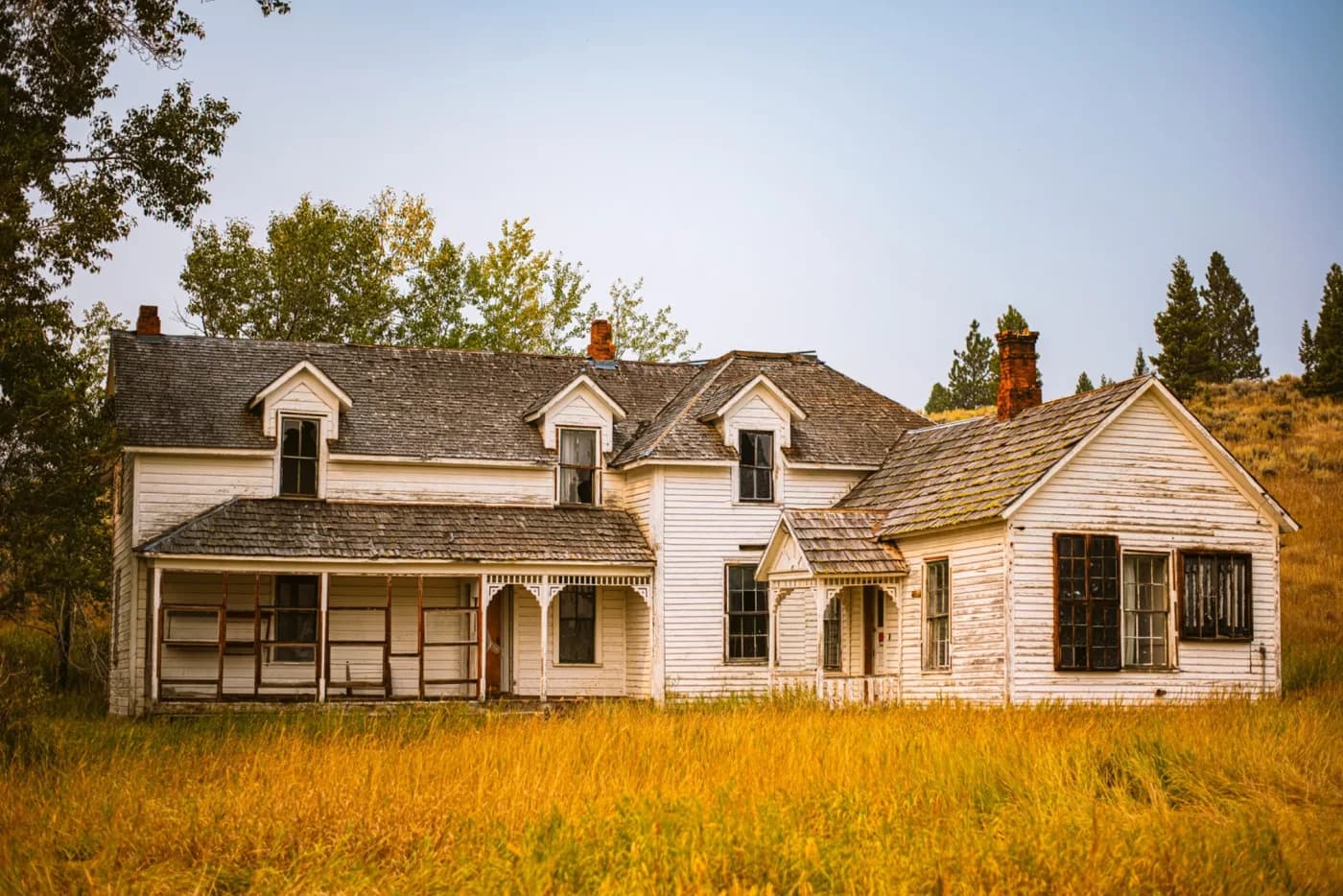
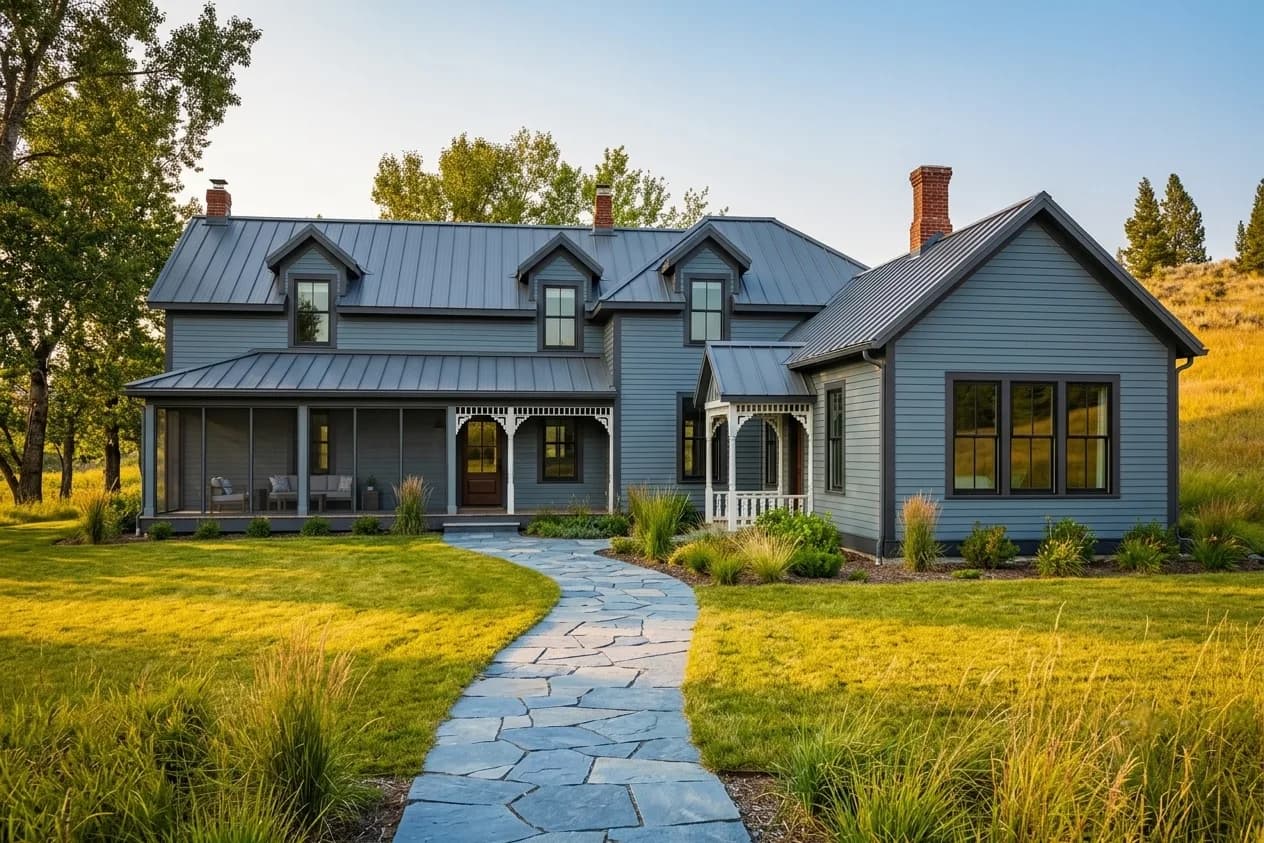
What Changed in This Exterior Redesign:
- ✓ Faded beige siding replaced with dark, modern vertical board-and-batten
- ✓ Dated trim refreshed to crisp white for high contrast and a clean edge
- ✓ Old front door swapped for a bold statement door that anchors the entry
- ✓ Aging roof colour updated to a charcoal tone that grounds the palette
- ✓ Overgrown yard replaced with structured planting, a clean path, and lawn
- ✓ Exterior lighting added to highlight the architecture after dark
What Is an AI Exterior Designer?
An AI exterior designer is a tool that takes a single photo of your home's facade and re-renders it in a new style — modern farmhouse, contemporary, craftsman, Mediterranean and more — while preserving the home's actual shape, rooflines, and windows. It lets you test siding, paint colours, roofing, doors, and landscaping on your real house before committing to expensive materials.
Choosing exterior finishes is one of the highest-stakes decisions in any remodel: siding and paint are costly, permanent, and impossible to judge from a small sample. AI exterior design removes the guesswork by showing the whole house in the new finish, in context, with its real surroundings and light.
It's used by homeowners planning a facade remodel, real estate agents boosting curb appeal before a listing, contractors and designers presenting options to clients, and buyers who want to see a property's potential before they make an offer.
How to Use the AI Exterior Designer (Step-by-Step)
Step 1: Upload a Photo of Your Home
Take a straight-on or slight-angle photo of the front of the house in daylight, capturing the full facade. Clear, well-lit shots give the AI the most accurate read of the structure.
Step 2: Choose an Architectural Style
Select from styles like Modern, Modern Farmhouse, Craftsman, Mediterranean, Contemporary, or Colonial. Each applies a coherent palette of siding, trim, roofing, and detailing.
Step 3: Add Specific Requirements (Optional)
Add notes like 'dark siding with white trim', 'add stone accents to the base', 'black-framed windows', or 'modern landscaping' to fine-tune the materials and colours.
Step 4: Generate & Download
Generate (most designs are ready in seconds) and download photorealistic results to share with a contractor for quotes, with your HOA for approval, or to compare colour directions side by side.
Ready to Boost Your Curb Appeal?
Start Free Exterior Design →Popular Exterior Design Styles for 2026
Our AI exterior designer supports every major architectural look. Here are the most requested styles:
Modern Exterior
Flat or low-slope rooflines, dark monochrome siding, large windows, and minimal ornamentation. Clean geometry and bold contrast define the look.
Modern Farmhouse
Crisp white or dark board-and-batten siding, black-framed windows, a metal roof accent, and a welcoming covered porch. Currently the most-requested style.
Craftsman
Tapered columns, exposed rafter tails, mixed siding and stone, earthy tones, and rich detailing around the porch and entry.
Mediterranean
Stucco walls, a terracotta tile roof, arched openings, and warm sandy tones for a sun-washed, resort-like feel.
Contemporary
A mix of materials — wood, metal, stone, and render — with asymmetric massing, flat planes, and a refined neutral palette.
Colonial & Traditional
Symmetrical facades, shutters, a centred front door, and classic siding in timeless colours for a refined, established look.
💡 Trying to pick a siding colour? Render two or three on your actual house — colours read completely differently at full scale and in real daylight.
AI Exterior Designer vs Hiring an Architect or Designer
| Factor | AI Exterior Designer | Traditional Designer |
|---|---|---|
| Cost | Free to try; Pro from $39/month (see Pricing) | $2,000 – $10,000+ for facade design |
| Speed | Most designs ready in seconds; time varies by model | 3 – 6 weeks for first renderings |
| Revisions | Generate more variations using available credits | Limited, billed per revision |
| Best For | Testing colours & materials, curb appeal, quick comparisons | Structural changes, additions, permit drawings |
| Flexibility | Try many styles on your real home | Constrained by scope and budget |
When to use AI: Use AI to settle the look — siding, colour, roof, door, and landscaping — and to get everyone aligned before you request contractor quotes.
When to hire a pro: Hire a professional when you're changing the structure, adding square footage, or need stamped construction drawings and permits.
Who Should Use an AI Exterior Designer?
🏠 Homeowners Planning a Remodel
See new siding, paint, and roofing on your actual house before committing to materials that are expensive and permanent. Avoid a costly colour mistake.
🏢 Real Estate Agents
Show buyers a property's curb-appeal potential, or stage a tired facade in a listing. Strong curb appeal measurably lifts perceived value and first impressions.
🌿 Landscapers & Designers
Present clients with a clear before-and-after of facade and landscaping changes together, so the whole exterior reads as one cohesive plan.
🔨 Contractors & Remodelers
Help clients decide quickly by showing options photorealistically, reducing back-and-forth and change orders later in the project.
🔑 Home Buyers
Look past a dated facade and visualise a property's true potential before you make an offer or plan a renovation budget.
AI Exterior Design by Element
A facade redesign is the sum of a few big decisions. Here's how to approach each with AI:
Siding & Cladding
Test board-and-batten, lap siding, stucco, brick, or mixed materials on your real walls. Material has as much impact as colour — compare a few before you price anything.
Exterior Paint & Colour
See whole-house colour combinations — body, trim, and accent — in real daylight. A colour that looks safe on a chip can read very differently across an entire facade.
Roof, Doors & Windows
Swap roof colour, add black-framed windows, or test a bold front door. These smaller moves often deliver the biggest jump in curb appeal for the budget.
Landscaping & Entry
Visualise structured planting, a clean walkway, and exterior lighting. Tidy, intentional landscaping frames the home and makes every other change look more finished.