Is There a Free AI for Interior Design? How to Design Your Room with AI
Article Contents
- What can AI help you do with your room?
- What is the best free AI for interior design?
- How to use AI for interior design ideas
- 1. Choose one room and one goal
- 2. Take a clear photo
- 3. Decide what must stay
- 4. Generate a design
- 5. Compare the ideas
- 6. Check the room’s measurements
- What should I write in an AI interior design prompt?
- AI interior design prompt ideas for different rooms
- Small bedroom
- Living room
- Home office
- Budget room makeover
- Can AI design a room from a photo?
- Can AI create a furniture layout or floor plan?
- Can I use AI to design a room on a budget?
- Are free AI interior design tools really free?
- What are the limitations of AI interior design?
- Final answer
Is There a Free AI for Interior Design? How to Design Your Room with AI
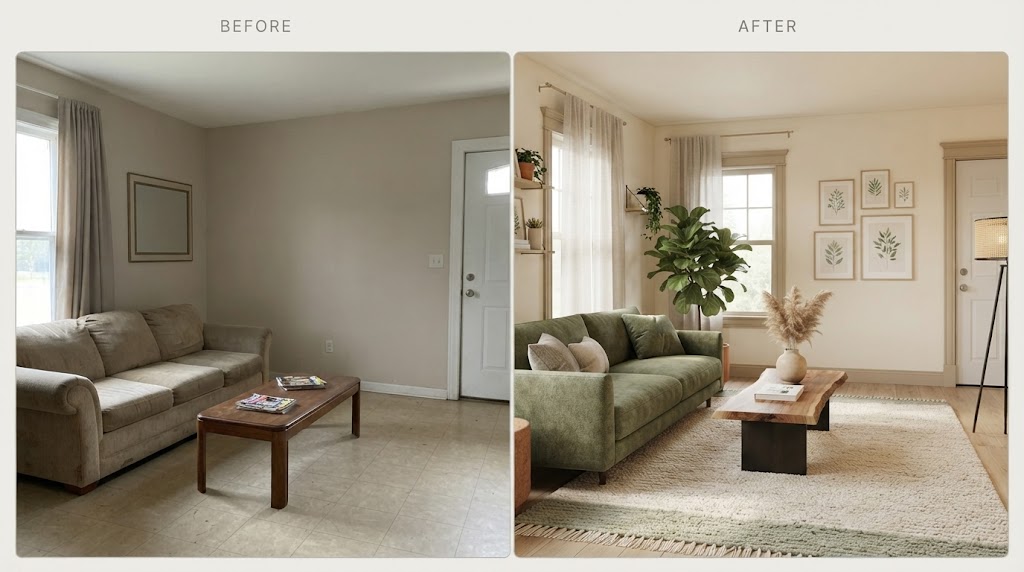
Yes, you can use AI for interior design for free. Upload a photo of your room to HouseGPTs to explore new design ideas; it currently offers two free generations without a credit card.
AI can help you picture different colors, furniture styles, lighting, and layouts before you make changes. The most useful approach is to generate ideas from your actual room, choose the details you like, and check measurements before buying anything.
What can AI help you do with your room?
An AI interior design tool can show how a room might look with a different style or color scheme. It can help you explore questions such as:
Would lighter walls make this bedroom feel more open?
Could a different rug and lighting improve the living room?
What style works with the furniture I already own?
How could I make a small room feel less crowded?
A generated image is a design concept. It helps you decide what you like, but it cannot confirm that the furniture shown will fit or that an exact product is available to buy.
What is the best free AI for interior design?
Choose a tool based on the question you need to answer.
Your goal | Use |
|---|---|
See your existing room in a new style | A photo-based AI interior designer |
Check whether furniture will fit | A measured room planner |
Explore colors and materials | AI room redesigns |
Plan a renovation | AI concepts alongside accurate plans |
For ideas based on a room photo, start with HouseGPTs. If furniture dimensions are your priority, use a floor planner. HouseGPTs offers an online floor plan designer, while Planner 5D has a free Basic plan with limited features.
How to use AI for interior design ideas
1. Choose one room and one goal
Start with the room you most want to improve. Decide what is wrong with it now: poor lighting, limited storage, an awkward layout, or a style you no longer like.
A specific goal will make the AI result easier to evaluate. “Make this small bedroom feel calmer” is more useful than “design my house.”
2. Take a clear photo
Take the photo in daylight and show as much of the room as possible. Include the floor, windows, doors, and major furniture. A view from a corner often gives a better picture of the space than a close-up.
3. Decide what must stay
List the items you intend to keep, such as your sofa, flooring, bed, or built-in cabinets. Also decide how much you are willing to change. A room refresh with paint and textiles needs a different design from a full renovation.
4. Generate a design
Upload your photo to a tool such as HouseGPTs and describe the result you want. Its current free offer includes two generations, so try two meaningfully different directions rather than making nearly identical requests.
5. Compare the ideas
Look beyond which image is prettiest. Identify the changes that make each result work: the wall color, lighting, furniture arrangement, curtains, rug, or storage.
You can take one idea from each image. You do not have to recreate a generated design exactly.
6. Check the room’s measurements
Measure the room and any furniture you plan to buy. Confirm that doors can open, windows remain accessible, and there is enough space to walk between pieces. For a layout-sensitive project, check the arrangement in a measured floor plan.
What should I write in an AI interior design prompt?
Tell the AI which room it is, what you want to achieve, what must stay, and the style you prefer. Use this template:
Redesign my [room] in a [style] style. Keep [existing items]. Use [colors or materials]. Help solve [specific problem]. Do not change [fixed features].
For example:
Redesign this small living room in a warm minimalist style. Keep the existing sofa and flooring. Use cream, natural wood, and soft lighting. Add practical storage and keep the walkway clear. Do not change the windows or doors.
AI interior design prompt ideas for different rooms
Small bedroom
Make this small bedroom feel brighter and more spacious. Keep the bed and wardrobe. Use warm neutrals, compact storage, and soft lighting. Do not change the room’s structure.
Living room
Give this living room a cozy, contemporary look. Keep the existing sofa. Suggest a new rug, curtains, lighting, and wall colors while leaving enough space to walk around the furniture.
Home office
Redesign this home office to feel organized and comfortable for daily work. Keep the desk. Add useful storage, good task lighting, and a calm color palette.
Budget room makeover
Refresh this room on a limited budget. Keep the flooring and all large furniture. Focus on paint, lighting, cushions, curtains, and furniture placement.
Can AI design a room from a photo?
Yes. Photo-based AI tools use an image of your existing room as the starting point for a new visual concept. This is helpful when you want to see a style in your space rather than in a showroom photo. HouseGPTs provides this type of room redesign.
Check the generated image against your original photo. AI can change the apparent size of a room or alter furniture you asked it to keep.
Can AI create a furniture layout or floor plan?
AI images may suggest a furniture arrangement, but they are not a reliable substitute for measurements. If you need to know whether a bed, desk, or sofa will fit, draw a floor plan using the room’s real dimensions.
Some free tools let you create floor plans. Automatically designing a room from an uploaded floor plan is a separate feature and may have different limits or costs. Check what the tool includes before starting.
Can I use AI to design a room on a budget?
Yes. Tell the AI to keep expensive items and focus on smaller changes. Paint, lighting, curtains, cushions, and a better furniture arrangement can change how a room feels without replacing everything.
After you choose an idea, make a shopping list using real products and prices. The items in an AI image may not exist as exact products.
Are free AI interior design tools really free?
Many tools are free to try, but their limits vary. Some offer a small number of AI images, while others provide basic planning tools and charge for particular features. HouseGPTs currently advertises two free design generations without a credit card; Planner 5D describes its Basic plan as free with limited functionality.
Before you start, check how many results you can generate and whether you can save or download them.
What are the limitations of AI interior design?
AI can produce an appealing room that would be difficult to recreate. It may show furniture at the wrong scale, change architectural details, or suggest materials outside your budget.
Use AI for the visual direction, measurements for the layout, and real products for the budget. For construction or technical work in kitchens and bathrooms, confirm the plan with qualified professionals.
Final answer
You can use free AI for interior design by uploading a photo of your room, describing the changes you want, and comparing the generated ideas. Start with HouseGPTs for a visual concept, then use measurements and real product prices to turn your favorite ideas into a plan you can carry out.
Ready for Your Own AI Redesign?
Start Designing with AI →FAQs about Is There a Free AI for Interior Design? How to Design Your Room with AI
Everything you need to know
Can I upload a picture of my room and redesign it for free?
Yes. Some photo-based AI tools offer free generations. HouseGPTs currently offers two without requiring a credit card.
Do I need interior design experience to use AI?
No. A clear room photo and a plain-language request are enough to begin. Describe the problem you want to solve and the items you want to keep.
Can AI help me choose paint colors?
Yes. AI can show how a color scheme might look in your room. Test real paint samples before choosing a color, since screen images and actual lighting differ.
Will AI keep my existing furniture?
You can ask it to, but inspect the result carefully. AI may still change an item’s appearance, position, or size.
Can AI replace an interior designer?
AI can help you explore ideas and communicate your preferences. It does not replace accurate measurements, technical plans, or professional advice for complex renovations.