RoomSketcher Alternative - Free AI Home Design Tool (2026)
Article Contents
- Why RoomSketcher Users Look for Alternatives
- The Paywall Hits Fast
- Manual Floor Plan Drawing Is Slow
- It Shows a Model, Not Your Room
- Mobile Experience Is Frustrating
- What to Look for in a RoomSketcher Alternative
- Photo-Based Input vs Floor Plan Drawing
- Realistic Output of Your Actual Space
- Genuine Free Tier Without Artificial Limits
- Speed of Results
- The Best Free RoomSketcher Alternative in 2026: HouseGPTs
- Your Real Room, Not a Generic Model
- 30-Second Results, Not 90-Minute Setup
- Genuinely Free to Start
- 50+ Design Styles in One Tool
- Works Perfectly on Mobile
- HouseGPTs vs RoomSketcher: Full Comparison
- Input Method
- Time to First Useful Result
- Output Realism
- Cost Structure
- Best Use Case
- 5 Things You Can Do With HouseGPTs That You Cannot Do With RoomSketcher
- 1. See Your Actual Room Transformed
- 2. Compare 10 Style Directions in 10 Minutes
- 3. Design on Your Phone in One Workflow
- 4. Share Photorealistic References With Contractors
- 5. Discover Your Style Without Knowing It First
- Other RoomSketcher Alternatives Worth Knowing
- Planner 5D
- HomeByMe
- Homestyler
- SketchUp Free
- How to Get Started With HouseGPTs as Your RoomSketcher Alternative
- Step 1: Photograph Your Room
- Step 2: Upload to HouseGPTs
- Step 3: Choose a Design Style
- Step 4: Get Your Design in 30 Seconds
- Step 5: Use Your Designs
- Make the Switch From RoomSketcher Today
- Related Design Resources
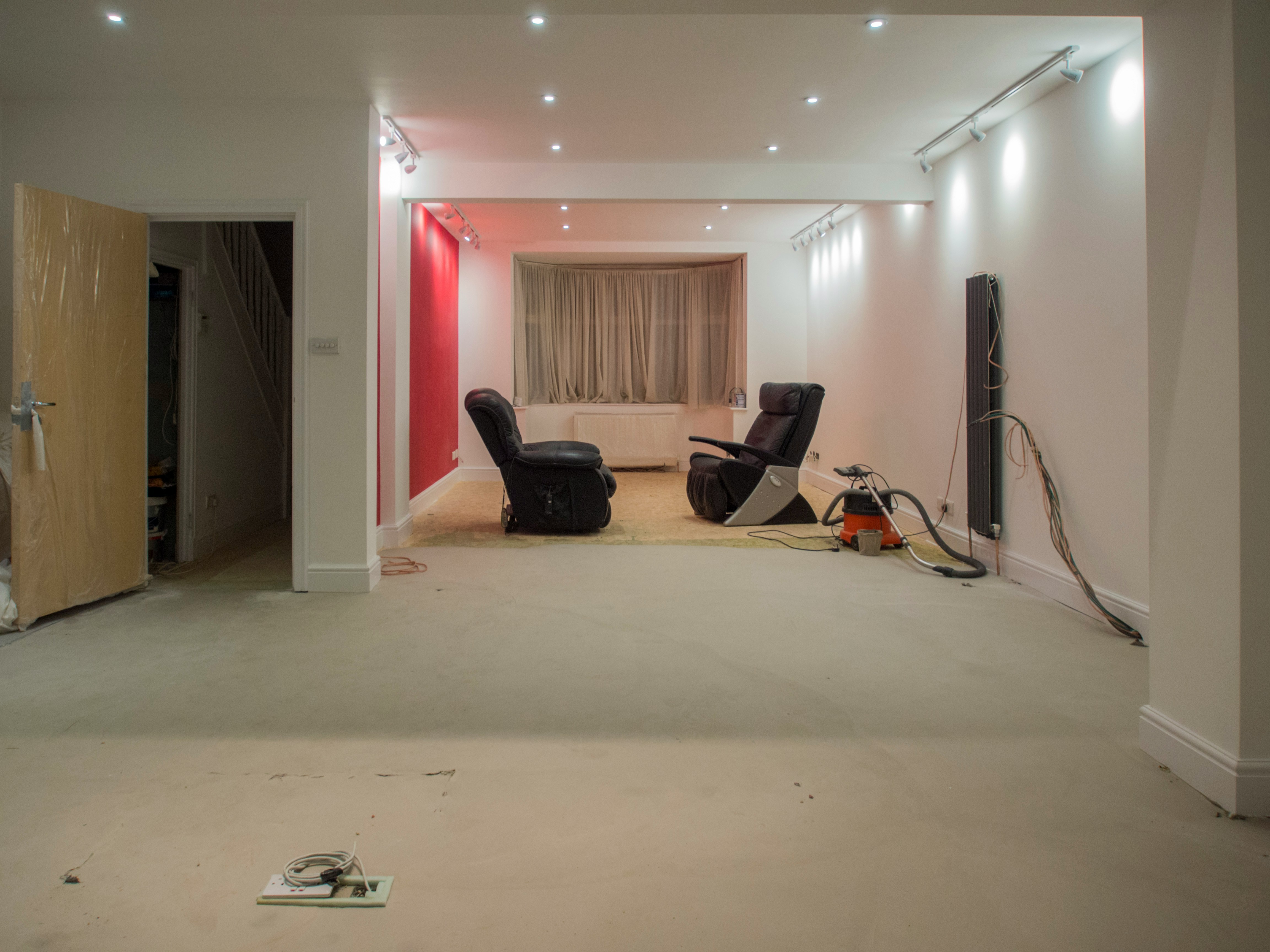
The Challenge: Before
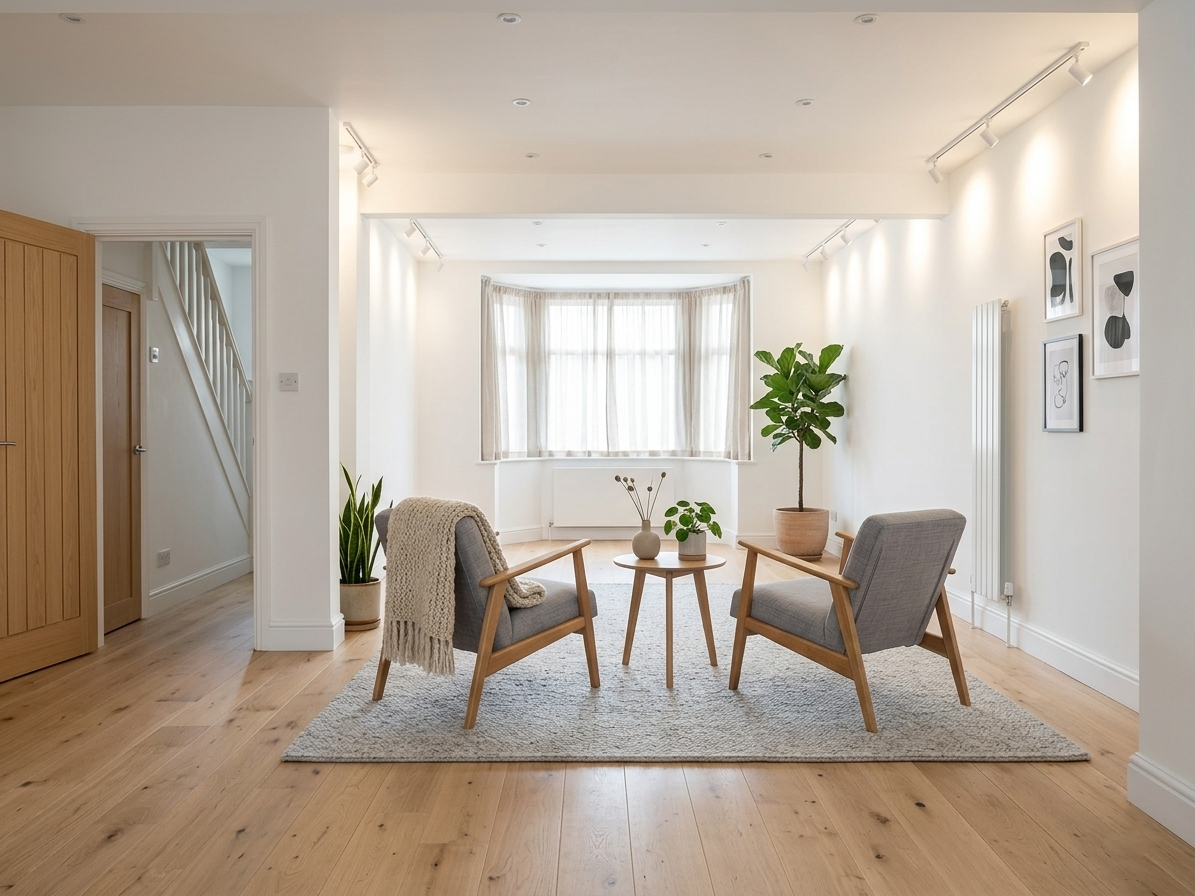
The Transformation: After (AI Generated)
RoomSketcher Alternative - Free AI Home Design Tool (2026)
RoomSketcher has served homeowners and real estate professionals for years as a reliable floor plan and 3D visualization tool, but its manual room-drawing workflow, aggressive paywall, and inability to show your actual room transformed have pushed thousands of users to search for better alternatives. In 2026, AI-powered home design has fundamentally changed what a free design tool can deliver. Instead of spending an hour drawing walls and placing furniture in a 3D model that still won't look like your real room, you can upload a photo of your actual space and receive a photorealistic redesign in 30 seconds — no software to learn, no floor plan to draw, no paywall blocking useful output. This guide covers why RoomSketcher users are switching, what to look for in an alternative, and which free AI tool delivers the best results without the frustrations that define traditional floor plan software.
Why RoomSketcher Users Look for Alternatives
RoomSketcher is a competent floor plan tool that does what it promises — but what it promises has become increasingly misaligned with what most homeowners actually need from a design tool. The gap between the product's core strength (accurate floor plan documentation) and the typical user's actual goal (seeing what their room could look like redesigned) creates frustration that drives users toward alternatives.
The Paywall Hits Fast
RoomSketcher's free tier is designed to demonstrate the product, not deliver useful output. HD photos, 3D Floor Plans, and the Live 3D walkthrough feature all sit behind the paid subscription. Users who download RoomSketcher hoping for a free design tool quickly discover the useful outputs cost $49–99 per year depending on the plan. For occasional residential design exploration, a recurring subscription to floor plan software is a difficult value proposition — especially when AI alternatives produce better visual results at lower cost.
Manual Floor Plan Drawing Is Slow
Before seeing any design output in RoomSketcher, you have to build your room from scratch: draw walls to scale, place windows and doors at accurate positions, add furniture from the catalog, apply materials to surfaces, and position a camera for a useful viewing angle. For a single room, this process takes 45–90 minutes minimum. For users who simply want to know whether their living room would look good in Scandinavian or Industrial style, this is an enormous amount of work before reaching the actual question.
It Shows a Model, Not Your Room
Even after completing the setup, RoomSketcher's output is a render of a virtual model — not a transformation of your actual room. The couch in the render is a generic catalog item, not yours. The ceiling height may not match yours. The natural light coming through your south-facing window isn't replicated. This disconnect between the polished 3D visualization and what your real room with its specific proportions and architecture would actually look like undermines confidence in design decisions. You're choosing based on a model, not your reality.
Mobile Experience Is Frustrating
RoomSketcher was designed for desktop. The floor plan interface requires precision mouse work that doesn't translate well to touchscreens. Users trying to use it on phones or tablets encounter a cramped, frustrating experience that makes the already complex workflow even harder. In an era where most people photograph their spaces on their phones, a design tool that effectively requires a desktop creates unnecessary friction.
What to Look for in a RoomSketcher Alternative
Before choosing a replacement, it helps to identify what you were actually trying to accomplish with RoomSketcher. The best alternative depends on your real use case.
Photo-Based Input vs Floor Plan Drawing
RoomSketcher is fundamentally a floor plan documentation tool. If you never really needed the floor plan — you just wanted to visualize style options — then AI photo-based tools are a dramatically better fit. They skip the setup entirely and jump straight to the output you care about: seeing your room transformed. If you genuinely need architectural drawings for construction purposes, you need to stay in the floor plan software category.
Realistic Output of Your Actual Space
The most important quality in a design visualization tool is whether the output helps you make confident real-world decisions. Generic 3D renders of imagined rooms don't do this as well as photorealistic transformations of your actual space. Look for tools that analyze your room's specific proportions, natural light, and existing architecture — not tools that produce beautiful images of someone else's ideal room.
Genuine Free Tier Without Artificial Limits
Many tools claim to be free but deliver watermarked, low-resolution outputs designed to frustrate you into upgrading. A genuine free tier means real, full-quality output — enough to evaluate whether the tool works for your space — with no credit card required to see actual results.
Speed of Results
Design exploration should be fast enough to be iterative. If each option takes an hour to set up, you'll look at one or two directions. If each option takes 30 seconds, you'll explore ten and find what actually resonates. Speed directly determines how well you can discover your real preferences.
The Best Free RoomSketcher Alternative in 2026: HouseGPTs
HouseGPTs is the strongest free RoomSketcher alternative for homeowners who want to see their actual rooms transformed rather than build virtual floor plan models. The workflow eliminates every friction point that frustrates RoomSketcher users: photograph your room with your phone, upload it to HouseGPTs, select a design style, and receive a photorealistic redesign of your specific space in approximately 30 seconds. No floor plan drawing. No furniture catalog browsing. No waiting for renders to process.
Your Real Room, Not a Generic Model
HouseGPTs analyzes the photo you upload — the actual proportions implied by your walls, the light coming through your specific windows, your ceiling height, your existing flooring — and generates a design that fits your real space. The result looks like your room, redesigned, not a showroom approximation. This specificity matters enormously when you're making actual decisions about paint colors, furniture purchases, or renovation direction.
30-Second Results, Not 90-Minute Setup
The entire workflow from photo to photorealistic design takes less time than logging into RoomSketcher and naming a new project. This speed isn't just convenient — it transforms design exploration from a project requiring dedicated time into something you can do while standing in the room you're thinking about redesigning.
Genuinely Free to Start
HouseGPTs provides 2 free AI designs with no credit card required. These are real, full-quality designs of your actual room — not watermarked previews or degraded samples. You can see exactly what the tool produces before making any payment decision. Unlimited designs are available for $39/month, which for active design projects represents strong value compared to RoomSketcher's annual subscription cost for far more limited visual output.
50+ Design Styles in One Tool
Modern, Minimalist, Scandinavian, Farmhouse, Industrial, Coastal, Bohemian, Mid-Century Modern, Traditional, Transitional, Luxury, Rustic, Mediterranean, Japanese, and dozens more. Because each generation takes 30 seconds, you can explore your room in five different styles in the time RoomSketcher takes to set up one project. Most users discover their actual style preference through this rapid comparison — realizing what genuinely excites them only after seeing the options side by side.
Works Perfectly on Mobile
Photograph your room, upload it, and see your design — all from your phone, in one continuous workflow. No desktop required, no app to install, no hardware limitations. HouseGPTs works through any browser on any device, making it accessible to anyone regardless of what technology they have access to.
HouseGPTs vs RoomSketcher: Full Comparison
Understanding how these tools differ helps clarify which is right for your specific situation. The differences go beyond features — they reflect fundamentally different approaches to what home design visualization should be.
Input Method
RoomSketcher requires you to build a model: draw walls to scale, place windows and doors, add furniture, apply materials. HouseGPTs requires a photo. This single difference determines everything downstream — how long setup takes, how realistic the output looks, and how closely the result reflects your actual space.
Time to First Useful Result
RoomSketcher: 45–90 minutes of setup before seeing any design output, plus additional time for rendering. HouseGPTs: 30 seconds from photo upload to photorealistic design. For users exploring design possibilities rather than producing architectural documentation, this time difference is decisive.
Output Realism
RoomSketcher produces 3D renders of virtual models — technically polished but visually distinct from real photography, and not representing your actual room. HouseGPTs produces photorealistic transformations of your specific space, appearing like professional interior photography. The realism difference directly affects how confidently you can make real-world decisions based on what you see.
Cost Structure
RoomSketcher free tier: useful outputs blocked behind $49–99/year subscription. HouseGPTs: 2 real designs free with no card, unlimited for $39/month. For active design exploration across multiple rooms, HouseGPTs delivers more visual output per dollar while producing higher-quality results.
Best Use Case
RoomSketcher is strongest for floor plan documentation — producing accurate scaled layouts for professional or construction use. HouseGPTs is strongest for design visualization — seeing what your real room could look like in a different style, fast. For most homeowners, design visualization is the actual goal.
5 Things You Can Do With HouseGPTs That You Cannot Do With RoomSketcher
1. See Your Actual Room Transformed
RoomSketcher builds a model from scratch. HouseGPTs transforms your existing room. Seeing your specific space — your awkward corner, your south-facing window, your existing built-in shelf — redesigned in a new style is vastly more useful for real decisions than seeing a clean generic 3D model that may bear little resemblance to your reality.
2. Compare 10 Style Directions in 10 Minutes
Because HouseGPTs generates designs in 30 seconds with no setup, you can explore Scandinavian, Farmhouse, Industrial, Coastal, and Modern for the same room in the time RoomSketcher takes to finish one project setup. This speed of comparison is how most homeowners discover their actual preferences — not by thinking abstractly about style labels but by seeing their room rendered in each direction.
3. Design on Your Phone in One Workflow
Photograph your room, upload it, and see your design — all from the same device in one session. RoomSketcher's floor plan interface is genuinely difficult on mobile. HouseGPTs was designed for the photo-first mobile workflow most people use naturally when thinking about their spaces.
4. Share Photorealistic References With Contractors
When communicating your vision to painters, contractors, or interior designers, photorealistic images of your actual room redesigned in your target style communicate far more clearly than floor plan renders or verbal descriptions. HouseGPTs designs work as contractor references in a way that 3D model renders don't — they show the real space, not an approximation.
5. Discover Your Style Without Knowing It First
RoomSketcher requires design decisions up front — you choose furniture and styles before seeing results. HouseGPTs lets you explore first and decide after. Upload your room, generate it in five styles, and let the results show you what excites you. This discovery-first approach is how most people actually figure out what they want.
Other RoomSketcher Alternatives Worth Knowing
Beyond HouseGPTs, several other tools appear frequently when users search for RoomSketcher alternatives. Understanding what each does helps match tool to use case.
Planner 5D
A 3D floor plan tool similar to RoomSketcher with a larger furniture catalog and slightly more consumer-friendly interface. Still requires manual room drawing, still produces 3D model renders rather than photorealistic transformations, still has a limited free tier. Better interface than RoomSketcher for some users, same fundamental limitations for design visualization.
HomeByMe
Web-based 3D design tool with a large furniture catalog and reasonable free tier. Good for visualizing room layouts with specific furniture pieces. Requires manual floor plan setup like RoomSketcher, and exports are watermarked on the free plan. Similar category, similar trade-offs.
Homestyler
Includes a photo-based design feature that bridges the gap between floor plan software and AI tools. More capable for design exploration than RoomSketcher, with some AI-assisted features. Output quality and photorealism don't match dedicated AI tools like HouseGPTs, but worth considering if you want something between traditional floor plan software and full AI photo transformation.
SketchUp Free
Professional 3D modeling software with a free web tier. Extremely powerful, extremely complex — learning curve measured in days or weeks. Relevant for users who need professional architectural modeling capability, not for homeowners wanting design visualization.
For homeowners wanting to see design possibilities for their actual rooms quickly and affordably, HouseGPTs outperforms all of these by working directly from your real space.
How to Get Started With HouseGPTs as Your RoomSketcher Alternative
The switch takes about two minutes and requires nothing beyond a photo of your room and a browser.
Step 1: Photograph Your Room
Stand at a corner or doorway to capture as much of the space as possible. Natural daylight produces better AI results than flash. You want the full room visible — walls, ceiling, flooring — not a tight shot of a single piece of furniture. Wide shots that show the whole space give the AI more to work with and produce more accurate, realistic redesigns.
Step 2: Upload to HouseGPTs
Go to housegpts.com from any browser on any device. Upload your photo directly — no account required to start, no credit card needed for the first two designs.
Step 3: Choose a Design Style
Browse the available styles and select one that interests you. If you're uncertain where to start, pick two that feel different from each other — Modern and Farmhouse, or Scandinavian and Industrial — and generate both to see what resonates through comparison.
Step 4: Get Your Design in 30 Seconds
Your photorealistic redesign appears in approximately 30 seconds. Review it, generate another in a different style, or download and share what you have. Your two free designs are enough to see whether a particular direction works for your actual space before investing further.
Step 5: Use Your Designs
Download for use as personal references, share with family to get input, or bring to contractors and designers as clear visual communication of your intended direction. Photorealistic images of your real room redesigned in your target style communicate vision far more effectively than floor plan renders or verbal descriptions.
Make the Switch From RoomSketcher Today
RoomSketcher is a legitimate tool for floor plan documentation, but for homeowners who want to see design possibilities for their actual rooms quickly and affordably, it has been overtaken by AI-powered alternatives that produce better results from less effort. HouseGPTs delivers photorealistic redesigns of your real space in 30 seconds, for free, with no learning curve and no floor plan drawing required. If you have hit RoomSketcher's paywall, found its setup workflow too slow for simple design questions, or simply want to see what your room could actually look like rather than what a generic 3D model suggests, HouseGPTs is the natural next step. Start with your 2 free designs today at housegpts.com — upload your photo and see what is possible.
Try the Best Free RoomSketcher Alternative
Upload your room photo and get a photorealistic AI redesign in 30 seconds. No floor plan drawing, no learning curve, no paywall. Just your actual room, transformed.
Related Design Resources
Ready for Your Own AI Redesign?
Start Designing with AI →FAQs about RoomSketcher Alternative - Free AI Home Design Tool (2026)
Everything you need to know
What is the best free RoomSketcher alternative?
HouseGPTs is the best free RoomSketcher alternative for homeowners who want to see their actual rooms redesigned rather than draw floor plans. While RoomSketcher requires manually drawing walls and placing furniture in a 3D model before seeing any useful output, HouseGPTs lets you upload a photo of your real room and receive a photorealistic redesign in 30 seconds. You get 2 free designs with no credit card required, unlimited designs for $39/month, 50+ design styles, and results that show your actual space transformed — not a generic 3D model render.
Is HouseGPTs really free compared to RoomSketcher?
Yes. HouseGPTs provides 2 completely free AI designs with no credit card required — real, full-quality photorealistic results, not watermarked previews. RoomSketcher's free tier blocks the most useful features including HD photos, 3D Floor Plans, and Live 3D walkthroughs behind a $49–99/year subscription. For actual design visualization, HouseGPTs is genuinely free to try and $39/month for unlimited designs, while RoomSketcher requires a paid subscription before delivering useful output.
Does HouseGPTs require drawing a floor plan like RoomSketcher?
No. HouseGPTs requires only a photo of your room — no floor plan drawing, no wall placement, no furniture catalog browsing, no technical setup of any kind. RoomSketcher requires you to draw your entire room from scratch including walls, windows, doors, and furniture placement before seeing any design output, which typically takes 45–90 minutes per room. HouseGPTs generates a photorealistic redesign of your actual room in 30 seconds from a single photo.
Can HouseGPTs show my actual room redesigned, or just generic 3D models?
HouseGPTs works from a photo of your actual room, so the output shows your specific space transformed — your real walls, your windows, your ceiling height, your proportions — redesigned in your chosen style. RoomSketcher builds a virtual model that may not accurately represent your real room's specific characteristics. The difference matters significantly when making real-world decisions about renovation, furniture purchases, or paint colors, since HouseGPTs shows what your actual room would look like rather than what an approximation might look like.
Does HouseGPTs work on mobile phones unlike RoomSketcher?
Yes. HouseGPTs works perfectly on any device including smartphones, tablets, and any internet-connected device through a simple browser — no app download or installation required. You can photograph your room with your phone and receive a photorealistic redesign in that same session. RoomSketcher's floor plan interface was designed for desktop and is difficult to use on mobile, making the complex room-drawing workflow frustrating on touchscreens.
What design styles does HouseGPTs offer compared to RoomSketcher?
HouseGPTs offers 50+ design styles including Modern, Minimalist, Scandinavian, Farmhouse, Industrial, Coastal, Bohemian, Mid-Century Modern, Traditional, Transitional, Luxury, Rustic, Mediterranean, Japanese, and many more. Because each generation takes only 30 seconds, you can explore your room in multiple styles in minutes. RoomSketcher's style exploration is limited by its catalog-based approach and the time required to set up each variation manually.
Is HouseGPTs better than RoomSketcher for renovation planning?
For design visualization during renovation planning, HouseGPTs is stronger — it produces photorealistic images of your actual room redesigned in your target style, which communicate renovation intent to contractors more clearly than 3D model renders. For producing scaled architectural floor plans needed for construction documentation, RoomSketcher remains useful. Most homeowners primarily need design visualization, not architectural documentation, making HouseGPTs the more practical renovation planning tool for typical residential projects.
How does HouseGPTs compare to other RoomSketcher alternatives like Planner 5D or HomeByMe?
Planner 5D and HomeByMe are in the same category as RoomSketcher — floor plan tools requiring manual room construction that produce 3D renders of virtual models. HouseGPTs is a different category entirely: an AI photo-based tool that transforms photos of your real room into photorealistic redesigns without any setup. For design visualization (seeing what your room could look like), HouseGPTs outperforms all floor plan alternatives through faster results, higher realism, and no learning curve. For floor plan documentation, Planner 5D and HomeByMe are comparable to RoomSketcher.