House Design Software - Free AI Alternative (2026)
Article Contents
- The Traditional House Design Software Problem
- Traditional Software vs AI Design: Direct Comparison
- Time Investment: Hours vs Seconds
- Required Skills: 3D Modeling vs Photo Upload
- Flexibility: Catalog Limits vs AI Generation
- Results Quality: 3D Renders vs Photorealistic Images
- Design Intelligence: Manual Choices vs AI Expertise
- Accessibility: Installation vs Browser-Based
- Learning Curve: Days vs Minutes
- Popular House Design Software: Why Users Switch to AI
- SketchUp: Powerful but Overkill
- Sweet Home 3D: Free but Dated
- Home Designer Suite: Expensive Professional Tool
- Planner5D: Simplified but Still Manual
- How AI House Design Works
- Upload and Instant Analysis
- Style Selection and Requirements
- Automated Design Generation
- Photorealistic Visualization
- Rapid Iteration and Refinement
- When to Use Traditional Software vs AI Design
- Use Traditional Software For:
- Use AI Design For:
- The Hybrid Approach
- Making the Switch from Traditional Software
- What You'll Gain
- What You'll Lose
- Transition Strategy
- Try Free AI House Design Alternative Today
- Related Design Software Alternatives
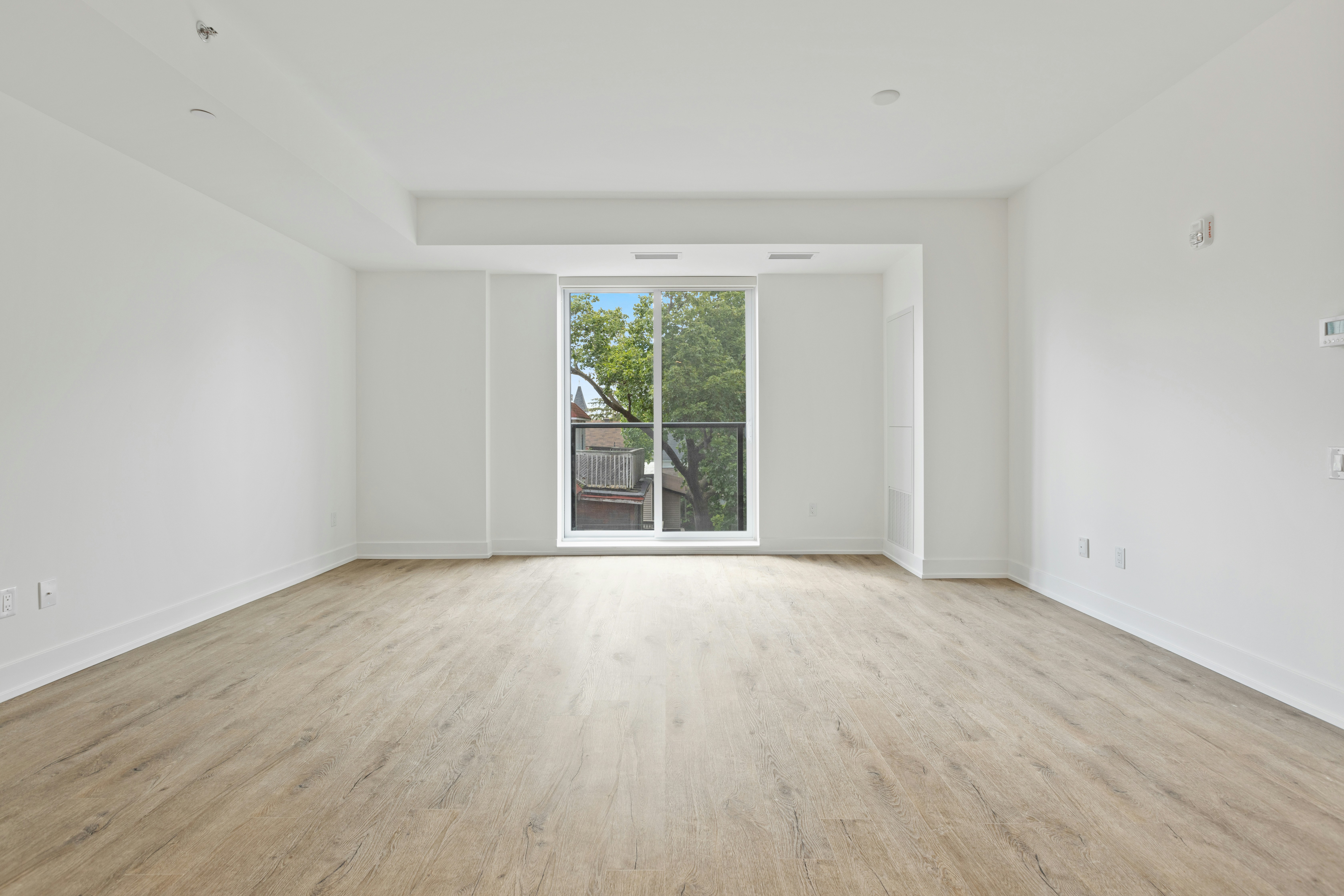
The Challenge: Before
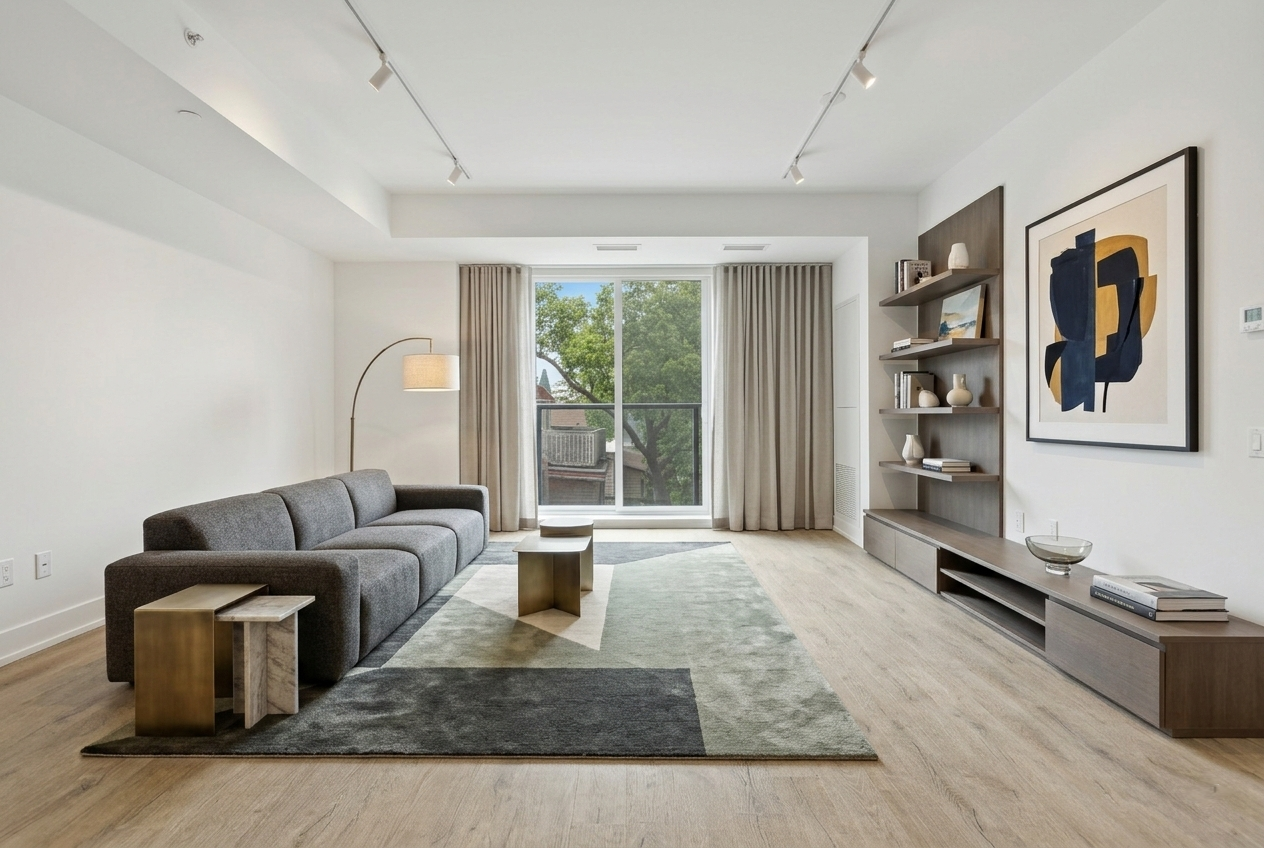
The Transformation: After (AI Generated)
House Design Software - Free AI Alternative (2026)
Traditional house design software represented significant advancement when it emerged, making architectural visualization accessible to homeowners without requiring professional CAD expertise or expensive specialist consultations. However, anyone who's actually used programs like SketchUp, Sweet Home 3D, Home Designer, or similar tools quickly discovers significant drawbacks: steep learning curves requiring hours or days before producing useful results, time-consuming manual construction demanding 30-90 minutes minimum per room, technical complexity around 3D modeling concepts having nothing to do with actual design aesthetics, and 3D rendered output that often appears obviously computer-generated rather than photorealistic. Modern AI technology offers fundamentally different approach eliminating manual construction, technical learning, and time investment while producing superior photorealistic results in 30 seconds instead of hours. This comprehensive comparison explains why thousands of users are abandoning traditional house design software for AI-powered alternatives that democratize professional-quality visualization through intelligent automation rather than demanding technical skills most people don't possess and don't want to develop just to see what their rooms could look like with different furniture or colors.
The Traditional House Design Software Problem
Traditional house design software follows fundamentally flawed approach requiring users to manually build virtual versions of their rooms from scratch before seeing any design options. You must place walls defining room boundaries, add windows and doors in correct positions with proper dimensions, construct ceiling and floor planes, insert every furniture piece individually from catalogs, adjust lighting sources and camera angles, configure materials and textures, then finally render scenes hoping results justify hours invested. This architectural modeling approach makes sense for professionals designing buildings that don't yet exist, but creates massive unnecessary burden for homeowners who simply want to visualize what their existing spaces could look like with different aesthetics, furniture, or colors.
The learning curve represents significant barrier where most users require multiple sessions across several days reaching basic proficiency with ongoing learning needed for advanced features. Tutorial videos, documentation reading, and forum searching become necessary just to accomplish simple tasks like rotating furniture, adjusting wall heights, or changing material textures. Even experienced users sometimes forget rarely-used features or encounter unexpected interface behaviors requiring troubleshooting. This technical complexity gate-keeps house design software to patient, technically-inclined hobbyists willing to invest substantial learning time rather than serving busy homeowners wanting quick answers about design possibilities without committing to learning new complex software systems.
The time investment creates practical barrier where generating even basic room designs demands 30-90 minutes minimum for simple spaces, with complex rooms or multiple rooms requiring hours or days of work. Each design variation or modification requires additional manual adjustments and rendering time since changing furniture styles means finding and placing new catalog items, altering colors involves material editor navigation, and layout modifications demand moving every affected object individually. This inefficiency makes exploring multiple design directions prohibitively time-consuming, forcing users to commit to first functional direction rather than comprehensively evaluating alternatives that might work better but require additional hours to visualize.
The catalog limitations frustrate users discovering that software doesn't include furniture matching their actual pieces, desired styles, or budget ranges. You might want Scandinavian minimalism but find catalogs emphasize traditional ornate pieces, or seek affordable IKEA-style options but encounter mostly high-end designer items. Some software requires additional purchases for expanded catalogs or premium furniture libraries, creating unexpected costs beyond free or low-cost software itself. These mismatches force unsatisfying compromises arranging rooms with furniture you wouldn't actually buy just to complete projects, undermining entire purpose of visualization when results don't reflect realistic implementation possibilities.
Traditional Software vs AI Design: Direct Comparison
Time Investment: Hours vs Seconds
Traditional house design software demands 30-90 minutes for basic room designs including interface learning, manual room construction, furniture placement and adjustment, material selection and application, lighting configuration, camera angle setup, and rendering. Each subsequent design variation requires 15-30 minutes minimum for modifications and re-rendering. First-time users typically spend 2-4 hours on initial designs including learning time, with ongoing projects requiring 30+ minutes per session. AI design generates complete professional visualizations in 30 seconds after simple photo upload and style selection. Exploring multiple design directions takes 5-10 minutes total versus traditional software's hours, representing 100x efficiency improvement making comprehensive design exploration practical for busy people rather than requiring dedication to time-consuming hobby projects.
Required Skills: 3D Modeling vs Photo Upload
Traditional software requires learning 3D modeling concepts including orthographic versus perspective views, dimension specification and measurement, object manipulation in three-dimensional space, camera angle and focal length adjustment, lighting placement and configuration, material and texture application, and rendering settings optimization. These technical skills have nothing to do with design aesthetics but prove necessary for software operation, creating barrier excluding people without spatial reasoning ability, patience for technical learning, or interest in computer modeling as activity unto itself. AI design requires only ability to take or upload photo, select from visual style options, and evaluate which generated results you prefer—tasks literally anyone can accomplish regardless of technical skill, spatial reasoning ability, or design training.
Flexibility: Catalog Limits vs AI Generation
Traditional software constrains you to whatever furniture, materials, and objects exist in their catalogs which might not include styles you want, brands you can afford, or aesthetics you prefer. If catalog lacks good modern pieces, you cannot create authentic modern design regardless of skill level. If Scandinavian finishes aren't in material library, you're stuck approximating aesthetic with mismatched alternatives. Some software sells additional content packs expanding options but creating ongoing costs. AI uses generative technology creating designs from unlimited style knowledge rather than rearranging preset catalog items. You're never constrained by catalog limitations because AI generates designs based on style understanding rather than available furniture database, enabling any established aesthetic regardless of what catalog happens to include.
Results Quality: 3D Renders vs Photorealistic Images
Traditional software produces 3D rendered images with characteristic computer-generated appearance featuring somewhat artificial lighting despite ray tracing, plastic-looking materials despite texture mapping, and overall aesthetic clearly distinguishable from real photography creating visual disconnect making it hard to judge whether designs would actually look good implemented. While technically impressive, these renders don't help you emotionally connect with proposed designs or confidently evaluate real-world implementation feasibility. AI generates photorealistic images appearing like professional interior photography making it easy to visualize how designs would actually look in your real space, feel emotionally connected to proposals, and confidently make implementation decisions based on realistic rather than abstract representations.
Design Intelligence: Manual Choices vs AI Expertise
Traditional software gives you tools but provides zero design guidance leaving all aesthetic decisions to users typically lacking professional design training. You can create technically accurate rooms that look terrible because nothing prevents bad furniture combinations, poor color choices, awkward layouts, inappropriate scale relationships, or any other design mistakes beginners commonly make. The software doesn't know or care whether your design follows professional principles. AI incorporates intelligence trained on professional design expertise automatically ensuring furniture scale suits room proportions, color palettes coordinate beautifully, layouts optimize function and flow, style elements remain authentic and cohesive, and overall compositions follow proven principles about balance, focal points, and hierarchy. You get professional-quality results even without design knowledge because AI applies expert thinking automatically.
Accessibility: Installation vs Browser-Based
Traditional software requires downloading installers often hundreds of megabytes, running installation processes that may require administrator permissions, creating accounts with email verification, potentially dealing with license activation, and managing software updates over time. The installed applications demand adequate computer processing power and graphics capabilities for 3D rendering, limiting usage to capable desktop computers rather than phones or tablets. Software versions may become incompatible with operating system updates requiring re-purchasing or finding alternatives. AI design works entirely in web browsers on any device including phones, tablets, laptops, and desktops without installing anything. Start designing immediately without downloads or accounts, work from anywhere, avoid software management, and ensure consistent experience across all devices without system requirement concerns.
Learning Curve: Days vs Minutes
Traditional software's complexity means most users require multiple sessions across several days reaching basic proficiency with ongoing learning needed for advanced features. Many watch tutorial videos, read documentation, search forums for answers, and gradually develop familiarity through repeated use. Even after significant investment, users sometimes struggle with features or encounter unexpected behaviors requiring troubleshooting or additional research. The learning never quite ends as software updates introduce interface changes or new features demanding additional familiarization. AI design requires approximately 2 minutes to understand: upload photo, select style, generate design. That's the complete learning curve. No tutorials needed, no documentation reading, no troubleshooting. The simplicity means immediate value rather than investing hours learning before seeing useful results.
Popular House Design Software: Why Users Switch to AI
SketchUp: Powerful but Overkill
SketchUp represents industry-standard architectural modeling software used by professionals for comprehensive building design and construction documentation. Its power and flexibility make it excellent for architects and contractors but complete overkill for homeowners wanting simple room visualization. The professional-grade capabilities come with professional-grade complexity requiring substantial training investment before productive use. Free version limitations and expensive Pro version costs ($299/year) make it poor value for occasional residential design needs. Users seeking simple visualization discover they're learning architectural software when they just wanted to see furniture arrangement options or color schemes, representing massive tool-to-task mismatch wasting time on capabilities they'll never use.
Sweet Home 3D: Free but Dated
Sweet Home 3D offers genuinely free open-source house design software that's helped many people over the years. However, the interface feels dated compared to modern applications, the furniture catalog skews traditional making contemporary design difficult, rendering quality lags current standards producing obviously computer-generated results, and the manual construction process still demands significant time despite being more streamlined than SketchUp. The software serves users willing to invest learning and usage time in exchange for free access, but many discover the time cost exceeds value received when AI alternatives provide superior results in fraction of time without any cost beyond few minutes uploading photos and selecting preferences.
Home Designer Suite: Expensive Professional Tool
Chief Architect's Home Designer Suite ($99-$499 depending on version) targets serious hobbyists and design enthusiasts wanting professional-grade capabilities. The comprehensive feature set appeals to people genuinely interested in house design as hobby or side business, but represents massive overkill for homeowners wanting simple room visualization. The learning investment required to utilize even fraction of available capabilities makes it poor choice for casual users, while the cost seems difficult to justify for occasional residential design needs most people face. Those attracted to Home Designer usually either become serious enthusiasts treating design as hobby or quickly realize they wanted simple visualization rather than professional design platform, with AI serving the latter group much better.
Planner5D: Simplified but Still Manual
Planner5D attempts to simplify house design through more intuitive interface and streamlined workflow compared to professional tools. However, it still requires manual room construction and furniture placement consuming significant time, free version limitations force paid subscriptions for full functionality, and catalog constraints limit design flexibility despite improvements over other platforms. The rendering quality shows progress toward photorealism but often still appears somewhat computer-generated rather than fully realistic. Users appreciate Planner5D's accessibility improvements over harder software but many still find the manual process too time-consuming and results insufficiently realistic for confident implementation decisions, leading them toward AI alternatives eliminating manual work entirely.
How AI House Design Works
Upload and Instant Analysis
Instead of manually measuring and building virtual rooms, simply photograph your actual space using phone camera showing room clearly from corner or doorway position. The AI analyzes this photo through computer vision instantly understanding room dimensions and proportions, window and door placements, ceiling height indicators, architectural features, natural light quality, existing furniture and objects, and spatial relationships. This automatic analysis extracts comprehensive room information in milliseconds without requiring manual measurements, dimension specifications, or technical input. The photo-based approach makes design accessible to anyone with smartphone versus traditional software requiring measurement precision and CAD-like data entry.
Style Selection and Requirements
After photo upload, select desired design style from comprehensive options including modern, traditional, Scandinavian, industrial, bohemian, farmhouse, coastal, mid-century modern, minimalist, transitional, rustic, and many more. Optionally specify functional requirements like pet-friendly materials, maximize seating capacity, include workspace area, or accommodate existing furniture you're keeping. This input takes seconds through simple visual selections rather than requiring detailed specifications or technical briefs. The AI uses your selections to guide generation ensuring results match your aesthetic preferences and practical needs rather than creating generic beautiful rooms ignoring your actual constraints and requirements.
Automated Design Generation
The AI processes your photo and requirements generating complete room design in approximately 30 seconds through neural networks trained on professional design principles. During generation, the technology automatically makes thousands of decisions about furniture selection, scale relationships, arrangement optimization, color palette development, material choices, lighting design, decorative placement, and style consistency without requiring any user input on individual elements. This comprehensive automated design thinking represents what professional designers do mentally when developing room concepts, now handled by AI enabling professional-quality results without requiring users to possess or develop professional design knowledge and spatial reasoning abilities.
Photorealistic Visualization
Unlike traditional software's 3D renders, AI generates photorealistic images appearing like professional interior photography enabling immediate emotional connection and confident evaluation. The images show your actual room transformed according to specifications with realistic lighting, authentic material appearances, proper shadows and reflections, and natural photographic quality making it easy to visualize implementation rather than struggling to interpret abstract 3D representations. This realism proves crucial for making confident decisions since you're evaluating realistic depictions rather than computer graphics requiring mental translation into real-world expectations that often prove inaccurate when designs get implemented.
Rapid Iteration and Refinement
Since each generation completes in 30 seconds, you can rapidly explore multiple design directions through simple regeneration. Want warmer colors? Generate new version. Prefer different furniture style? Request alternative. Need more casual arrangement? Specify adjustment. This iterative process takes minutes total rather than hours because modifications don't require manual reconstruction, just new generation with adjusted parameters. Most users reach confident design direction within 3-5 generations totaling 5-10 minutes including evaluation time, representing massive efficiency improvement over traditional software where each variation demands 15-30 minutes minimum of manual adjustment and re-rendering.
When to Use Traditional Software vs AI Design
Use Traditional Software For:
Architectural projects designing buildings that don't yet exist requiring floor plans, elevations, construction documents, and precise specifications for contractors. Technical renovations involving structural changes, custom millwork, electrical planning, or plumbing modifications needing accurate measurements and specifications. Professional work where you're a designer, architect, contractor, or real estate professional using design software daily as core business tool justifying significant learning investment and ongoing subscription costs. Hobbyist interests where you genuinely enjoy 3D modeling as activity itself rather than just wanting design visualization outcomes, treating software mastery as satisfying pursuit rather than necessary evil.
Use AI Design For:
Room visualization showing existing spaces with different aesthetics, furniture, or colors helping you understand transformation possibilities before buying anything or hiring contractors. Design direction establishing clear aesthetic vision and specific goals enabling confident furniture shopping, paint selection, and contractor communication. Style exploration rapidly comparing how different aesthetics transform identical space revealing preferences through direct visual comparison. Quick answers when you need immediate visualization without time for manual software work or ability to justify learning investment for occasional residential design needs. Professional presentations when designers want rapid client visualization without investing hours in manual modeling for conceptual direction-setting discussions.
The Hybrid Approach
Many professionals use both traditional software and AI for different purposes: AI first for rapid client visualization and direction-setting showing multiple aesthetic options quickly building enthusiasm and alignment, then traditional software later for technical specifications, construction documents, and precise planning once direction is established. This sequence leverages each technology's strengths—AI for speed and photorealism in conceptual phases, traditional software for precision and documentation in implementation phases. Homeowners might use AI for establishing vision and confidence, then engage professionals who use traditional software for technical execution of that vision through proper plans and specifications.
Making the Switch from Traditional Software
What You'll Gain
Switching from traditional house design software to AI delivers immediate dramatic time savings with 30-second generation versus 30-90 minute manual construction, zero learning curve replacing days or weeks of tutorial watching and documentation reading, superior photorealistic results versus computer-generated 3D renders, unlimited style flexibility versus catalog constraints, professional design intelligence versus manual decision-making without expertise, instant device accessibility versus installed software limitations, and genuine free functionality versus restricted trials or expensive licenses. These combined benefits make AI compelling alternative for anyone using traditional software primarily for residential visualization rather than professional architectural work.
What You'll Lose
Traditional software provides capabilities AI currently doesn't including precise dimension control and measurement, technical construction documentation for contractors, custom object modeling and editing, complex lighting control and simulation, detailed material and texture customization, architectural drawing generation (floor plans, elevations), and comprehensive project coordination across multiple rooms or buildings. For users actually utilizing these advanced capabilities regularly, traditional software remains necessary. For most homeowners who never used these features anyway despite their availability, losing unused capabilities represents no practical disadvantage while gaining massive usability and efficiency improvements through AI's streamlined approach.
Transition Strategy
If currently using traditional software, test AI approach alongside existing tools rather than abandoning immediately. Spend one session trying AI for room you've already designed traditionally, comparing time investment, result quality, and overall satisfaction. Most users who try both never return to manual software once experiencing AI's speed and ease, but direct comparison in your specific situation provides confidence making informed decision rather than abandoning familiar tools on recommendation alone. Keep traditional software available for any technical needs while using AI for rapid visualization and direction-setting where it excels.
Try Free AI House Design Alternative Today
Traditional house design software served important role making architectural visualization accessible to non-professionals, but modern AI technology renders the manual construction approach obsolete for most residential design visualization needs. Why invest hours learning complex 3D modeling software and manually building virtual rooms when AI can analyze your actual space photo and generate professional photorealistic designs in 30 seconds? The efficiency gain, result quality improvement, and accessibility enhancement make AI compelling alternative for anyone wanting house design visualization without committing to software mastery as hobby or profession. Whether you're frustrated traditional software user seeking better approach or someone who tried and abandoned house design software finding it too complex or time-consuming, modern AI offers the streamlined, effective alternative making professional-quality visualization finally practical for normal busy people.
Experience AI House Design - No Software Required
Upload your room photo and receive professional AI-generated design in 30 seconds. Works in browser on any device. Completely free, no download, no learning curve.
Related Design Software Alternatives
Ready for Your Own AI Redesign?
Start Designing with AI →FAQs about House Design Software - Free AI Alternative (2026)
Everything you need to know
What is the best free house design software?
HouseGPTs AI offers the best free house design alternative in 2026, generating professional photorealistic designs in 30 seconds versus traditional software's 30-90 minute manual construction. Unlike SketchUp, Sweet Home 3D, or Planner5D requiring downloads, learning curves, and manual room building, HouseGPTs works in browser through simple photo upload and style selection. You get 2 free AI-generated designs without watermarks, downloads, or signup. Superior results, zero learning curve, instant accessibility make it better alternative for residential visualization than traditional design software.
Is AI better than traditional house design software?
AI is better for residential visualization offering: 100x faster results (30 seconds vs 30-90 minutes), zero learning curve vs days/weeks of training, photorealistic images vs 3D renders, unlimited style options vs catalog constraints, professional design intelligence vs manual decisions, and browser-based access vs software installation. Traditional software excels at: technical construction documents, precise measurements, architectural drawings, and professional design work. For homeowners wanting room visualization, AI provides superior experience. For architects and contractors, traditional software remains necessary.
Do I need to download house design software?
Not with AI alternatives. Traditional house design software like SketchUp, Sweet Home 3D, and Home Designer requires downloading installers (often 100s of MB), running installation, creating accounts, and managing updates. HouseGPTs AI works entirely in web browser on any device including phones, tablets, laptops, desktops without installing anything. Simply visit website, upload photo, generate designs immediately. No downloads, no installation, no software management, no system requirements to worry about—just instant browser-based access from anywhere.
How long does it take to learn house design software?
Traditional house design software requires days or weeks to reach basic proficiency. Most users spend 2-4 hours on first designs including learning time, with ongoing tutorial watching and documentation reading for advanced features. Even experienced users sometimes struggle with rarely-used functions or interface changes. HouseGPTs AI has ~2 minute learning curve: upload photo, select style, generate design. That's the complete process. No tutorials, no documentation, no troubleshooting. Immediate useful results rather than investing hours learning before seeing value.
What's wrong with traditional house design software?
Traditional software problems include: steep learning curve requiring hours/days before useful results, time-consuming manual room construction (30-90 min minimum), technical complexity unrelated to design aesthetics, catalog limitations constraining style options, 3D rendered output appearing computer-generated not photorealistic, expensive licenses or restricted free versions, software installation and management hassles, and providing professional architectural capabilities most homeowners never use. These barriers make traditional software poor fit for residential visualization despite being excellent for professional architectural work.
Can I use house design software on my phone?
Traditional house design software typically requires desktop computers with adequate processing power for 3D modeling and rendering, though some offer limited mobile apps with reduced functionality. HouseGPTs AI works fully in mobile browsers on phones and tablets without installing apps. Take photo with phone camera, upload directly, select style, generate professional designs—entire process works seamlessly on mobile. The browser-based approach ensures consistent full functionality across all devices without mobile-specific limitations or requiring desktop access.
Is house design software difficult to use?
Yes, traditional house design software involves significant complexity requiring learning 3D modeling concepts, manual room construction, furniture placement from catalogs, material application, lighting setup, and rendering configuration. Most users find steep learning curve and time investment challenging, with many abandoning software after initial frustrating experiences. HouseGPTs AI eliminates this difficulty through automated generation—upload photo, select style, receive design. Anyone can do this regardless of technical skill or design knowledge. The simplicity makes professional-quality visualization accessible to everyone versus only technically-inclined hobbyists.
What is the easiest house design software?
HouseGPTs AI is the easiest house design tool requiring only: (1) upload room photo (2) select style preference (3) receive professional design in 30 seconds. No manual construction, no 3D modeling, no technical learning. Among traditional software, Planner5D and Sweet Home 3D are easier than SketchUp but still require manual room building consuming 30+ minutes minimum. The fundamental difference: traditional software requires users to build designs manually, AI generates designs automatically. For pure ease, AI represents quantum leap beyond even simplest traditional software.