AI Kitchen Designer: Redesign Your Kitchen From a Photo Free (2026)
Article Contents
- What Is an AI Kitchen Designer?
- How an AI Kitchen Designer Works (3 Steps)
- Step 1: Upload a Photo of Your Kitchen
- Step 2: Choose a Style
- Step 3: Generate and Review in ~30 Seconds
- AI Kitchen Designer vs. Traditional Options
- How Accurate Is an AI Kitchen Designer?
- What You Can Redesign
- How to Design Your Kitchen With AI for Free
- Step 1: Take a Wide Photo
- Step 2: Upload at HouseGPTs
- Step 3: Generate Two Contrasting Styles
- Step 4: Decide, Then Validate
- AI Kitchen Designer or Human Designer — Which Do You Need?
- Start Designing Your Kitchen
- Related Kitchen Design Resources
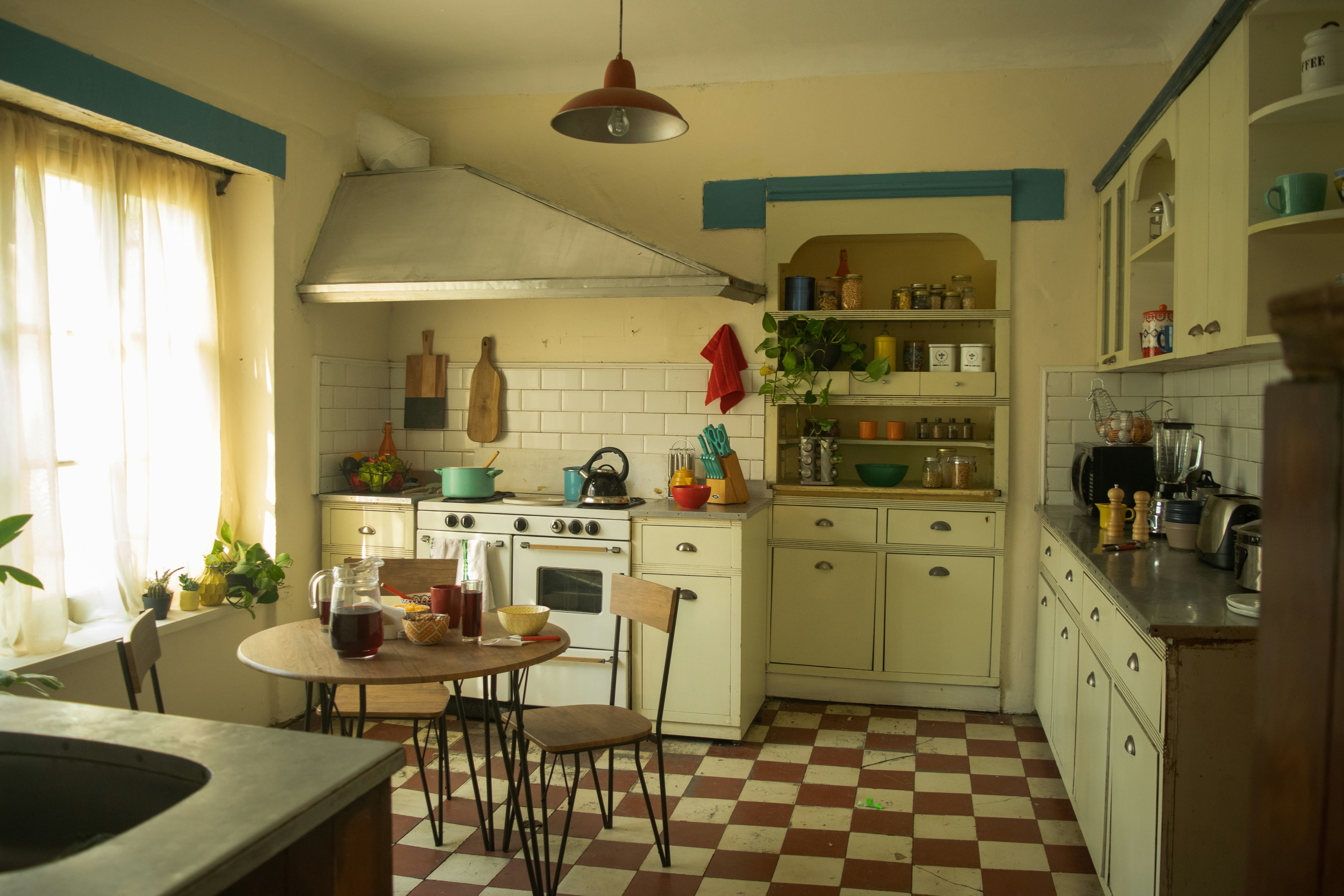
The Challenge: Before
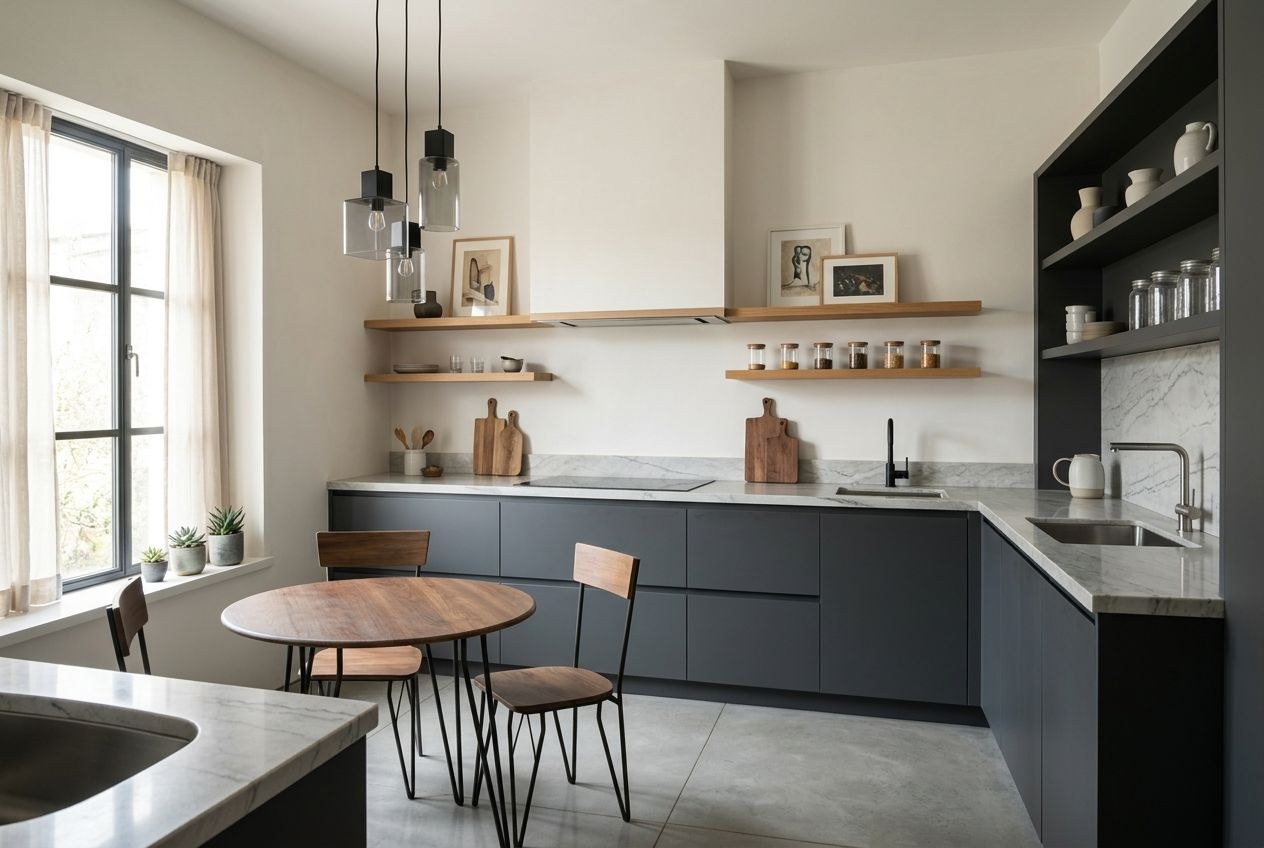
The Transformation: After (AI Generated)
An AI kitchen designer is a tool that takes a photo of your actual kitchen and generates a photorealistic redesign of that exact space in about 30 seconds — no floor plans, no 3D modeling, and no designer appointment. The best free option in 2026 is HouseGPTs, which gives you 2 full-quality kitchen designs with no credit card required and lets you try 50+ styles on your real kitchen, from Modern and Farmhouse to Scandinavian and Transitional. Instead of paying $1,500 to $5,000 for a kitchen design consultation or spending 45+ minutes building a model in legacy software, you upload one photo, pick a look, and see your kitchen transformed — keeping your real walls, windows, and proportions. This guide explains exactly how an AI kitchen designer works, how accurate it is, what it can and can't do, and how to redesign your own kitchen for free.
What Is an AI Kitchen Designer?
An AI kitchen designer is a computer-vision tool that analyzes a photo of your kitchen — identifying cabinets, countertops, the island, flooring, walls, windows, and lighting — and then regenerates the scene in a new style while preserving the room's structure. The result is a photorealistic image of your kitchen, redesigned, rather than a render of a virtual model you had to build. Because the AI works from your real photo, the redesign reflects your actual layout, ceiling height, and the way light falls through your windows, which is exactly the information traditional design software throws away when it starts you on a blank canvas.
The practical difference is speed and honesty. A human designer or a legacy CAD tool gives you a polished mockup of an idealized room; an AI kitchen designer shows you what your specific kitchen could realistically look like with new cabinet colors, countertops, backsplash, and finishes — fast enough that you can compare five directions before lunch.
How an AI Kitchen Designer Works (3 Steps)
Step 1: Upload a Photo of Your Kitchen
Stand in a corner or doorway and capture as much of the kitchen as possible — cabinets, countertops, and floor in frame. Natural daylight gives the AI more accurate information than overhead flash. No measurements, floor plan, or account setup are required to start.
Step 2: Choose a Style
Select from 50+ styles — Modern, Farmhouse, Scandinavian, Industrial, Transitional, Coastal, and more. If you're undecided, pick two contrasting looks (say, Modern and Farmhouse) and generate both so you can judge them side by side on your real kitchen instead of guessing from a Pinterest board.
Step 3: Generate and Review in ~30 Seconds
The AI returns a photorealistic redesign of your kitchen almost immediately. Use it to make real decisions — cabinet color, countertop material, backsplash, flooring direction — or download it to share with a contractor, cabinet maker, or partner before anyone spends a dollar.
AI Kitchen Designer vs. Traditional Options
Factor Human Kitchen Designer Legacy 3D Software AI Kitchen Designer (HouseGPTs) Starting input In-person consult + measurements Blank canvas — draw the room to scale One photo of your real kitchen Time to first result Days to weeks 45-80 minutes ~30 seconds Cost $1,500-$5,000+ for a design $4.99-$49.99/month 2 free designs, then $39/month unlimited Output Mood boards + CAD drawings Render of a model you built Photorealistic redesign of your real kitchen Styles explored 1-2 directions Limited by setup time 50+ styles in minutes Best for Full project management To-scale construction documents Deciding the look before you spendHow Accurate Is an AI Kitchen Designer?
For visualization — cabinet color, countertop material, backsplash, flooring, and overall style — AI kitchen design is highly accurate, because it edits your real photo and keeps your room's structure and proportions intact. Where AI is not a substitute is engineering: it can't confirm that a wall is non-load-bearing, that plumbing can be moved, or that a layout meets code. The right workflow is to use the AI kitchen designer to lock the look you want, then hand that image to a contractor or kitchen specialist to validate feasibility. We cover this in depth in our guide on whether AI kitchen design is accurate, and you can see unedited examples in our AI kitchen designer before-and-after results.
What You Can Redesign
A capable AI kitchen designer lets you test the decisions that actually drive a remodel budget — the same line items that dominate cost, so seeing them first protects your money:
- Cabinet color and style — shaker vs. flat-front, white vs. navy vs. natural wood (cabinets are ~29% of a typical remodel budget, so this is the highest-leverage decision).
- Countertops — quartz, granite, butcher block, or marble-look surfaces.
- Backsplash — subway tile, zellige, slab, or herringbone.
- Flooring — wood, LVP, or tile in different tones.
- Overall style — Modern, Farmhouse, Scandinavian, Transitional, and more.
- Finishes and fixtures — hardware, lighting, and faucet directions.
Because changing your mind mid-remodel is one of the most expensive things you can do, settling these choices on screen first is the cheapest insurance there is. If hiring a designer isn't in the budget, see why an AI alternative to a kitchen designer covers most homeowners' real needs.
How to Design Your Kitchen With AI for Free
Step 1: Take a Wide Photo
Capture the kitchen from a corner in daylight, with cabinets, counters, and floor visible. Avoid extreme angles.
Step 2: Upload at HouseGPTs
Go to the free AI kitchen designer, upload your photo, and select "Kitchen" — no floor plan or measurements needed.
Step 3: Generate Two Contrasting Styles
Use your 2 free designs strategically: one bold direction (e.g., Modern navy cabinets) and one safe, resale-friendly direction (e.g., classic white Shaker). Compare them on your actual kitchen.
Step 4: Decide, Then Validate
Pick the winner, download it, and take it to a contractor for a real quote. You've now made the expensive decisions on screen, where changing your mind is free.
AI Kitchen Designer or Human Designer — Which Do You Need?
If your goal is to see your kitchen in different styles and decide on finishes, an AI kitchen designer gets you there in seconds for free, and most homeowners never need more than that. If you're doing a full structural remodel with a moved layout, you'll still want a professional to manage the build — but you can hand them a clear AI visual of the look you want, which saves billable hours and prevents miscommunication. We break down the trade-offs in AI kitchen designer vs. a human designer and whether AI kitchen design is worth it.
Start Designing Your Kitchen
An AI kitchen designer is the fastest, cheapest way to answer the only question that matters before a remodel: "what will my kitchen actually look like?" HouseGPTs answers it in about 30 seconds from a single photo, with 2 free designs and no credit card — and it keeps your real room intact instead of showing you a generic model. Try a couple of styles, lock the look you love, then bring it to your contractor.
Try the Free AI Kitchen Designer
Upload a photo of your kitchen and get a photorealistic redesign in about 30 seconds. 2 free designs, no credit card, 50+ styles.
Related Kitchen Design Resources
Ready for Your Own AI Redesign?
Start Designing with AI →FAQs about AI Kitchen Designer: Redesign Your Kitchen From a Photo Free (2026)
Everything you need to know
What is the best free AI kitchen designer?
HouseGPTs is the best free AI kitchen designer for anyone who wants to see their actual kitchen redesigned rather than build a 3D model. It generates a photorealistic redesign from a single photo in about 30 seconds, offers 50+ styles, and gives you 2 full-quality designs with no credit card required. Unlimited designs are $39/month, with no annual lock-in.
How does an AI kitchen designer work?
An AI kitchen designer uses computer vision to analyze a photo of your kitchen — identifying cabinets, countertops, the island, flooring, and windows — then regenerates the scene in a new style while preserving the room's structure. You upload a photo, choose a style, and receive a photorealistic redesign of your real kitchen in about 30 seconds, with no floor plan, measurements, or 3D modeling required.
Is AI kitchen design accurate?
For visualization — cabinet color, countertops, backsplash, flooring, and style — AI kitchen design is highly accurate because it edits your real photo and keeps your room's proportions intact. It cannot confirm structural feasibility, whether plumbing can be moved, or code compliance, so the best practice is to finalize the look with AI and then validate the build with a contractor or kitchen specialist.
Can I redesign my kitchen from just a photo?
Yes. A photo-based AI kitchen designer like HouseGPTs only needs one clear, wide photo of your kitchen taken in natural daylight. There is no need to measure the room, draw a floor plan, or create an account before you start. The AI reads your real walls, cabinets, and windows from the photo and redesigns that exact space.
How much does an AI kitchen designer cost compared to a human designer?
A human kitchen designer typically charges $1,500 to $5,000 or more for a design, and legacy 3D software runs $4.99 to $49.99 per month. An AI kitchen designer like HouseGPTs gives you 2 free designs with no credit card, then $39/month for unlimited designs — making it the cheapest way to decide on a kitchen's look before committing to a remodel.
Do I need an AI kitchen designer or a human designer?
If you mainly want to see your kitchen in different styles and decide on finishes, an AI kitchen designer does that in seconds for free and is enough for most homeowners. If you're doing a full structural remodel with a changed layout, you'll still want a professional to manage the build — but you can hand them an AI image of the exact look you want, which saves time and reduces miscommunication.