Free Home Design Software - AI Alternative (2026)
Article Contents
- The "Free" Home Design Software Problem
- Popular Free Home Design Software: Reality Check
- Sweet Home 3D: Actually Free but Dated
- SketchUp Free: Limited Web Version
- RoomSketcher: Free Trial Only
- Planner5D: Freemium Model
- Why AI Represents Better Free Alternative
- Actually Free Without Hidden Limitations
- Zero Learning Curve
- No Download or Installation
- Superior Results Quality
- Professional Design Intelligence Included
- Time Efficiency
- What Actually Costs Money (And What Doesn't)
- Free Features vs Paid Upgrades
- Hidden Costs to Watch For
- The Real Cost: Your Time
- Choosing the Right Free Home Design Approach
- When Traditional Free Software Makes Sense
- When AI Free Alternative Excels
- The Hybrid Approach
- Getting Started with Free AI Home Design
- What You Need
- First Session Strategy
- Implementation Planning
- Try Genuinely Free Home Design Today
- Related Free Design Resources
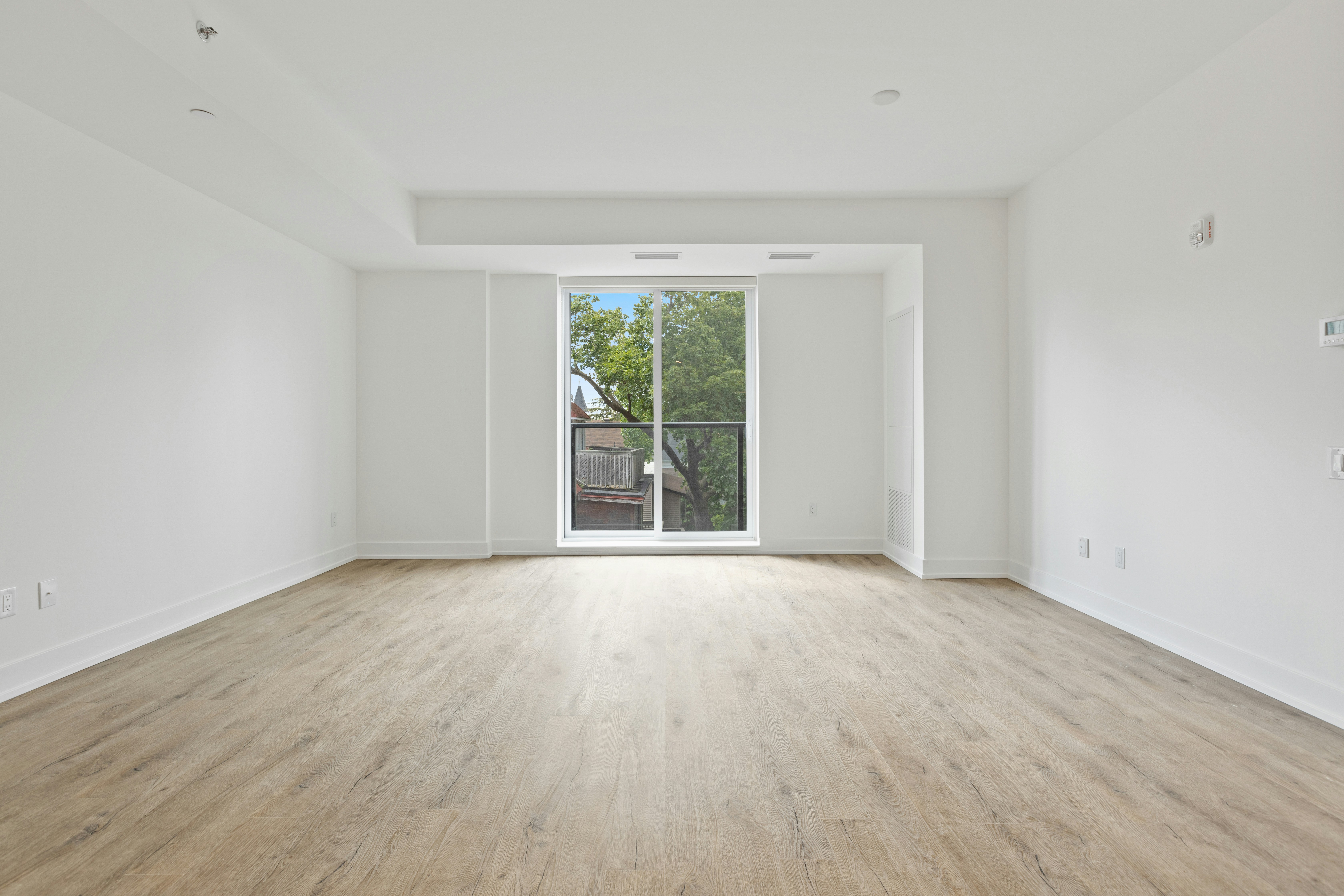
The Challenge: Before
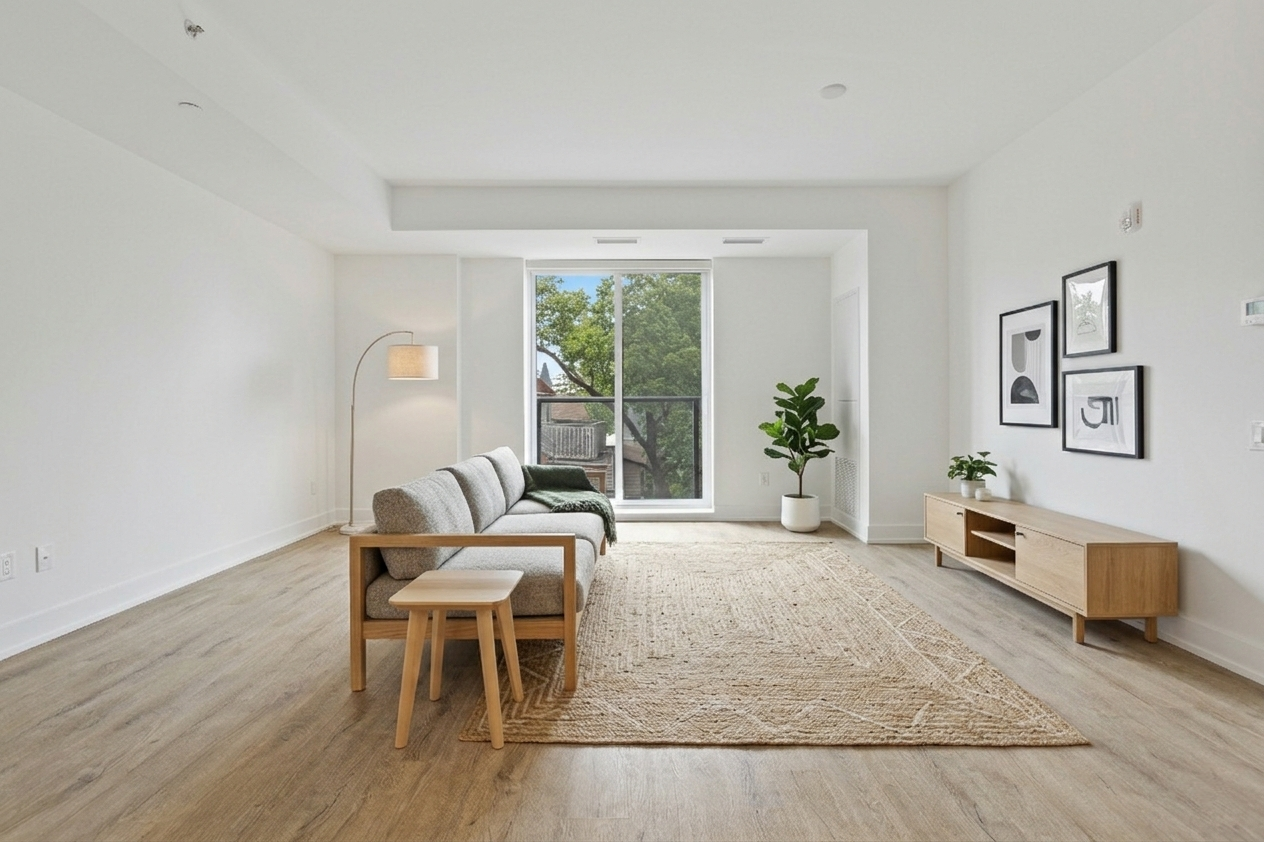
The Transformation: After (AI Generated)
Free Home Design Software - AI Alternative (2026)
Finding genuinely free home design software that delivers professional results without frustrating limitations, steep learning curves, or hidden costs represents significant challenge for homeowners wanting to visualize room transformations, plan renovations, or explore design possibilities. Most software marketed as "free" either requires extensive downloads consuming gigabytes of storage, demands days of tutorial-watching before producing useful results, restricts critical features behind paywalls forcing expensive upgrades, or generates obviously computer-generated renders that don't help confident real-world decision-making. The fundamental problem involves these programs requiring users to become amateur 3D modelers and interior designers simultaneously—learning complex software while making design decisions most people lack training to make confidently. Modern AI technology offers revolutionary alternative eliminating manual construction, technical learning, feature restrictions, and time investment while producing superior photorealistic results in 30 seconds instead of hours. This comprehensive guide explores why traditional free home design software disappoints users, how AI-powered alternatives solve these problems, what realistic expectations should guide tool selection, and how to choose approaches matching your actual needs rather than marketing promises that rarely deliver practical value for typical homeowners.
The "Free" Home Design Software Problem
Software marketed as free home design tools typically fails delivering genuine value through several common patterns that frustrate rather than serve users. The truly free versions often prove so limited in functionality that completing even basic room designs becomes impossible without paid upgrades. You can build walls and place furniture but cannot export designs without watermarks, cannot save more than one project, cannot access full furniture catalogs, or cannot generate adequate resolution renders for implementation planning. These artificial restrictions exist purely to force paid conversions rather than serving users who expected free software to actually work for free rather than operating as crippled trial versions disguised as free offerings.
The download and installation requirements create another barrier where supposedly free software demands hundreds of megabytes or even gigabytes of storage space, requires administrator permissions for installation, needs regular updates consuming bandwidth and time, and only works on specific operating systems excluding users on incompatible devices. These technical demands make "free" software expensive in terms of storage, processing power, compatibility requirements, and ongoing maintenance burden that paid cloud-based services handle invisibly. The free designation ignores these hidden costs in computer resources and user time managing software rather than using it productively for actual design work.
The learning curve represents perhaps the most significant hidden cost where free software requires substantial time investment before producing any useful results. Users must watch hour-long tutorial series, read dense documentation, practice basic operations repeatedly, troubleshoot unexpected interface behaviors, and gradually develop proficiency over days or weeks before feeling comfortable enough to attempt real projects. This learning investment makes sense for professionals using software daily but represents terrible value proposition for homeowners needing occasional design visualization. The hours spent learning software often exceed time saved versus hiring professionals or making decisions through simpler trial-and-error approaches requiring no technical training.
The quality gap between marketing promises and delivered results creates final disappointment where free software claims to produce "professional quality" designs but actually generates obviously computer-generated renders lacking the photorealism needed for confident implementation decisions. The 3D output appears artificial through plastic-looking materials, unrealistic lighting, and overall aesthetic clearly distinguishable from real photography. These unconvincing visualizations don't help users understand how designs would actually look implemented in real spaces, undermining the entire purpose of design software which should build confidence rather than leaving users uncertain whether beautiful renders would translate to beautiful reality.
Popular Free Home Design Software: Reality Check
Sweet Home 3D: Actually Free but Dated
Sweet Home 3D represents genuinely free open-source software that doesn't restrict features or demand payments, making it honest exception to free-software-as-trial-version trend. However, the completely free access comes with significant limitations including dated interface feeling decades behind modern applications, furniture catalog skewing traditional making contemporary design difficult, rendering quality producing obviously computer-generated results rather than photorealism, and manual construction process still demanding extensive time investment despite being more streamlined than professional alternatives. The software serves users valuing truly free access over modern interface design, comprehensive style coverage, or convincing visualizations, but many discover the time cost and result quality don't justify zero monetary cost when faster better alternatives exist.
SketchUp Free: Limited Web Version
SketchUp offers free web-based version providing cloud access without downloads, but this free tier severely restricts functionality compared to paid Pro version costing $299 annually. The free version limits storage space forcing project deletions, restricts export formats preventing standard file sharing, removes advanced features professionals need, and still requires substantial learning investment mastering 3D modeling concepts despite simplified interface. The software targets users wanting to sample SketchUp before purchasing Pro rather than serving homeowners needing simple free visualization, with the capability-to-complexity ratio favoring professionals over casual users wanting straightforward design exploration without becoming 3D modeling enthusiasts.
RoomSketcher: Free Trial Only
RoomSketcher markets itself prominently but the free access proves extremely limited functioning essentially as trial period rather than genuine free software. Users can create one project and generate low-resolution previews before hitting paywall requiring $49-99 annually for actual functionality including multiple projects, high-resolution exports, professional floor plans, and full feature access. This trial-as-free-software marketing frustrates users investing time learning the platform before discovering they cannot actually use it meaningfully without paying, representing bait-and-switch approach rather than honest free offering serving users who cannot afford or don't want to pay for design software.
Planner5D: Freemium Model
Planner5D provides free tier allowing basic room creation but restricts most valuable features behind monthly subscriptions ranging from $10-25 depending on capabilities needed. The free version limits catalog access showing only fraction of available furniture, prevents high-quality rendering forcing users to accept low-resolution outputs, restricts project saves requiring deletions to create new designs, and adds watermarks to exports making them unsuitable for professional sharing. Like many freemium models, the free tier exists to demonstrate software while frustrating users enough that upgrading seems necessary for any serious use, raising question of whether heavily restricted free versions provide value or just create marketing funnel toward paid conversions.
Why AI Represents Better Free Alternative
Actually Free Without Hidden Limitations
AI-powered home design tools like HouseGPTs offer genuinely free functionality providing complete useful service without artificial restrictions forcing paid upgrades. Free users receive professional AI-generated designs without watermarks, can download high-resolution results suitable for implementation planning, access all design styles rather than limited subsets, and generate designs for any room types without artificial constraints. The optional paid upgrades add unlimited generation quantities for users wanting to explore dozens of variations but free users get complete value rather than crippled trial experience. This honest free offering respects users rather than attempting to frustrate them into paying for features that should have been included in advertised free service from beginning.
Zero Learning Curve
Traditional free software requires days or weeks of learning before producing useful results through tutorial watching, documentation reading, and practice sessions building proficiency with complex interfaces. AI design requires approximately two minutes to understand: upload photo, select style preference, generate design. This elimination of learning investment makes AI accessible to everyone regardless of technical aptitude, patience for software learning, or time availability for training. The immediate productivity means first session generates actual useful designs rather than being dedicated to software familiarization, providing instant value traditional software withholds until substantial learning investment pays off through eventual competency.
No Download or Installation
Free downloadable software consumes storage space, requires installation processes, demands regular updates, and only works on compatible operating systems creating barriers and ongoing maintenance burden. AI design works entirely in web browsers on any device including phones, tablets, laptops, and desktops without installing anything. Start designing immediately without downloads, software management, storage consumption, or compatibility concerns. This browser-based accessibility means working from anywhere, avoiding software update interruptions, eliminating storage constraints, and ensuring consistent experience across all devices without platform-specific limitations or capabilities varying by operating system.
Superior Results Quality
Free 3D design software generates computer-rendered images with characteristic artificial appearance despite best technical efforts. AI produces photorealistic images appearing like professional interior photography making it dramatically easier to visualize implementation, feel emotionally connected to designs, and confidently make real-world decisions based on realistic rather than abstract representations. This quality difference proves crucial since design visualization purpose involves building confident understanding of how spaces would actually look transformed, goal that unconvincing 3D renders undermine despite technical capabilities impressing software developers more than serving end users needing decision-making support rather than technical achievements.
Professional Design Intelligence Included
Free software provides tools but offers zero design guidance, leaving aesthetic decisions entirely to users typically lacking professional design training. You can create technically accurate rooms that look terrible because nothing prevents bad furniture combinations, poor color choices, awkward layouts, or inappropriate scale relationships. AI incorporates professional design intelligence trained on millions of expertly designed spaces, automatically ensuring furniture scale suits room proportions, color palettes coordinate beautifully, layouts optimize function and flow, and style elements remain authentic rather than accidentally mixing incompatible aesthetics. This automatic design expertise makes professional-quality results accessible to everyone rather than requiring years of training or natural talent most users don't possess.
Time Efficiency
Free traditional software demands 30-90 minutes minimum for basic room designs including manual construction, furniture placement, material selection, and rendering. Each variation requires additional manual work and waiting. AI generates complete professional designs in 30 seconds with exploring multiple styles taking 5-10 minutes total versus traditional software's hours for comparable exploration. This efficiency transforms design from major time commitment into quick exploration fitting realistically into busy schedules, making comprehensive design consideration practical rather than theoretical goal abandoned due to time constraints. The speed also enables true experimentation rather than committing to first functional direction because exploring alternatives demands prohibitive additional time investment.
What Actually Costs Money (And What Doesn't)
Free Features vs Paid Upgrades
Understanding what genuinely requires payment versus what marketing suggests needs payment helps make informed decisions. Truly free AI home design includes photo upload and analysis automatically understanding room dimensions and features, style selection across comprehensive range of established aesthetics, AI-generated professional design showing complete transformation, photorealistic visualization appearing like real photography, high-resolution download suitable for implementation planning and professional sharing, and ability to generate designs for multiple different rooms using included free designs strategically. These free features provide complete useful service rather than teaser restricting essential functionality behind paywalls.
Optional paid upgrades typically add unlimited generation quantities for users wanting to explore dozens of variations per room rather than few included free designs, priority processing during peak usage times for faster generation, early access to new features or experimental capabilities before general release, and advanced options like custom requirements specification or specialized technical features serving professional users. These paid features represent legitimate enhancements rather than essential functionality artificially restricted to force upgrades, with most typical homeowners finding free tier serves their needs completely without frustrating limitations forcing payment for basic capabilities.
Hidden Costs to Watch For
Some free software hides costs through patterns including watermarked outputs requiring payment for clean exports suitable for professional use, export format restrictions forcing paid upgrades for standard file types, resolution limitations making free renders too low-quality for actual implementation planning, catalog restrictions showing only fraction of available furniture forcing paid access for comprehensive options, and project limits forcing deletions or paid upgrades for multiple room designs. These hidden restrictions make "free" software functionally useless without paid upgrades despite marketing suggesting complete free functionality, representing dishonest bait-and-switch approach rather than transparent offering respecting users expecting advertised free software to actually work freely.
The Real Cost: Your Time
Beyond monetary costs, consider time investment required by different approaches. Traditional free software demanding hours of learning before useful results effectively costs whatever you value your time at multiplied by hours invested. If you value time at $25/hour and software requires 10 hours learning before productivity, the "free" software actually costs $250 in time value plus ongoing time investment for each design project. AI requiring essentially zero learning and 30-second generation represents genuine time savings making it effectively cheaper than free software demanding extensive time investment despite zero monetary cost. This time-value analysis reveals why supposedly free software often proves more expensive than paid alternatives delivering immediate value without training requirements.
Choosing the Right Free Home Design Approach
When Traditional Free Software Makes Sense
Despite AI advantages, traditional free software serves specific situations including projects requiring precise technical specifications like exact dimensions and measurements for contractor documentation, users genuinely interested in 3D modeling as hobby activity rather than just wanting visualization outcomes, professional work where you're architecture student or design professional building portfolio through free software before affording commercial tools, and technical renovations requiring detailed construction plans, electrical layouts, or plumbing specifications that visualization tools cannot provide. For these specialized needs, accepting traditional software's learning curve and time investment makes sense since the technical capabilities justify investment in ways simple visualization doesn't require.
When AI Free Alternative Excels
AI-powered free home design serves most typical homeowner needs including room visualization showing existing spaces with different aesthetics exploring transformation possibilities, furniture arrangement exploration seeing various layout options quickly, color scheme testing comparing how different palettes affect spaces, style discovery understanding which aesthetics resonate through rapid comparative generation, shopping preparation creating clear reference images guiding furniture purchasing and material selection, contractor communication providing photorealistic visualization explaining desired results, and family consensus building through specific visual examples rather than debating abstract possibilities. These common residential design needs favor AI's speed, ease, quality, and instant results over traditional software's technical capabilities rarely needed for straightforward decorating projects.
The Hybrid Approach
Many users benefit from combining both approaches strategically: AI first for rapid direction-setting and style exploration generating clear aesthetic vision through quick comparative designs, then traditional software later if technical specifications become necessary for complex renovations requiring detailed plans contractors need for implementation. This sequence leverages each technology's strengths—AI for speed and photorealism during conceptual phases, traditional software for precision and documentation during technical execution if projects escalate beyond simple decorating into substantial renovation requiring formal plans. Starting with AI prevents wasting time on technical software learning unless projects genuinely need capabilities justifying that investment.
Getting Started with Free AI Home Design
What You Need
AI home design requires minimal preparation including smartphone or camera for photographing current spaces showing rooms clearly from corners or doorways, web browser on any device since no software downloads or installations needed, few minutes to upload photos and select style preferences completing entire generation process, and open mind about exploring multiple style options through rapid generation revealing preferences through direct comparison. These minimal requirements make AI accessible to everyone rather than demanding technical resources, expensive equipment, or specialized knowledge that excludes typical homeowners from design visualization previously reserved for those with professional tools or substantial technical investment.
First Session Strategy
Maximize first free AI design session by photographing priority room clearly showing major features and furniture, uploading photo to AI design tool through simple browser interface, selecting 2-3 different styles for comparative generation seeing how varied aesthetics transform identical space, evaluating which generated designs resonate emotionally and practically, and downloading favorites as reference images guiding implementation planning and purchasing decisions. This strategic approach explores maximum design territory using minimal free designs efficiently rather than generating randomly without comparative context helping understand preferences. Most users gain clarity about aesthetic direction within single focused session rather than requiring multiple attempts.
Implementation Planning
Use free AI-generated designs practically by downloading high-resolution images serving as shopping references showing precise furniture styles, color palettes, and overall aesthetic to pursue, sharing visualizations with contractors or handypeople communicating renovation visions clearly without ambiguity, showing family members building consensus around specific plans rather than debating abstract possibilities, and referencing designs when making all design-related decisions ensuring purchases align with overall vision preventing expensive mistakes from selecting incompatible elements. The photorealistic quality makes AI designs genuinely useful implementation tools rather than just interesting visualizations, providing concrete value justifying time invested in generation even without requiring any monetary payment.
Try Genuinely Free Home Design Today
The landscape of free home design software disappoints through artificially limited trial versions disguised as free offerings, technically free but practically unusable tools forcing paid upgrades for basic functionality, dated software trading modern capabilities for genuine freedom from payment, or complex professional tools overwhelming homeowners wanting simple visualization without becoming 3D modeling enthusiasts. Modern AI technology offers revolutionary alternative providing genuinely free, genuinely useful home design through simple photo upload and intelligent automated generation eliminating learning curves, feature restrictions, technical requirements, and time investment that make traditional free software often more expensive than honest paid services when considering total cost including time value. Whether you need quick room visualization, style exploration, implementation planning, or confident design direction, AI-powered free alternatives serve these needs better than complex software designed for different purposes then marketed to homeowners who don't actually need or want technical capabilities justifying that complexity.
Experience Genuinely Free Home Design
Upload your room photo and receive professional AI-generated design in 30 seconds. Completely free, no download required, no hidden limitations, no watermarks.
Related Free Design Resources
Ready for Your Own AI Redesign?
Start Designing with AI →FAQs about Free Home Design Software - AI Alternative (2026)
Everything you need to know
What is the best free home design software?
HouseGPTs AI offers the best free home design experience in 2026 with genuinely free functionality including 2 professional AI-generated designs without watermarks, high-resolution downloads, all design styles, zero learning curve, no downloads, and browser-based access on any device. Traditional free software like Sweet Home 3D is technically free but demands extensive learning and produces dated results. SketchUp Free, RoomSketcher, and Planner5D severely restrict free tiers forcing paid upgrades for basic functionality. AI provides superior results instantly without artificial limitations.
Is there actually free home design software?
Yes, but definitions vary. Sweet Home 3D is genuinely free open-source software without feature restrictions but has dated interface and rendering quality. Most marketed as 'free' (SketchUp Free, RoomSketcher, Planner5D) are actually limited trials forcing paid upgrades for useful functionality. HouseGPTs AI provides genuinely free service including professional designs without watermarks, downloads, or essential features locked behind paywalls. The 'free' designation requires examining actual capabilities versus marketing claims to avoid trial-as-free-software bait-and-switch approaches.
Do I need to download free home design software?
Traditional free software typically requires downloading installers (100s of MB or GBs), running installations, managing updates, and working only on compatible operating systems. HouseGPTs AI works entirely in web browser on any device—phones, tablets, laptops, desktops—without installing anything. Simply visit website, upload photo, generate designs immediately. No downloads, no storage consumption, no compatibility concerns, no software management. Browser-based approach provides instant access from anywhere without technical requirements or ongoing maintenance burden.
Why is free home design software so limited?
Most 'free' home design software uses freemium business models where free tiers exist to demonstrate capabilities while frustrating users into paid upgrades through artificial restrictions including watermarked outputs, export limitations, catalog restrictions, project save limits, and resolution caps. Companies invest development costs expecting revenue from paid conversions, making genuinely useful free tiers financially unsustainable. True free software like Sweet Home 3D exists but lacks resources for modern interfaces and features. AI alternatives can provide genuine free value by automating design work rather than requiring extensive manual labor.
How long does it take to learn free home design software?
Traditional free software requires days or weeks to reach basic proficiency. Users typically spend 2-4 hours on first designs including learning time, with ongoing tutorial watching and documentation reading for advanced features. Sweet Home 3D and SketchUp Free demand substantial investment mastering 3D modeling concepts, interface navigation, and design principles. HouseGPTs AI has ~2 minute learning curve: upload photo, select style, generate design. Zero learning investment means immediate useful results rather than dedicating hours to software training before seeing any value.
Can free home design software create professional results?
Quality varies dramatically. Traditional free 3D software (Sweet Home 3D, SketchUp Free) generates computer-rendered images with characteristic artificial appearance—plastic materials, unrealistic lighting, obviously CGI aesthetic. These technical renders don't help confidently judge real-world implementation. HouseGPTs AI generates photorealistic images appearing like professional interior photography, making it easy to visualize actual implementation and feel emotionally connected to designs. The photorealism proves crucial for confident decision-making based on realistic rather than abstract representations.
What's the catch with free home design software?
Common catches include: severe feature restrictions forcing paid upgrades for basic functionality, watermarked outputs unsuitable for professional use without payment, low-resolution exports inadequate for implementation planning, limited catalog access showing fraction of available options, project save limits forcing deletions, steep learning curves requiring extensive time investment, dated interfaces and capabilities, and computer resource demands (storage, processing, compatibility). HouseGPTs AI avoids these catches through genuinely free service with professional quality outputs, no watermarks, all styles, zero learning curve, and browser-based accessibility.
Is AI home design better than free traditional software?
For most homeowners: yes. AI offers 100x faster results (30 seconds vs 30-90 minutes), zero learning curve vs days/weeks training, photorealistic images vs 3D renders, unlimited style options vs catalog constraints, professional design intelligence vs manual decisions, browser-based access vs software installation, and genuinely free without artificial restrictions. Traditional software excels at technical construction documents and precise measurements for professional architectural work. For residential visualization, AI provides superior experience. Choice depends on whether you need technical capabilities or design visualization.